VoIP Phone Not Registering? 12 Causes and How to Fix Them
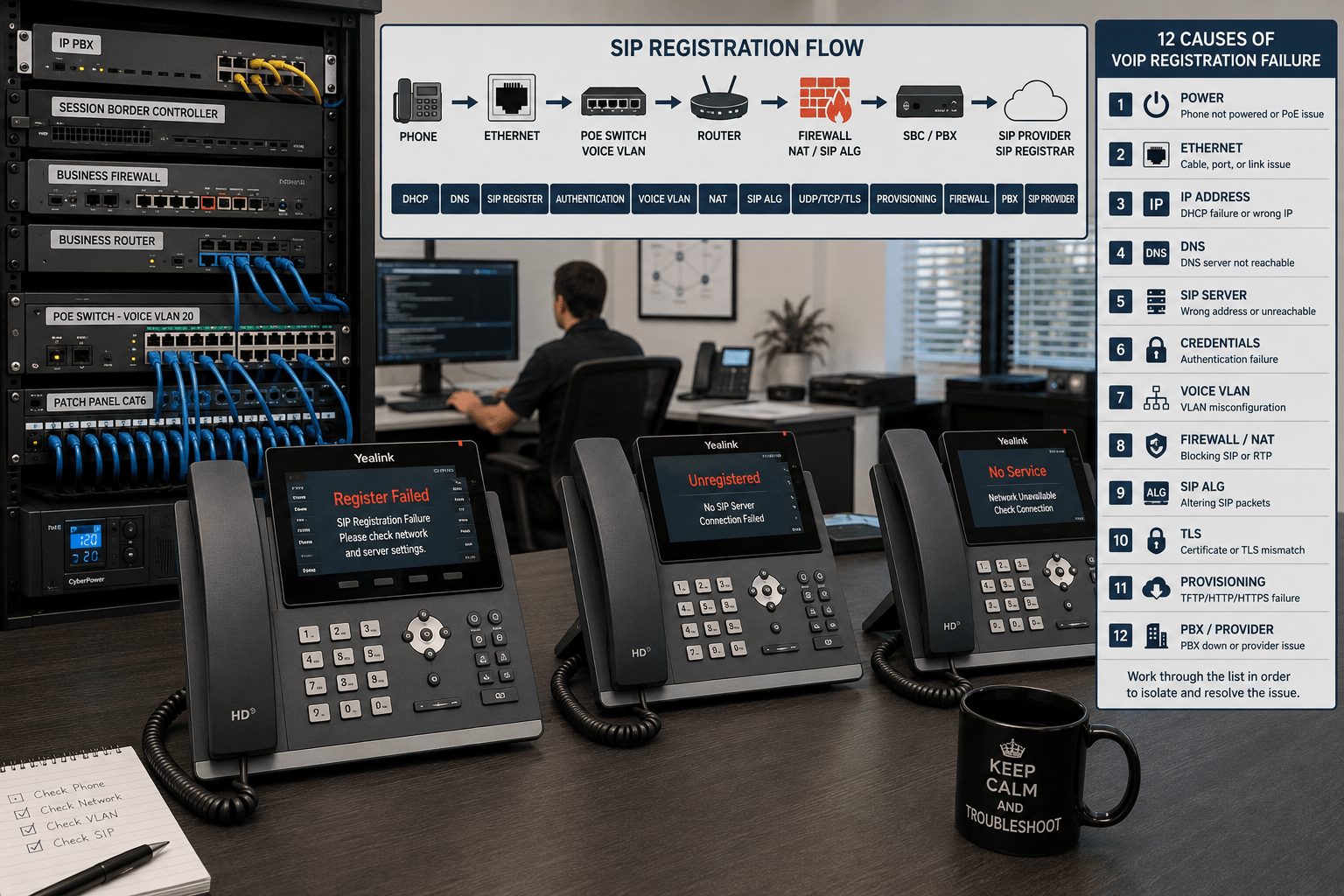
A VoIP phone that displays Register Failed, Unregistered, No Service, or a similar message cannot establish the SIP registration it needs to place and receive calls. The cause might be as simple as an incorrect password, but registration failures can also originate with DNS, VLAN configuration, firewalls, NAT, provisioning, TLS, or the IP PBX itself.
The fastest way to troubleshoot a VoIP phone not registering is to work through the connection in order: power, Ethernet, IP addressing, DNS, SIP configuration, authentication, network security, and finally the PBX or service provider.
This guide covers 12 common causes of SIP registration failure and explains how to isolate each problem without randomly changing network settings.
What Does VoIP Registration Mean?
Most SIP phones register with a SIP registrar, IP PBX, hosted VoIP platform, or other communications server. The phone sends a SIP REGISTER request that identifies the account and tells the system where that endpoint can currently be reached.
The registrar can then authenticate the endpoint and maintain a binding between the SIP account and the phone’s current network location. SIP registration and authentication behavior is defined in the IETF SIP specification, RFC 3261.
A phone that cannot complete this process typically remains unregistered and cannot use the affected SIP account normally.
Start With This VoIP Registration Checklist
Before changing advanced settings, check the basic network path.
Confirm that the phone powers on normally.
Confirm that the Ethernet link is active.
Verify that the phone received a valid IP address.
Verify subnet mask, default gateway, and DNS settings.
Confirm that the phone can reach the SIP server.
Check the SIP username, authentication ID, and password.
Verify the SIP server address, port, and transport.
Check the voice VLAN.
Review firewall, NAT, and SIP ALG behavior.
Confirm that provisioning is not overwriting the settings.
Check TLS certificates and time synchronization when TLS is used.
Verify that the PBX or hosted VoIP service is operational.
If several phones are experiencing other problems in addition to registration failures, use our broader VoIP troubleshooting resources to evaluate the entire network.
1. The Phone Does Not Have a Valid Network Connection
SIP troubleshooting should begin at Layer 1 and Layer 3 rather than at the PBX.
Check the phone’s network status screen and confirm that it has:
A valid IP address
The correct subnet mask
A default gateway
At least one valid DNS server
An active Ethernet connection
An address beginning with 169.254 commonly indicates that the device did not receive the expected IPv4 configuration from DHCP and assigned itself a link-local address instead.
How to Fix It
Check the Ethernet cable, wall jack, patch panel, and switch port. If the phone uses PoE, verify that the switch port is supplying adequate power.
Move the phone temporarily to a known-working Ethernet port. If it registers there, the problem is probably somewhere in the original network path rather than the phone itself.
A phone may have an Ethernet link but still receive incorrect network information.
Common problems include:
DHCP server unavailable
Incorrect DHCP scope
Wrong default gateway
Duplicate IP address
Incorrect static IP configuration
Incorrect subnet mask
Phone connected to the wrong network
How to Fix It
Compare the phone’s IP configuration with a working phone on the same network.
If the phone uses a static address, temporarily switching it to DHCP can help determine whether the manually configured network information is wrong.
Also confirm that the phone’s default gateway provides a valid path to the PBX or hosted VoIP service.
3. DNS Cannot Resolve the SIP Server
Many VoIP systems configure phones with a hostname such as:
sip.example.com
rather than a numeric IP address. In that situation, the phone must resolve the hostname through DNS before it can contact the registrar.
A DNS failure can therefore look exactly like a SIP server failure.
How to Fix It
Check the DNS servers assigned to the phone and verify that the SIP hostname resolves correctly.
Where appropriate for troubleshooting, test whether the hostname resolves from another device on the same VLAN.
If changing the phone temporarily to a known-working DNS service allows registration, investigate the original DNS configuration instead of modifying SIP credentials.
4. The SIP Server, Port, or Transport Is Wrong
A phone can have perfect network connectivity and still fail to register if it is contacting the wrong SIP destination.
Verify:
SIP registrar or server hostname
Outbound proxy, if required
SIP port
UDP, TCP, or TLS transport
SIP domain or realm
Do not assume that every provider uses the same port or transport. Although certain SIP ports are commonly used, the correct values are the ones specified by your PBX administrator or VoIP provider.
How to Fix It
Compare the configuration with a working extension from the same system.
If the PBX requires TLS but the phone is configured for UDP, or the phone points to an obsolete server hostname, changing passwords will not solve the registration problem.
5. The SIP Username, Authentication ID, or Password Is Wrong
Incorrect credentials are among the most common reasons a SIP phone fails to register.
Several fields may be involved:
Extension number
SIP username
Authentication ID
SIP password
Domain or realm
Display name
The display name is generally not the authentication username. Likewise, the extension number and authentication ID are not necessarily identical.
How to Fix It
Retrieve the credentials directly from the PBX or service provider rather than relying on an old installation worksheet.
Re-enter the password carefully. Copy-and-paste operations can sometimes introduce spaces or incorrect characters.
If the password was recently changed at the PBX, update the phone or its provisioning template as well.
6. The SIP Account Is Disabled, Locked, or Restricted
Sometimes the phone configuration is correct but the server will not authorize the account.
Possible causes include:
Extension disabled by the administrator
Account locked after repeated authentication failures
Registration limited by IP address
Device or MAC-address restrictions
Maximum registration limit reached
Hosted service account suspended
How to Fix It
Check the extension or user account directly in the PBX or hosted VoIP administration portal.
If another device is already registered to the same extension, determine whether the system permits multiple simultaneous contacts for that account.
Do not simply increase registration limits without understanding why additional devices are connecting.
7. The Phone Is on the Wrong VLAN
Business networks commonly separate voice and data traffic using VLANs. A phone connected to the wrong VLAN might receive an IP address but still be unable to reach the PBX, DNS server, provisioning server, or Internet gateway it needs.
Voice VLAN assignment may come from:
Switch port configuration
LLDP-MED
DHCP options
Manual configuration on the phone
Vendor-specific network discovery
How to Fix It
Verify the VLAN ID displayed by the phone and compare it with the intended voice VLAN.
Check whether the switch port is configured correctly for tagged and untagged traffic, particularly when a computer is connected through the phone’s PC port.
Firewalls and NAT devices sit directly in the signaling path for many hosted and remote VoIP deployments. Incorrect policies can prevent REGISTER requests or responses from reaching their destination.
Potential problems include:
Outbound SIP traffic blocked
Return traffic blocked
Incorrect NAT rules
Short NAT session timeouts
Incorrect port forwarding
Multiple layers of NAT
Provider IP restrictions
How to Fix It
Review the firewall logs before opening ports indiscriminately.
Confirm which hosts, protocols, ports, and transports the PBX or provider actually requires. Avoid exposing a PBX broadly to the public Internet when a more restrictive firewall rule, VPN, or Session Border Controller can accomplish the same objective.
SIP Application Layer Gateway functionality is built into many routers and firewalls. Its purpose is to inspect or modify SIP traffic to assist with NAT traversal.
However, an incompatible SIP ALG implementation can alter signaling in ways that interfere with registration or calling.
How to Fix It
Do not automatically disable every SIP-related security function without testing.
If your PBX or provider recommends disabling SIP ALG, disable the applicable feature on the router or firewall and retest registration. Document the change so it can be reversed if necessary.
If SIP ALG is intentionally part of a managed voice architecture and is working correctly, leaving it enabled may be appropriate.
10. TLS, Certificates, or the Phone’s Clock Are Wrong
Secure SIP deployments may use TLS for signaling. In these environments, registration can fail because of certificate validation rather than incorrect SIP credentials.
Potential causes include:
Expired certificate
Certificate hostname mismatch
Untrusted certificate authority
Incorrect TLS version or configuration
Incorrect phone date or time
NTP failure
How to Fix It
First verify the phone’s date and time. A device with a substantially incorrect clock may reject an otherwise valid certificate because the certificate appears to be outside its validity period.
Next verify the SIP server hostname and certificate chain. Avoid disabling certificate validation as a permanent workaround unless the system design specifically requires a controlled alternative.
11. Provisioning Keeps Overwriting the Phone
This problem can be particularly confusing because an administrator may manually correct the SIP credentials, reboot the phone, and discover that the incorrect configuration has returned.
The cause may be automatic provisioning.
VoIP phones can receive configuration from:
HTTP or HTTPS provisioning servers
TFTP servers
PBX provisioning systems
Zero-touch provisioning platforms
DHCP provisioning options
Manufacturer or service-provider redirect services
How to Fix It
Determine where the phone obtains its configuration before repeatedly modifying settings through the phone’s web interface.
Correct the configuration at the authoritative provisioning source.
This is particularly important with phones previously deployed by a hosted VoIP provider. Factory resetting a phone does not necessarily prevent it from downloading the provider’s configuration again when it reconnects to the Internet.
12. The PBX, Registrar, or VoIP Provider Is Unavailable
If multiple previously working phones suddenly become unregistered at the same time, the phones themselves are less likely to be the problem.
Investigate shared infrastructure such as:
IP PBX
SIP registrar
Session Border Controller
Firewall
Router
Internet connection
DNS service
Hosted VoIP provider
VPN connection
How to Fix It
Determine the scope of the outage.
If one phone fails while 49 others remain registered, concentrate on that endpoint, switch port, credentials, and provisioning.
If all 50 phones lose registration simultaneously, begin with the shared network, PBX, SBC, Internet connection, or provider.
If the phone, PBX, or packet capture exposes the actual SIP response, the response code can dramatically narrow the troubleshooting process.
SIP Response
What It Generally Indicates
What to Check
200 OK
Registration accepted
No registration failure at that point
401 Unauthorized
Authentication challenge
Normal during digest authentication unless authentication continues to fail
403 Forbidden
Request understood but refused
Credentials, account authorization, IP restrictions, provider policy
404 Not Found
Requested identity or domain not found
Username, SIP domain, registrar
407 Proxy Authentication Required
Proxy requires authentication
Proxy authentication settings and credentials
408 Request Timeout
No timely response
Network path, DNS, firewall, server availability
423 Interval Too Brief
Registration expiration is below server minimum
Registration expiration setting
500 Server Internal Error
Server encountered an error
PBX or provider logs
503 Service Unavailable
Server or service temporarily unavailable
PBX, registrar, provider, upstream service
One important point is that a 401 Unauthorized response is not automatically an error. SIP digest authentication normally involves the server challenging the phone and the phone sending another REGISTER request containing authentication information. Registration becomes a problem when that exchange cannot complete successfully.
A Faster Troubleshooting Method
Instead of changing several settings simultaneously, isolate the failure systematically.
Test
If It Fails
Investigate
Phone powers normally
No
PoE switch, adapter, cabling
Ethernet link established
No
Cable, jack, switch port
Valid IP address received
No
DHCP, VLAN, static configuration
Gateway reachable
No
Subnet, VLAN, routing
SIP hostname resolves
No
DNS
Registrar reachable
No
Router, firewall, NAT, WAN
REGISTER receives response
No
Firewall, routing, server
Authentication succeeds
No
Username, auth ID, password, realm
Settings survive reboot
No
Provisioning system
One Phone Fails vs. Every Phone Fails
Only One Phone Is Unregistered
When only one phone is affected, investigate:
That phone’s credentials
Ethernet cable
Switch port
VLAN assignment
Firmware/configuration
Provisioning file
Extension status
Several or All Phones Are Unregistered
When many phones fail simultaneously, investigate shared infrastructure first:
DHCP
DNS
Voice VLAN
Managed switch uplink
Router
Firewall
Internet circuit
PBX
SBC
Hosted provider
This distinction can save considerable troubleshooting time.
Should You Factory Reset the Phone?
A factory reset should generally not be the first troubleshooting step.
Resetting can erase information that would otherwise help identify the problem, including manually entered account details and network settings.
Before resetting a phone, document:
MAC address
Current IP address
Firmware version
Provisioning server
SIP server
VLAN settings
Account configuration
Also determine whether the device belongs to an automatic provisioning system. Otherwise, it may simply download the same problematic configuration again after the reset.
When Network Hardware May Be the Real Problem
A registration problem does not automatically mean the IP phone needs replacement.
If multiple endpoints have similar issues, evaluate the supporting infrastructure before purchasing new phones.
The phone has been unable to complete SIP registration with its PBX or VoIP service. Common causes include incorrect credentials, network connectivity, DNS problems, incorrect SIP server settings, VLAN errors, firewall or NAT behavior, provisioning problems, and server outages.
Why does my phone have an IP address but still not register?
Receiving an IP address only confirms part of the network configuration. The phone must still reach DNS, resolve or reach the SIP registrar, pass through applicable firewall and NAT policies, and authenticate successfully.
Does 401 Unauthorized mean my SIP password is wrong?
Not necessarily. A 401 response can be a normal part of SIP digest authentication. The registrar challenges the initial REGISTER request, after which the phone submits authentication information. Repeated authentication failure requires further investigation.
Can SIP ALG stop a VoIP phone from registering?
Yes. Some SIP ALG implementations can modify signaling in ways that conflict with a particular PBX or VoIP provider. However, SIP ALG should not be disabled blindly; follow the requirements of the phone system, provider, and firewall platform.
Can a VLAN prevent SIP registration?
Yes. A phone assigned to the wrong VLAN may have an IP address while lacking the routing, DNS, firewall policy, DHCP options, or server access required to reach the SIP registrar.
Should I open port 5060 if my VoIP phone will not register?
Not automatically. First determine which SIP transport and port your provider actually uses and whether the connection is outbound, inbound, proxied, or handled through an SBC. Unnecessarily exposing SIP services to the Internet can increase security risk.
Should I factory reset an unregistered VoIP phone?
Usually not as the first step. Verify network connectivity, credentials, SIP server settings, VLANs, firewall behavior, and provisioning first. Document the existing configuration before performing a factory reset.
Why did all of our VoIP phones suddenly become unregistered?
When numerous phones fail simultaneously, investigate shared services such as DHCP, DNS, switching, routing, the firewall, Internet connection, IP PBX, SBC, or hosted VoIP provider before troubleshooting individual phones.
Final Thoughts
When a VoIP phone is not registering, the most effective approach is systematic troubleshooting rather than changing random SIP settings.
Begin with power and Ethernet connectivity. Verify IP addressing and DNS. Then confirm the SIP registrar, transport, authentication credentials, VLAN, firewall, NAT, provisioning, TLS configuration, and server availability.
Most importantly, determine whether the problem affects one phone or the entire system. A single failed endpoint usually points toward the phone, extension, cable, port, or configuration. A simultaneous failure across many phones usually points toward shared network or communications infrastructure.
To provide the best experiences, we use technologies like cookies to store and/or access device information. Consenting to these technologies will allow us to process data such as browsing behavior or unique IDs on this site. Not consenting or withdrawing consent, may adversely affect certain features and functions.
Functional
Always active
The technical storage or access is strictly necessary for the legitimate purpose of enabling the use of a specific service explicitly requested by the subscriber or user, or for the sole purpose of carrying out the transmission of a communication over an electronic communications network.
Preferences
The technical storage or access is necessary for the legitimate purpose of storing preferences that are not requested by the subscriber or user.
Statistics
The technical storage or access that is used exclusively for statistical purposes.The technical storage or access that is used exclusively for anonymous statistical purposes. Without a subpoena, voluntary compliance on the part of your Internet Service Provider, or additional records from a third party, information stored or retrieved for this purpose alone cannot usually be used to identify you.
Marketing
The technical storage or access is required to create user profiles to send advertising, or to track the user on a website or across several websites for similar marketing purposes.