How to Choose the Right Session Border Controller in 2026
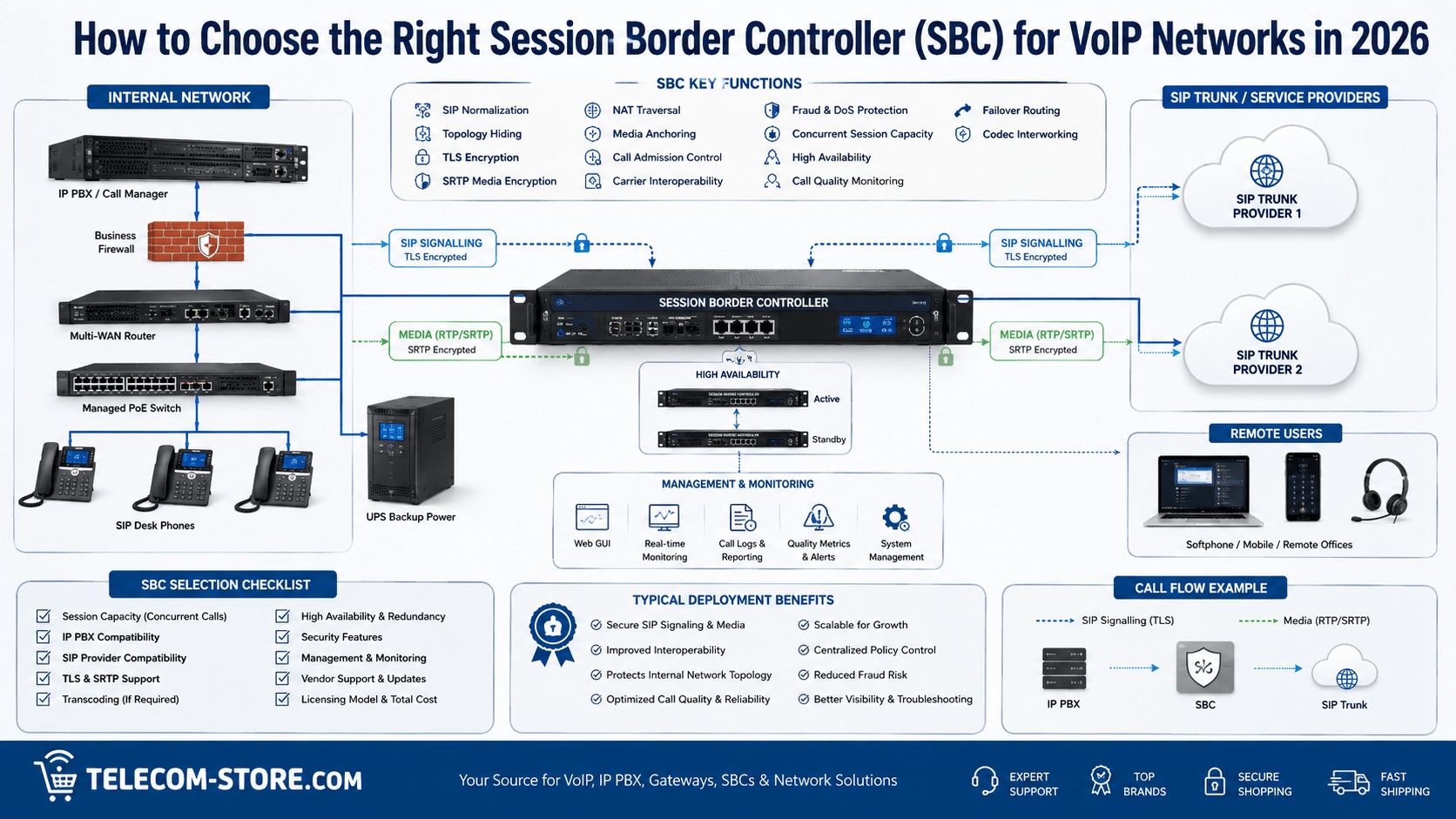
A Session Border Controller, commonly called an SBC, sits at the boundary between separate voice networks and helps control how SIP signaling and real-time media move between them. In a business deployment, that boundary may exist between an on-premises IP PBX and a SIP trunk provider, between branch offices and a centralized communications platform, or between an enterprise network and a cloud communications service.
The right SBC can improve security, simplify SIP interoperability, manage NAT traversal, control media paths, enforce call limits, support encryption, and provide visibility into call quality and signaling problems. However, an SBC is not simply another firewall, and not every VoIP installation requires one.
This guide explains how to choose a Session Border Controller for VoIP networks in 2026, including the technical functions that matter, the difference between an SBC and a firewall, call-capacity planning, security, TLS and SRTP, media handling, high availability, deployment examples, and common purchasing mistakes.
What Is a Session Border Controller?
A Session Border Controller is a network device or software application that controls SIP-based communication sessions as they cross a network boundary. SIP itself is the application-layer signaling protocol used to establish, modify, and terminate communications sessions. The protocol is formally defined in RFC 3261.
An SBC usually operates as a back-to-back user agent or similar intermediary. Instead of simply forwarding SIP packets, it can terminate one signaling leg and establish another. That position allows the SBC to inspect, normalize, secure, route, and control communications between otherwise separate networks.
The IETF documents common SBC functions such as topology hiding, media management, and resolving capability mismatches in RFC 5853.
Common SBC functions include:
SIP signaling control
Topology hiding
NAT traversal
Media anchoring
Call admission control
SIP normalization
Carrier interoperability
Encryption termination and interworking
Codec negotiation or transcoding on supported platforms
Denial-of-service protection
Call-quality monitoring
Routing and failover
When Does a Business Need an SBC?
Not every business VoIP installation requires a dedicated SBC. A small company using a fully hosted VoIP platform may never manage an SBC directly because the service provider already handles session-border functions in its network.
An SBC becomes more valuable when the organization operates:
An on-premises IP PBX with SIP trunks
Multiple SIP trunk providers
A contact center
Several office locations
Remote SIP endpoints
Legacy voice gateways
Microsoft Teams Direct Routing or another controlled SIP integration
Different PBX and carrier platforms that do not interoperate cleanly
Strict security or compliance requirements
Businesses troubleshooting NAT, firewall, or media-path problems should also review Telecom-Store.com’s VoIP one-way audio troubleshooting guide. An SBC can solve some media and signaling problems, but it should not be used to hide basic network-design errors.
SBC vs. Firewall: What Is the Difference?
A firewall and an SBC both protect network boundaries, but they operate at different layers and serve different purposes.
Function
Firewall
Session Border Controller
General network security
Primary function
Secondary function
SIP awareness
Limited to moderate
Core function
RTP media control
Basic policy enforcement
Media anchoring and session control
SIP normalization
Usually limited
Common capability
Topology hiding
Basic NAT obscures addresses
Designed to hide SIP topology
Codec interworking
Typically no
Available on supported SBCs
Call admission control
Usually not SIP-session aware
Common function
Carrier interoperability
Limited
Major use case
Call-quality metrics
Limited
Often available
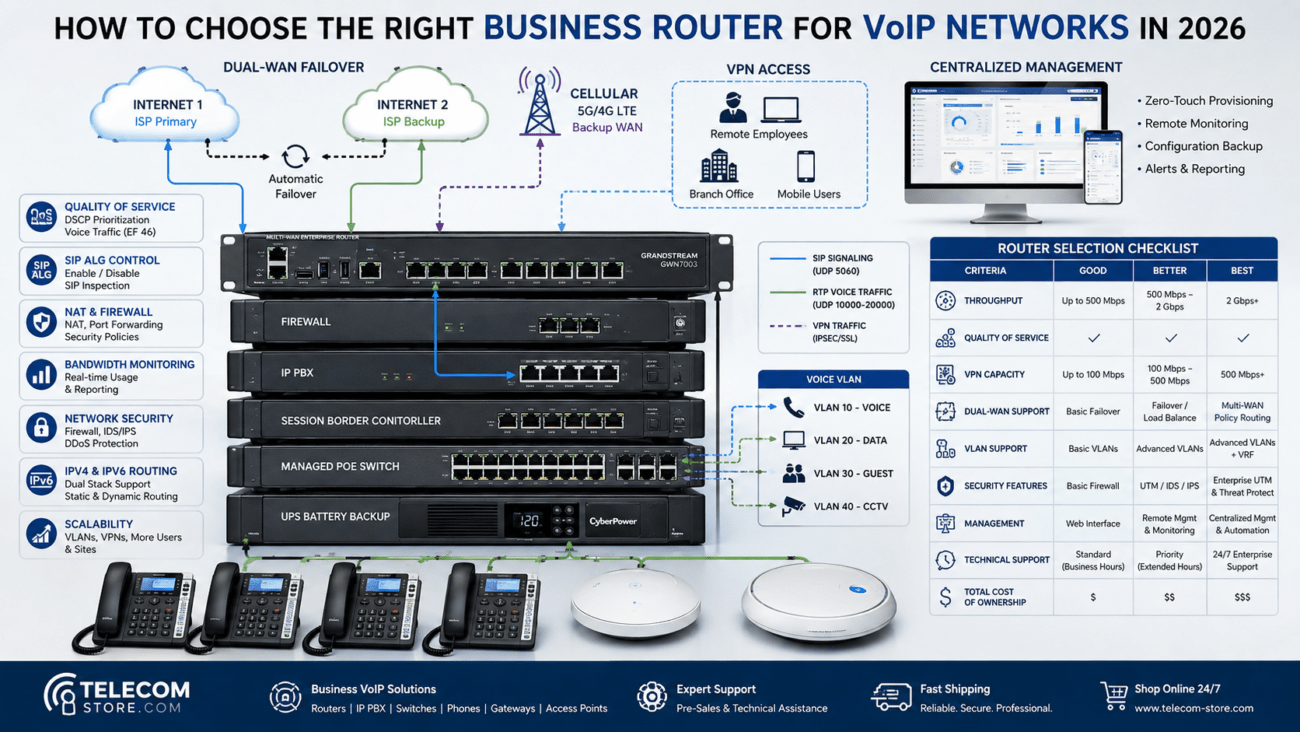
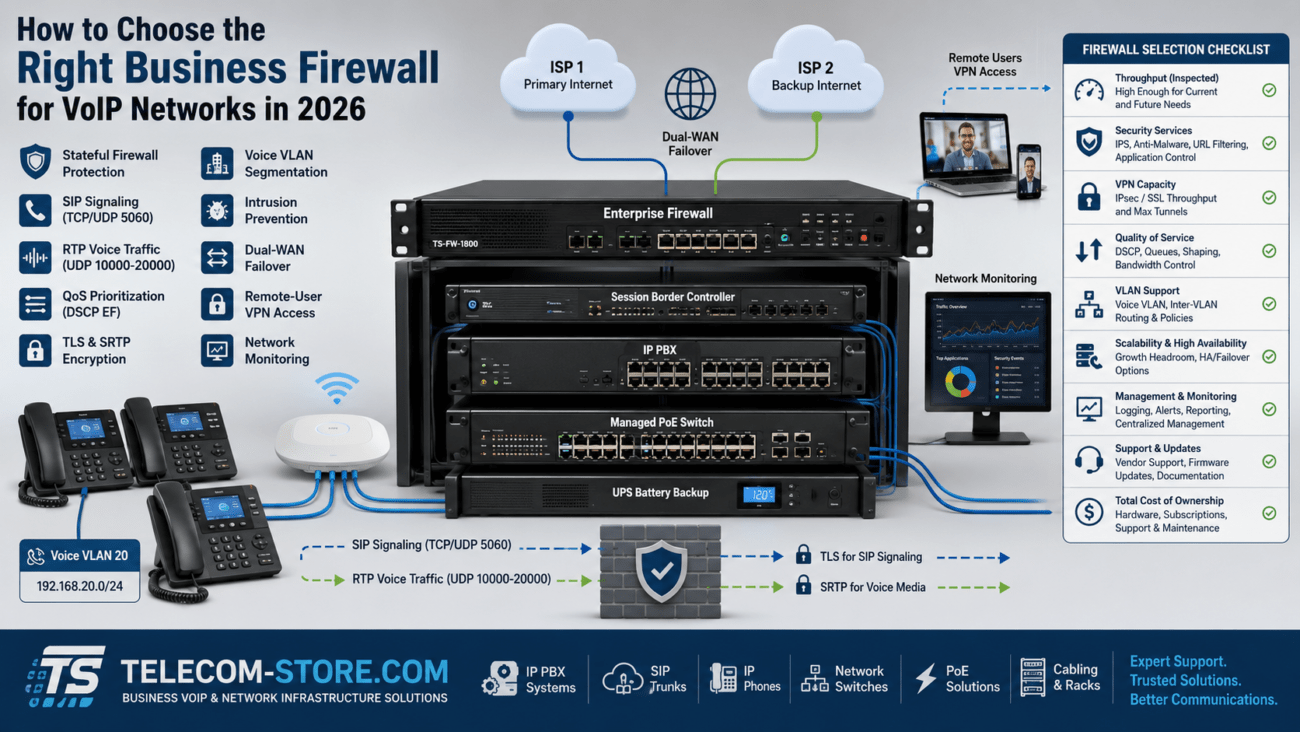
A properly configured firewall should remain part of the overall network design. Telecom-Store.com’s VoIP firewall configuration guide explains how SIP, RTP, NAT, security policies, and network segmentation interact at the firewall.
Prioritize SIP Interoperability
One of the most valuable SBC functions is resolving differences between SIP implementations.
SIP is standards-based, but PBX manufacturers, service providers, gateways, and cloud platforms may use different:
SIP headers
Authentication methods
Session timers
Transport protocols
Codec preferences
DTMF methods
Caller-ID formats
Early-media behavior
REFER and transfer behavior
Fax implementations
An SBC may modify or normalize signaling so that two systems can communicate reliably without forcing changes on every endpoint.
Before purchasing an SBC, verify interoperability with the exact:
IP PBX
SIP trunk provider
Cloud communications platform
Firmware or software version
Codec set
Authentication model
Emergency-calling configuration
Never assume that two platforms are compatible simply because both support SIP.
Evaluate Topology Hiding
Topology hiding prevents external networks from learning unnecessary details about the internal communications environment. An SBC may rewrite SIP headers and signaling information so that internal IP addresses, hostnames, routing paths, or application servers are not directly exposed.
This can reduce the amount of network information available to unauthorized users and make the internal voice architecture less visible from outside.
However, topology hiding involves modifying SIP signaling, so it must be implemented carefully. RFC 5853 specifically notes architectural considerations because changing SIP headers can interact with identity and end-to-end security mechanisms.
When comparing SBCs, determine:
Which SIP headers can be rewritten
Whether topology hiding is configurable by trunk or interface
How identity headers are handled
Whether logging clearly shows the original and modified signaling
How troubleshooting tools expose signaling changes
Review Media Anchoring and RTP Handling
Some SBCs anchor the RTP media path, meaning voice traffic passes through the SBC rather than flowing directly between endpoints.
Media anchoring can simplify:
NAT traversal
Firewall policies
Call recording
Media security
Codec interworking
Call-quality monitoring
Provider interoperability
However, anchoring media also increases SBC bandwidth and processing requirements. An SBC sized for signaling alone may be inadequate if every RTP stream passes through it.
When sizing the SBC, calculate:
Maximum simultaneous calls
Audio codec bandwidth
Video sessions if supported
SRTP encryption overhead
Transcoding requirements
Recording or monitoring requirements
Understand TLS and SRTP Requirements
VoIP security should protect both signaling and media where required.
TLS can protect SIP signaling between compatible systems. SRTP protects real-time media and provides encryption, message authentication, and replay protection. SRTP is formally defined in RFC 3711.
An SBC may terminate TLS or SRTP on one side and create a separate protected session on the other side. This can help when:
Different certificate requirements exist
The carrier and PBX use different encryption policies
Encryption must be terminated at a controlled network boundary
A legacy platform needs to connect to a modern encrypted service
Before deployment, confirm:
Supported TLS versions
Certificate formats
Certificate lifecycle management
Supported SRTP profiles
Encryption performance at expected call volume
Whether media remains encrypted on every required call leg
Look for Strong SIP Security Controls
SIP systems are frequent targets for scanning, registration attacks, credential abuse, toll fraud, and denial-of-service attempts.
A business SBC should provide controls such as:
IP allowlists and blocklists
SIP rate limiting
Malformed-message detection
Registration controls
Call-per-second limits
Concurrent-session limits
Fraud and anomaly detection where supported
Geo-IP restrictions
Administrative MFA
Role-based access
Detailed signaling logs
Secure firmware updates
The SBC should complement—not replace—the network firewall, PBX security policies, strong SIP credentials, and proper VLAN segmentation.
For network-level segmentation, Telecom-Store.com’s VoIP VLAN setup guide explains when separating voice from data can improve security, QoS, and troubleshooting.
Size the SBC by Concurrent Sessions, Not Users
One of the most common purchasing mistakes is sizing an SBC according to employee count instead of simultaneous call volume.
A company with 200 extensions may only need 40 simultaneous external sessions. A contact center with 100 agents may need close to 100 or more concurrent sessions depending on call behavior.
Consider:
Busy-hour call volume
Inbound and outbound calls
Conference sessions
Call queues
Contact-center traffic
Video sessions
Remote users
Failover traffic
Future growth
The Ribbon EdgeMarc 2900e with five concurrent-call support is one example of an intelligent-edge platform for smaller deployments. The Telecom-Store.com listing shows dual Ethernet WAN interfaces, optical WAN support, four LAN ports, and field-upgradeable session licensing. At the time of verification, the product page showed inventory available. Always confirm the exact session license and required features before deployment.
Determine Whether Transcoding Is Necessary
Transcoding converts media between codecs. It can be useful when one side of a connection supports a codec that the other side does not.
Examples may include interworking between:
G.711 and compressed codecs
Legacy systems and newer platforms
Different carrier requirements
Wideband and narrowband voice
However, transcoding consumes significant processing resources and can add latency. Do not purchase transcoding capacity unless the deployment actually requires it.
Whenever possible, use a common codec across the PBX, SBC, and carrier to avoid unnecessary conversion.
Evaluate Call Admission Control
Call Admission Control, or CAC, prevents more sessions from entering the system than the network or licensed platform can support.
CAC can protect:
SIP trunk capacity
WAN bandwidth
PBX resources
SBC licenses
Remote sites with limited connections
For example, if a branch office connection reliably supports 20 simultaneous calls, the SBC can reject or reroute additional sessions instead of allowing congestion to degrade every call.
Plan for High Availability
Once an SBC becomes the path for all business voice traffic, it also becomes a critical point of failure.
Larger organizations should evaluate:
Active-passive redundancy
Active-active clustering
State synchronization
Redundant power supplies
Dual network interfaces
Geographic redundancy
Virtual-machine failover
Cloud redundancy
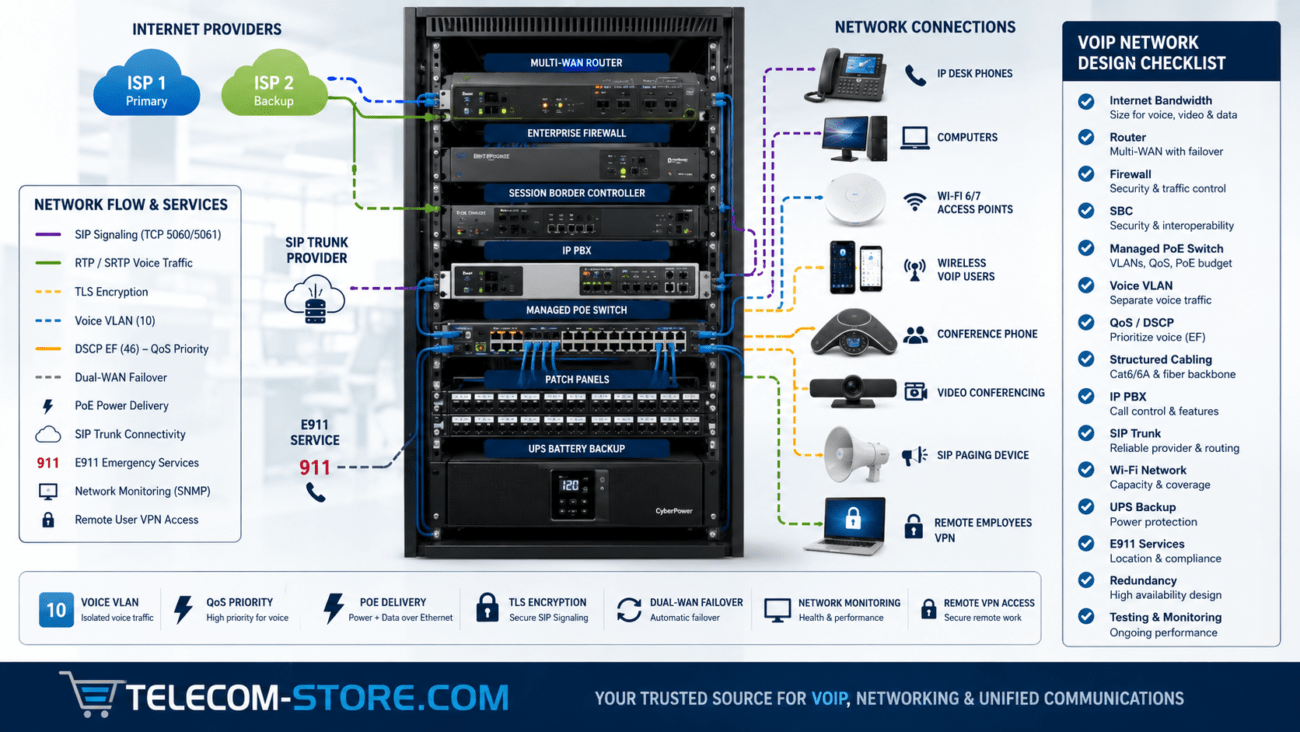
High availability should extend beyond the SBC. The network may also require redundant routers, firewalls, switches, SIP trunks, internet connections, PBXs, and power systems.
A managed switch such as the Grandstream 24-port managed PoE switch with SFP+ uplinks can support voice VLANs, QoS, and powered endpoints in the surrounding network infrastructure. At the time of verification, this product page showed inventory available.
Physical redundancy and lifecycle management required
Virtual SBC
Flexible scaling, easier data-center deployment
Depends on virtualization platform and resource allocation
Cloud SBC
Flexible geographic deployment and elastic infrastructure
Cloud networking, security, licensing, and recurring costs must be evaluated
Provider-managed SBC
Reduced customer administration
Less direct control and potential provider dependency
The best form factor depends on whether the company operates on-premises infrastructure, private cloud, public cloud, or a hybrid environment.
SBC Selection Matrix
Requirement
Small Business
Growing Business
Enterprise / Multi-Site
SIP normalization
Useful
Important
Critical
Topology hiding
Recommended
Recommended
Required in many designs
TLS/SRTP
Recommended
Important
Often required
Call admission control
Optional
Recommended
Important
High availability
Usually optional
Depends on downtime tolerance
Frequently required
Transcoding
Only if needed
Project-specific
Often project-specific
Central management
Optional
Useful
Important
Call-quality analytics
Helpful
Important
Important
Example SBC Deployment Scenarios
Small Business with One SIP Trunk
A business with an on-premises PBX and one SIP provider may need an SBC primarily for NAT traversal, topology hiding, security, and interoperability. If the provider and PBX already work reliably through a well-configured firewall, a dedicated SBC may not be necessary.
Growing Business with Multiple Carriers
A company using two SIP trunk providers may use an SBC to normalize signaling, route calls according to carrier availability, enforce session limits, and simplify failover.
Multi-Site Enterprise
A larger organization may deploy redundant SBCs at data centers or cloud edges to control traffic between multiple sites, carriers, contact centers, and communications platforms.
Legacy PBX Migration
An SBC can help bridge older voice infrastructure to a newer SIP environment while the organization migrates in phases. Depending on the deployment, additional gateways may still be required for analog, PRI, or other legacy interfaces.
Common SBC Purchasing Mistakes
Buying Too Few Sessions
Size for busy-hour concurrent calls, not extension count alone.
Assuming the SBC Replaces the Firewall
An SBC secures real-time communications, while the firewall protects the broader network. Most organizations need both.
Ignoring Encryption Performance
TLS and SRTP processing can reduce effective capacity. Confirm performance with encryption enabled.
Purchasing Transcoding You Do Not Need
Transcoding increases cost and processing requirements. Use common codecs whenever practical.
Ignoring Licensing
Many SBCs are licensed by concurrent session, feature, support level, or software module. Compare the complete cost, not just the appliance price.
Failing to Test Carrier Interoperability
A laboratory or pilot deployment should verify inbound calls, outbound calls, transfers, caller ID, DTMF, voicemail, fax if required, TLS, SRTP, emergency calling, and failover.
SBC Buying Checklist
Document the exact PBX and SIP providers.
Determine peak concurrent call volume.
Confirm required SIP transports.
Verify TLS and SRTP support.
Determine whether media anchoring is required.
Identify transcoding requirements.
Confirm call admission control features.
Verify topology-hiding capabilities.
Review SIP normalization tools.
Check denial-of-service and fraud controls.
Evaluate high-availability options.
Confirm virtual or cloud support if needed.
Review management, logging, and analytics.
Calculate licensing and support costs.
Plan capacity for future growth.
Complete interoperability testing before production cutover.
SBC Troubleshooting Matrix
Symptom
Possible SBC Cause
Recommended Check
Calls fail to establish
SIP normalization, routing, authentication, or policy issue
Compare SIP traces on both sides of the SBC
One-way audio
Media anchoring, NAT, RTP policy, or firewall issue
Verify SDP addresses and RTP paths
Calls drop after a fixed time
Session timer or signaling refresh mismatch
Review re-INVITE, UPDATE, and timer behavior
Encrypted calls fail
TLS certificate or SRTP profile mismatch
Validate certificates, cipher support, and media profiles
No. Hosted VoIP providers often manage SBC functions themselves. Dedicated SBCs are most useful for on-premises SIP trunks, multi-carrier deployments, large networks, contact centers, and environments with complex interoperability or security requirements.
Is an SBC the same as a firewall?
No. A firewall protects general IP traffic, while an SBC controls SIP sessions and real-time media. They perform complementary roles.
Can an SBC fix one-way audio?
It can help when one-way audio is caused by NAT traversal, media routing, or incompatible SDP information. It cannot fix poor cabling, failing internet service, weak Wi-Fi, or other unrelated network problems.
Does an SBC improve call quality?
An SBC can monitor and control media paths, enforce call admission control, and prevent overload. It does not create bandwidth or correct a poor network connection.
How many SBC sessions do I need?
Size the system according to the highest expected number of simultaneous sessions, then add capacity for growth, failover, conferencing, contact-center traffic, and other peak conditions.
Do I need transcoding?
Only when the networks being connected cannot agree on a compatible codec. Avoid unnecessary transcoding because it consumes resources and can increase latency.
Can an SBC support multiple SIP providers?
Yes. Multi-carrier routing, normalization, failover, and policy control are common enterprise SBC use cases.
Key Takeaways
An SBC controls SIP signaling and media at a communications network boundary.
Do not confuse an SBC with a general-purpose firewall.
Prioritize interoperability, security, session capacity, media handling, and management.
Confirm TLS and SRTP capabilities if encrypted communications are required.
Size by simultaneous sessions rather than extension count alone.
Use transcoding only when necessary.
Consider high availability when the SBC becomes a critical call path.
Test the exact PBX and carrier combination before production deployment.
Practical Next Steps
Document your PBX platform, SIP providers, simultaneous-call requirements, codecs, security requirements, remote users, branch locations, and failover expectations. Then compare SBC platforms against those requirements rather than buying solely by headline session capacity.
To provide the best experiences, we use technologies like cookies to store and/or access device information. Consenting to these technologies will allow us to process data such as browsing behavior or unique IDs on this site. Not consenting or withdrawing consent, may adversely affect certain features and functions.
Functional
Always active
The technical storage or access is strictly necessary for the legitimate purpose of enabling the use of a specific service explicitly requested by the subscriber or user, or for the sole purpose of carrying out the transmission of a communication over an electronic communications network.
Preferences
The technical storage or access is necessary for the legitimate purpose of storing preferences that are not requested by the subscriber or user.
Statistics
The technical storage or access that is used exclusively for statistical purposes.The technical storage or access that is used exclusively for anonymous statistical purposes. Without a subpoena, voluntary compliance on the part of your Internet Service Provider, or additional records from a third party, information stored or retrieved for this purpose alone cannot usually be used to identify you.
Marketing
The technical storage or access is required to create user profiles to send advertising, or to track the user on a website or across several websites for similar marketing purposes.