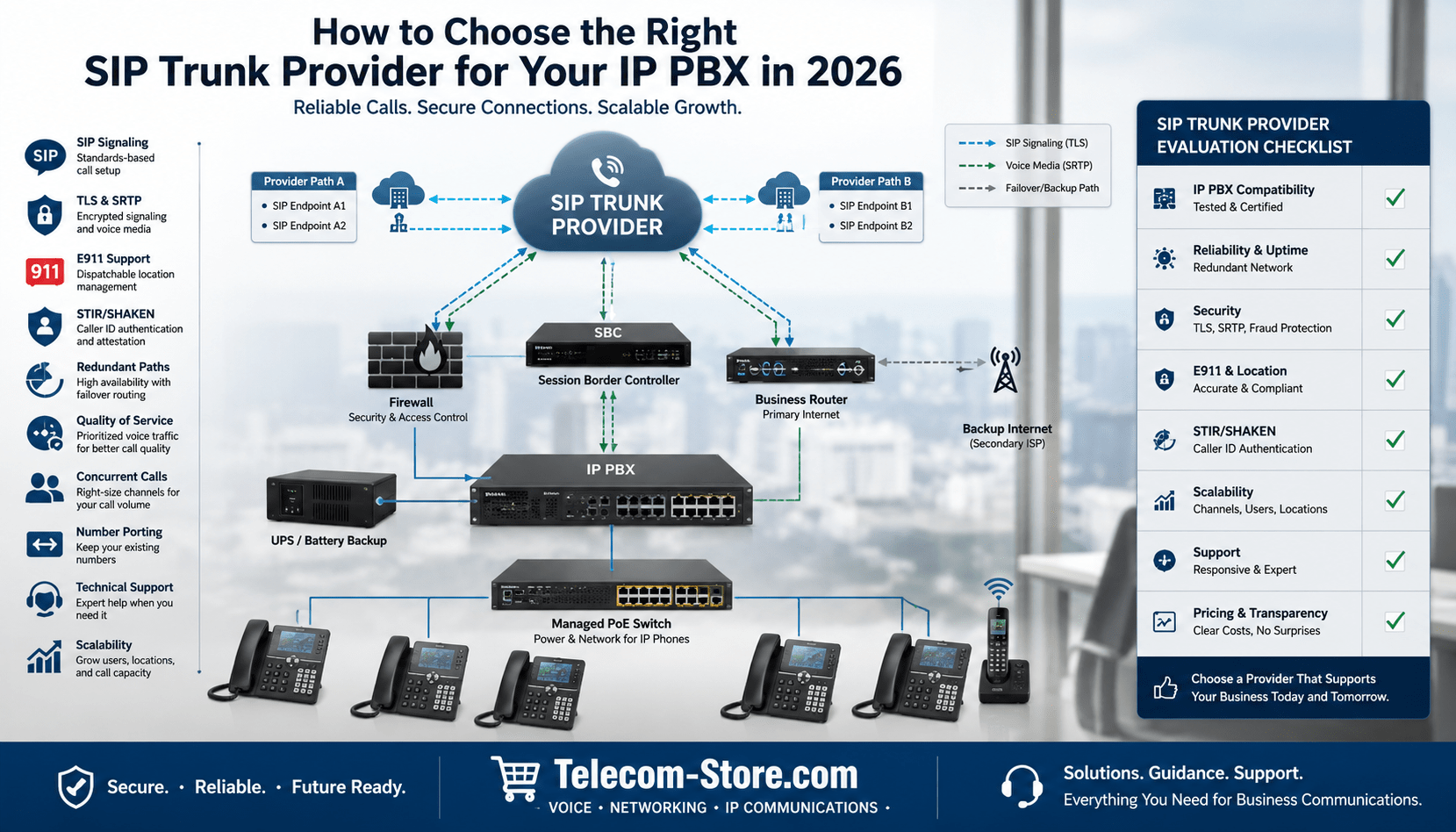
How to Choose the Right SIP Trunk Provider for Your IP PBX in 2026
Choosing a SIP trunk provider is not simply a matter of finding the lowest monthly rate. Your provider becomes a critical part of your business communications infrastructure, affecting call quality, telephone-number availability, emergency calling, security, scalability, and your ability to recover from an outage.
The right provider should work reliably with your IP PBX, support your expected call volume, provide responsive technical assistance, and offer a clear path for future growth. Before signing an agreement, businesses should evaluate technical compatibility and operational risk—not just advertised pricing.
This guide explains how to compare SIP trunk providers in 2026 and identify a service that fits your phone system, network, locations, and business continuity requirements.
What Is a SIP Trunk?
A SIP trunk is a virtual telephone connection that carries voice calls between an IP PBX and the public switched telephone network over an IP connection. SIP, or Session Initiation Protocol, is used to establish, manage, and terminate communication sessions. The protocol is formally defined in the IETF SIP specification, RFC 3261.
Unlike analog telephone lines or PRI circuits, a SIP trunk does not require a separate physical pair or channel for every call. Instead, the business purchases enough concurrent call capacity to support its expected inbound and outbound traffic.
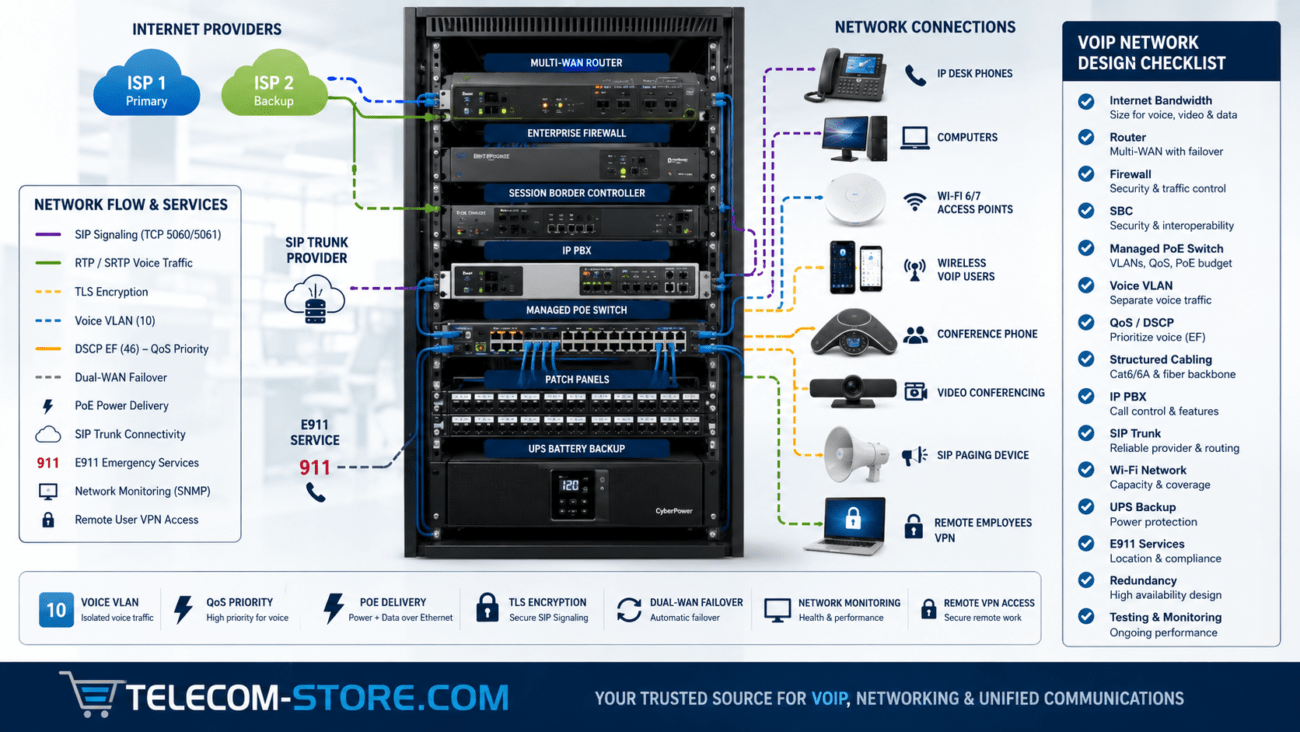
A typical deployment includes:
- A compatible IP PBX
- A business-class internet connection
- A router and properly configured firewall
- A managed network switch
- IP desk phones or softphones
- SIP credentials or IP-based authentication
- Telephone numbers and emergency-calling configuration
Businesses upgrading their communications infrastructure can review available Grandstream IP PBX equipment and other standards-based systems before selecting a trunk provider.
SIP Trunking Compared with Analog Lines and PRI
| Feature | SIP Trunk | PRI | Analog Lines |
|---|---|---|---|
| Connection type | IP-based | Digital circuit | Physical copper line |
| Scalability | Channels can often be added remotely | Usually expanded in fixed channel groups | Requires additional physical lines |
| Equipment requirements | IP PBX, network, and possibly an SBC | PRI interface or gateway | FXO ports or analog gateway |
| Multi-location support | Well suited to centralized or distributed deployments | Normally tied to a physical location | Normally tied to a physical location |
| Business continuity | Can support alternate routing and failover | Depends on carrier circuit redundancy | Limited without additional services |
| Best fit | Modern IP PBX deployments | Organizations maintaining legacy infrastructure | Small systems, alarms, fax, or specialty equipment |
Legacy circuits can remain appropriate when a business depends on older equipment or has limited internet connectivity. However, SIP trunking generally provides greater flexibility for organizations operating modern VoIP systems, remote extensions, or multiple locations.
Confirm Compatibility with Your IP PBX
The first step is confirming that the provider supports your exact IP PBX platform and software version. SIP is standards-based, but implementations vary. Differences in authentication, codecs, registration behavior, SIP headers, fax handling, caller identification, and NAT traversal can create problems even when both systems technically support SIP.
Ask each provider whether it offers:
- A configuration guide for your PBX
- A certified or tested interoperability profile
- A preconfigured trunk template
- Support for registration-based and IP-authenticated trunks
- Documented inbound and outbound routing requirements
- Support for your required codecs
- Assistance with test calls before number porting
For example, a small office may use an appliance such as the Yeastar S412 small-business IP PBX, while a larger organization may require a system supporting substantially more users, concurrent calls, and locations. Provider compatibility must be confirmed for the exact deployment rather than assumed from the manufacturer name alone.
Evaluate Network Reliability and Redundancy
Your SIP trunk is only as useful as the path connecting your PBX to the provider. Review both the provider’s network architecture and your own internet connectivity.
Provider-side redundancy
A well-designed provider network should offer geographic redundancy, multiple carrier connections, redundant session border controllers, and documented procedures for routing around failures. Ask whether the provider has multiple points of presence and whether your PBX can connect to more than one SIP endpoint.
Internet redundancy
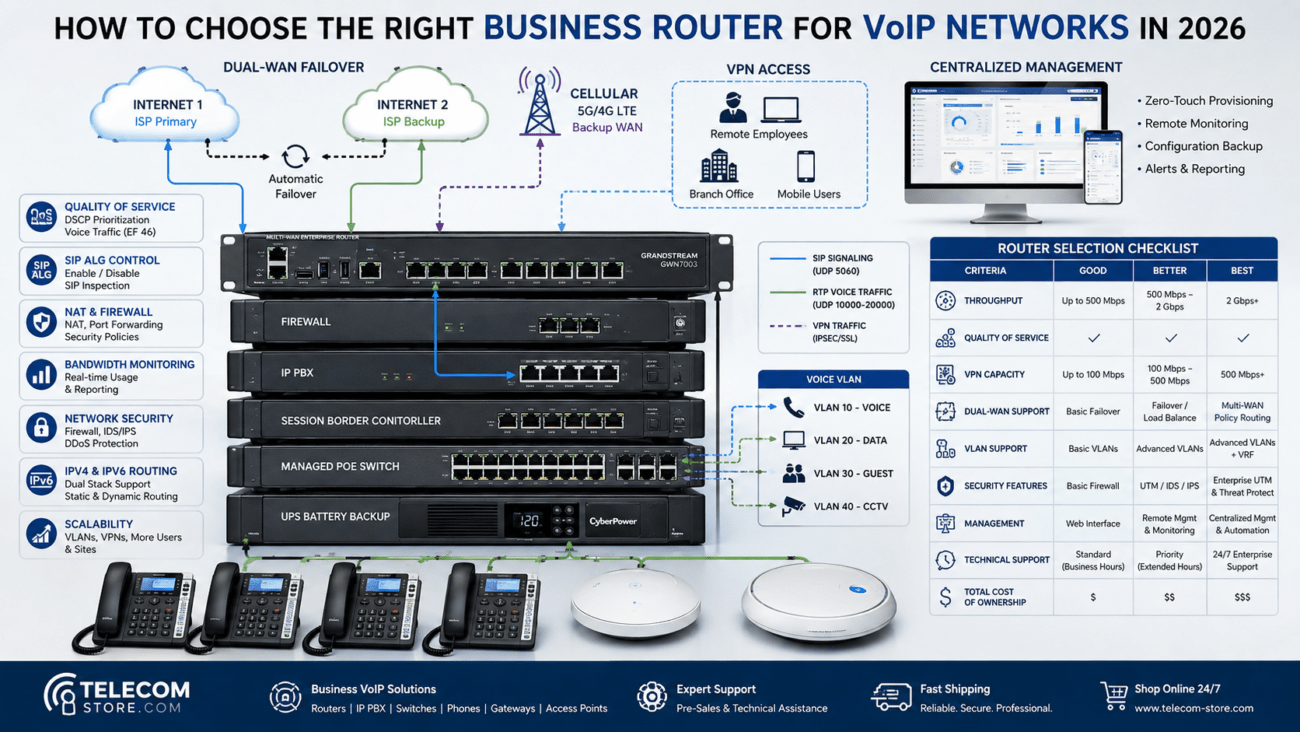
Consider a secondary internet connection from a different carrier. Ideally, the backup service should use a different physical path and access technology than the primary connection.
For example, pairing fiber or cable internet with cellular or fixed-wireless backup can provide better protection than purchasing two services that share the same local infrastructure. A Yeastar 4G LTE gateway may also support cellular routing or backup scenarios when it is compatible with the PBX design and carrier service.
Failover destinations
Ask whether unanswered calls can be forwarded automatically to:
- A secondary office
- Employee mobile phones
- An answering service
- A backup PBX
- A disaster-recovery number
Provider-side forwarding can be especially valuable when the primary PBX or internet connection is completely unavailable.
Review Call Quality and Network Requirements
Voice quality depends on bandwidth, latency, jitter, packet loss, codec selection, network congestion, and routing quality. A provider should be willing to explain its network requirements and help you complete test calls before deployment.
Your internal network should include:
- Managed switching
- Quality of Service policies
- Voice VLANs when appropriate
- Correct duplex and speed negotiation
- Firewall rules designed for SIP and RTP
- Monitoring for latency, jitter, and packet loss
- Battery backup for the PBX, switches, router, and modem
A managed switch such as the Grandstream managed PoE network switch can provide centralized power and network-management features for compatible IP phones. However, switch selection should be based on port count, PoE budget, uplink capacity, VLAN requirements, and the expected number of endpoints.
Bandwidth planning
Do not estimate capacity based only on the number of employees. Size the connection according to the highest realistic number of simultaneous calls, the selected codec, protocol overhead, other network traffic, and a reasonable safety margin.
For example, a 50-user company may rarely have 50 active external calls. Its actual requirement might be 10, 15, or 20 concurrent sessions. Historical call records and busy-hour data provide a better basis for sizing than extension count alone.
Compare Security Capabilities
SIP trunks connect a business phone system to external networks, making security an essential part of provider selection. Ask how the provider protects signaling, voice media, accounts, telephone numbers, and management portals.
TLS and SRTP
Transport Layer Security can protect SIP signaling between compatible endpoints. Secure Real-time Transport Protocol can protect the audio stream by providing encryption, message authentication, and replay protection. Technical details are defined in the IETF SRTP specification, RFC 3711.
Encryption support must be verified end to end. A provider supporting TLS or SRTP does not necessarily mean every PBX, endpoint, route, or PSTN call leg remains encrypted.
Fraud prevention
Look for controls such as:
- IP-based authentication
- Strong portal authentication
- Multi-factor authentication
- International dialing restrictions
- Destination-based permissions
- Spending or usage limits
- Concurrent-call limits
- Real-time fraud alerts
- Automatic blocking of abnormal call patterns
Administrators should also remove default credentials, restrict management access, apply PBX updates, disable unused services, and review call records regularly.
STIR/SHAKEN support
Ask how the provider handles caller-ID authentication and what attestation level your outbound calls will receive. STIR/SHAKEN is intended to help service providers authenticate caller-ID information and reduce illegal spoofing. The FCC’s caller-ID authentication resource provides additional information about the framework.
Examine E911 and Dispatchable Location Support
Emergency calling should never be treated as an optional add-on or assumed to work automatically. Confirm that the provider supports E911 and that your organization can assign accurate emergency locations to its telephone numbers, extensions, or users as required by the deployment.
For multi-line telephone systems, the provider and system design may need to support direct 911 dialing, on-site notifications, and dispatchable location information. The FCC explains these responsibilities in its guidance on Kari’s Law and RAY BAUM’S Act requirements.
Dispatchable location can include the validated street address along with details such as a building, floor, suite, room, or other information needed to locate the caller. Businesses should also review the Telecom-Store.com business VoIP 911 guide when planning or testing emergency calling.
Before deployment, ask:
- How are emergency addresses entered and validated?
- Can multiple locations be assigned within one account?
- How are remote and hybrid employees handled?
- What happens when an extension moves?
- Are test procedures available?
- Are emergency calls subject to separate charges?
- Does the service provide administrative notifications?
Place emergency test calls only through the provider’s approved testing procedure. Do not make unnecessary live calls to 911.
Check Telephone-Number and Porting Capabilities
Confirm that the provider can supply numbers in the geographic areas where your business operates. Businesses with established numbers should also investigate the provider’s porting process before canceling existing service.
Ask about:
- Local number availability
- Toll-free numbers
- International numbers
- Number-porting lead times
- Required documentation
- Partial ports
- Temporary routing during migration
- Port rejection procedures
- Fees for porting numbers in or out
Keep the existing carrier account active until every number has been tested successfully on the new service. Canceling early can delay or disrupt the port.
Understand Concurrent Calls and Scalability
A SIP channel generally represents one active call path, although provider terminology and billing models can differ. Determine the number of simultaneous inbound and outbound calls your organization needs during its busiest periods.
Providers may price service by:
- Concurrent call path
- Per-minute usage
- Unlimited or bundled calling plan
- Telephone number
- Account or location
- Feature package
Ask whether channels can be added quickly and whether the PBX, firewall, internet connection, and licensing can support the expansion. Capacity planning should include growth, seasonal peaks, call queues, conference calls, contact-center traffic, and failover requirements.
Compare Support and Service-Level Commitments
Low-cost service can become expensive when support is unavailable during an outage. Determine exactly what assistance the provider includes and whether its support staff will troubleshoot interoperability issues with your PBX vendor or system administrator.
Evaluate:
- Support hours
- Telephone, email, and ticket availability
- Emergency escalation procedures
- Average response targets
- Access to experienced SIP technicians
- Configuration documentation
- Network-status reporting
- Maintenance notifications
- Service-level agreements
Read the SLA carefully. An uptime percentage alone does not explain how outages are measured, what services are excluded, how credits are calculated, or how quickly the provider must respond.
Calculate the Total Cost of Service
Compare the complete monthly and one-time cost rather than relying on the advertised channel rate.
| Cost Category | Questions to Ask |
|---|---|
| Channels | Is pricing based on concurrent calls, users, locations, or usage? |
| Telephone numbers | What is the monthly charge for local and toll-free numbers? |
| Usage | Which destinations are included, metered, or restricted? |
| E911 | Are there recurring fees for each number or location? |
| Number porting | Are there inbound, outbound, or expedited port fees? |
| International calling | What rates, deposits, and fraud controls apply? |
| Support | Is advanced configuration assistance included? |
| Setup | Are activation, configuration, or professional-service fees required? |
| Taxes and regulatory fees | Which additional charges appear on the invoice? |
The least expensive provider may still be a reasonable choice for a small, technically experienced organization with simple requirements. A larger or multi-location business may benefit more from stronger support, redundancy, reporting, and emergency-calling administration.
SIP Trunk Provider Decision Matrix
| Evaluation Area | Recommended Priority | Minimum Expectation |
|---|---|---|
| PBX compatibility | Critical | Documented support or successful testing |
| Reliability | Critical | Redundant network and alternate routing |
| E911 | Critical | Validated location management and testing procedure |
| Security | High | Strong authentication, fraud controls, and encryption options |
| Support | High | Accessible technical escalation path |
| Scalability | High | Ability to add channels and numbers without redesigning the system |
| Number porting | High | Documented process and status visibility |
| Price | Important | Transparent total cost without unclear fees |
Common SIP Trunk Deployment Mistakes
Choosing solely on price
A low rate does not compensate for unreliable routing, weak fraud controls, poor support, or limited emergency-calling capability.
Assuming universal compatibility
Even standards-based products can handle SIP signaling differently. Test inbound calls, outbound calls, transfers, forwarding, voicemail, caller ID, DTMF, and fax before porting numbers.
Ignoring the firewall
Incorrect NAT, SIP ALG behavior, blocked RTP ports, or short session timeouts can cause registration failures, dropped calls, and one-way audio. The Telecom-Store.com guide to troubleshooting one-way VoIP audio explains several common network causes.
Skipping failover testing
A failover plan is not complete until the primary internet connection, PBX, and provider endpoint have been taken out of service during a controlled test.
Failing to maintain emergency locations
Emergency records can become inaccurate when employees move, offices are remodeled, or remote workers change locations. Assign responsibility for keeping the information current.
Questions to Ask a SIP Trunk Provider
- Is my exact IP PBX platform officially supported or tested?
- Do you provide redundant SIP servers or session border controllers?
- Can calls be redirected if my PBX or internet connection fails?
- Do you support TLS and SRTP?
- What fraud controls and account alerts are included?
- How do you manage E911 and dispatchable locations?
- What STIR/SHAKEN attestation can my business receive?
- Which codecs and fax methods do you support?
- How are concurrent calls measured and billed?
- What does number porting normally require?
- What support is available outside normal business hours?
- Do you provide an SLA?
- Are taxes, regulatory charges, and additional fees clearly documented?
- Can I complete a pilot deployment before porting production numbers?
- What happens if I later move my numbers to another provider?
Frequently Asked Questions
Can any SIP trunk work with any IP PBX?
No. Although SIP is standards-based, providers and PBX manufacturers may implement authentication, codecs, SIP headers, media handling, and other features differently. Confirm exact compatibility and complete test calls before deployment.
How many SIP channels does a business need?
The correct number depends on simultaneous call volume rather than employee count alone. Review busy-hour call records, queues, seasonal peaks, and expected growth before selecting capacity.
Does a SIP trunk require a dedicated internet connection?
Not necessarily. Voice and data can share a properly designed business network. However, sufficient bandwidth, Quality of Service, monitoring, and appropriate redundancy are important for reliable call quality.
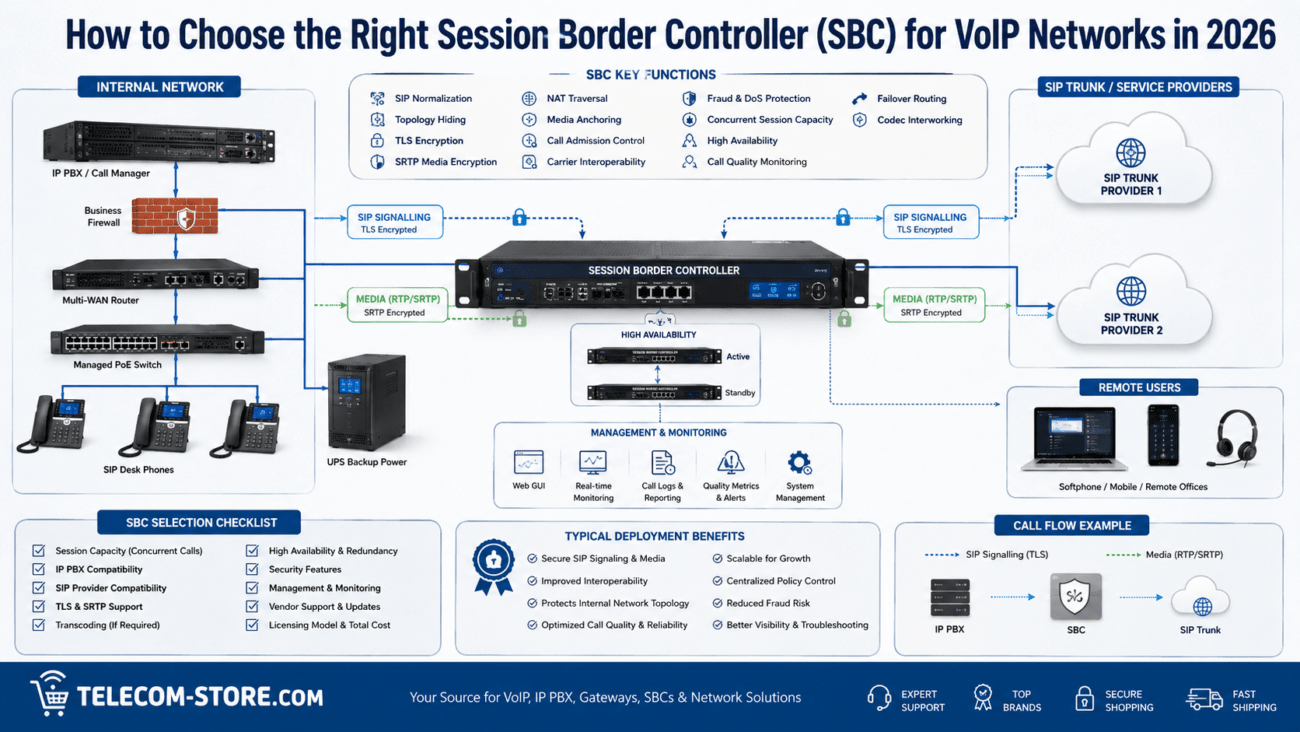
Should a business use a session border controller?
An SBC can provide security, signaling normalization, topology hiding, media control, and interoperability functions. Whether one is necessary depends on the PBX, provider, network architecture, security policy, and deployment size.
Can a SIP provider protect a business from toll fraud?
A provider can reduce risk through authentication, destination restrictions, usage limits, and monitoring. However, the customer must also secure the PBX, credentials, firewall, administrator accounts, and endpoints.
What happens to calls if the internet connection fails?
The result depends on the provider and configuration. Calls may fail, route to another number, reach a backup PBX, or use a secondary internet connection. Failover behavior should be configured and tested before deployment.
Key Takeaways
- Confirm compatibility with the exact IP PBX and software version.
- Prioritize network redundancy, E911, security, and support alongside price.
- Use busy-hour call data to determine concurrent-call capacity.
- Verify how the provider handles number porting, failover, encryption, and caller-ID authentication.
- Use managed networking equipment, Quality of Service, monitoring, and battery backup.
- Complete a pilot deployment and test all critical call functions before porting production numbers.
Practical Next Steps
Create a shortlist of two or three providers and give each one the same technical questionnaire. Confirm compatibility with your PBX, request complete pricing, evaluate the SLA, and conduct a controlled trial.
During the trial, test inbound and outbound calling, caller ID, call transfers, voicemail, DTMF, fax requirements, emergency-call configuration, failover, and number-porting procedures. Document the results so the final decision is based on measurable performance rather than sales claims.
The most appropriate SIP trunk provider is the one that balances compatibility, reliability, security, emergency calling, support, scalability, and transparent pricing for your specific business environment.