Choosing the right PoE switch for VoIP phones is an important part of building a reliable business communication network. The switch must provide enough Ethernet ports, data capacity, and electrical power for every connected IP phone while also supporting clear calls, network security, conference room equipment, and future expansion. A switch that is too small or lacks the right features can cause installation problems, limited management options, or poor voice performance.
The direct answer is to select a Gigabit PoE switch with enough ports for all current devices, at least 20 percent spare capacity for growth, and a total PoE power budget that exceeds the combined wattage of every connected phone and accessory. Small offices may only need an unmanaged PoE switch, while growing businesses and networks carrying voice, video, and regular data traffic usually benefit from a managed switch with VLAN, Quality of Service, security, and remote management features.
What Managed vs Unmanaged Network Switches Means for Business Communication
A network switch connects devices on the same local network and directs traffic between them. In a business communication system, those devices may include VoIP phones, computers, an IP PBX, wireless access points, conference phones, video conferencing systems, printers, security cameras, and internet routers.
Power over Ethernet, commonly called PoE, allows a compatible switch to send both network data and electrical power through the same Ethernet cable. This can eliminate separate power adapters for compatible IP phones and simplify installations in offices, reception areas, conference rooms, warehouses, and other business locations.
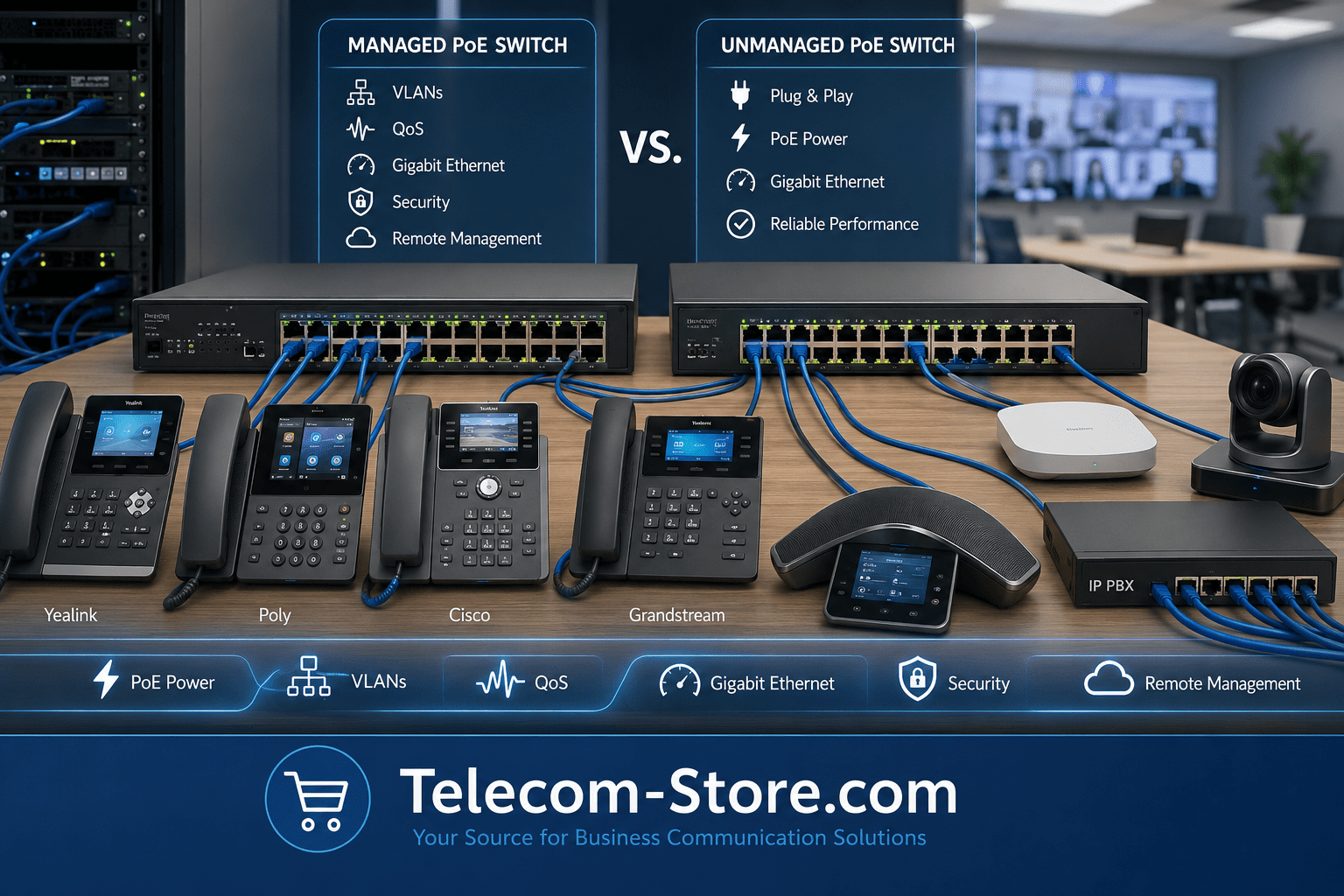
The difference between managed and unmanaged switches concerns how much control the administrator has over network traffic. An unmanaged switch provides basic connectivity with little or no configuration. A managed switch provides tools for separating traffic, prioritizing voice calls, monitoring devices, strengthening security, and troubleshooting problems remotely.
Managed vs Unmanaged Network Switches: Main Difference
The main difference is control. An unmanaged switch automatically connects devices using factory settings. A managed switch allows an administrator to configure how the network operates. Both types can support PoE, but PoE capability must be confirmed for the specific model because not every managed or unmanaged switch supplies power.
What Is a Managed Network Switch?
A managed network switch provides an administrative interface that may be accessed through a web browser, command-line interface, cloud portal, or network management platform. Depending on the model, administrators can create VLANs, prioritize voice traffic with QoS, monitor port activity, restrict unauthorized devices, configure link aggregation, and restart individual PoE ports.
A managed switch is usually the better choice when a business has multiple departments, a separate voice network, remote IT support, security requirements, or plans to expand. It also provides more useful diagnostic information when a phone loses registration, experiences one-way audio, or develops intermittent network problems.
What Is an Unmanaged Network Switch?
An unmanaged network switch is designed for simple plug-and-play connectivity. The user connects the router, phones, computers, or other devices, and the switch begins forwarding traffic without a configuration process. This simplicity can be useful for a small office, temporary workspace, home office, or isolated group of devices.
An unmanaged switch generally costs less and requires less technical knowledge. However, it does not normally provide detailed traffic controls, VLAN configuration, advanced security, remote diagnostics, or reliable voice prioritization options.
Why This Matters in 2026
Business networks now carry more than desktop computer traffic. A single Ethernet infrastructure may support cloud-based VoIP, SIP phones, video meetings, wireless access points, security systems, paging devices, room scheduling panels, and remote management services. As more communication services depend on the network, switch capacity and configuration have a direct effect on daily operations.
A properly selected VoIP network switch can help keep calls clear during large downloads, software updates, cloud backups, and video conferences. It can also make it easier to isolate voice devices, apply security rules, identify failing cables, and manage equipment in branch offices.
Hybrid Work and Cloud Communication
Hybrid teams often communicate through hosted phone systems, Microsoft Teams, Zoom, video conferencing platforms, and cloud contact-center services. Although the applications may be hosted off-site, office phones and meeting room devices still rely on the local network to reach those services.
A managed PoE switch can prioritize real-time voice and video traffic over less time-sensitive data. It can also separate VoIP phones from computers and guest devices through VLANs. This separation can improve organization, security, and troubleshooting without requiring separate physical networks.
Buyer Expectations in 2026
Modern buyers generally expect compatibility with current IP phones, simple installation, reliable PoE delivery, Gigabit connections, security controls, and room for expansion. Businesses with outside IT support may also need remote administration so a technician can diagnose a port or restart a phone without visiting the location.
Buyers should also verify firmware support, warranty terms, management platform requirements, and whether advanced features require subscriptions or licensing. A low initial price may not represent the full cost if cloud management, extended support, or proprietary accessories are required.
Key Features or Factors to Consider
PoE Support
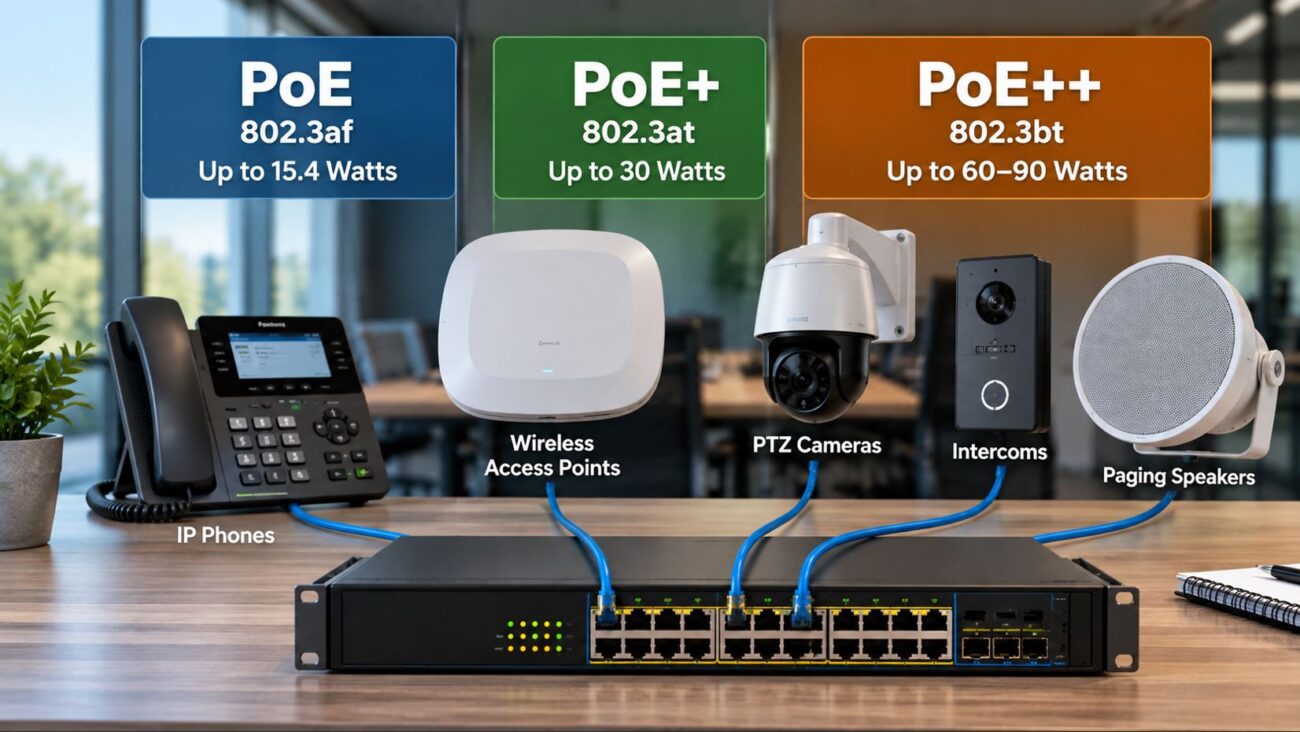
Confirm that the switch supports the PoE standard required by the phones and connected devices. Many desk phones operate within standard PoE power levels, while video phones, conference systems, wireless access points, cameras, and room devices may require PoE+ or PoE++. The device and switch documentation should identify the applicable IEEE power standard.
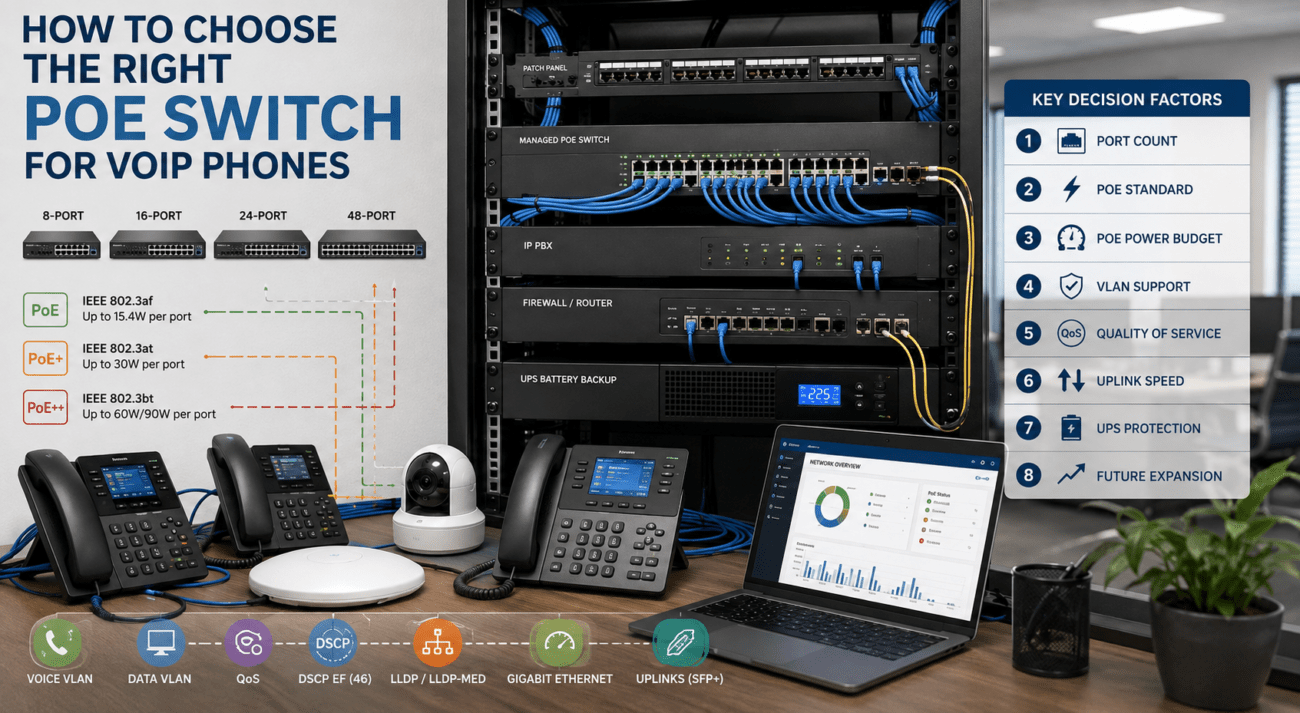
Review the total PoE power budget, not just the number of PoE ports. An eight-port switch may have eight powered ports but still lack enough total wattage to run eight high-power devices simultaneously. Add the maximum wattage of all devices and select a switch with additional capacity for startup demand and future additions.
VLAN Support
A virtual local area network separates devices logically even when they share the same physical switch. A voice VLAN can place IP phones on a dedicated network segment while computers use a separate data VLAN. This can simplify traffic management, improve security, and help administrators apply settings specifically to phone traffic.
VLAN support normally requires a managed or smart-managed switch. The router, firewall, IP PBX, and connected phones must also be configured correctly for the selected VLAN design.
QoS for VoIP
Quality of Service prioritizes delay-sensitive voice packets over traffic such as downloads, backups, and software updates. Without QoS, calls may experience clipping, delay, robotic audio, or brief interruptions when the network is congested.
A QoS switch for VoIP should support common traffic-prioritization methods such as DSCP and 802.1p. QoS works most effectively when it is configured consistently across the switch, router, firewall, and other network infrastructure.
Port Count
Count every wired device that will connect to the switch, including phones, computers that do not connect through a phone, IP PBXs, access points, conference systems, printers, cameras, uplinks, and servers. Then reserve additional ports for growth and troubleshooting.
A phone with a built-in PC passthrough port can sometimes share one wall connection with a computer, but this arrangement still requires proper VLAN and speed configuration. Avoid designing a network with every switch port occupied on the first day.
Speed
A Gigabit PoE switch is the practical choice for most current business installations. VoIP calls use relatively little bandwidth, but connected computers, video meetings, cloud applications, and access points can require much higher throughput.
Check both the speed of individual ports and the switch’s total switching capacity. Businesses with high-performance servers, Wi-Fi 6 or Wi-Fi 7 access points, or multiple switch uplinks may also benefit from multigigabit ports, 10-Gigabit uplinks, or fiber connectivity.
Security
Managed switches may provide port security, network access controls, traffic monitoring, storm protection, DHCP snooping, access control lists, and the ability to disable unused ports. These features help limit unauthorized access and reduce the effect of certain network failures or configuration mistakes.
Security features must be maintained. Administrators should change default passwords, install supported firmware updates, use encrypted management methods where available, and restrict administrative access to trusted users and networks.
Remote Management
Remote management is valuable for businesses with multiple locations or outside IT providers. It can allow a technician to view port status, check PoE consumption, identify link errors, change VLAN settings, and restart power to a frozen phone.
Some switches use local web management, while others offer centralized or cloud-based management. Buyers should determine whether cloud access is included, requires an account, or carries a recurring fee.
Budget
Unmanaged PoE switches are generally less expensive, but price should be compared against operational requirements. A managed switch may reduce service costs by providing remote troubleshooting, traffic monitoring, and individual PoE port control.
Consider the total cost of the switch, power supply, mounting accessories, management licenses, replacement coverage, and any required network upgrades. Avoid selecting a unit based only on the lowest purchase price.
Scalability
Choose a switch that can support expected expansion over the next several years. Growth may include additional employees, shared workspaces, conference rooms, access points, cameras, SIP paging devices, or branch-office connections.
Scalability involves more than unused ports. The switch must also have enough PoE budget, uplink capacity, VLAN support, and management capability to handle the expanded network.
Recommended Product Types to Explore
For Small Offices
A small office with a few IP phones and limited IT support may be well served by a compact unmanaged PoE switch. Look for Gigabit ports, adequate power capacity, silent or low-noise operation, and enough spare ports for moderate growth.
Buyers can compare PoE switches, compatible Yealink phones, and basic networking equipment based on the number of users and the power requirements of each device.
For Growing Businesses
Growing businesses should consider a managed PoE switch with VLANs, QoS, remote monitoring, security controls, and additional uplink capacity. A 24-port or 48-port model may provide better long-term value than adding several small switches as the office expands.
The switch should be selected alongside the company’s IP PBX system, SIP phones, router, firewall, and structured cabling. Businesses comparing phone options can also explore Poly phones and Cisco phones.
For Meeting Rooms or Hybrid Teams
Meeting rooms may contain a conference phone, video bar, touchscreen controller, room scheduler, wireless presentation device, and access point. A managed PoE switch provides better traffic control and can supply power to compatible room devices without multiple electrical adapters.
Review the requirements of video conferencing systems, conference phones, and other meeting room devices. Video systems typically require more bandwidth and may consume more PoE power than standard desk phones.
Compatibility and Setup Requirements
Phone and Platform Compatibility
An Ethernet switch does not normally determine whether a SIP phone can register with a particular hosted service or IP PBX. Registration compatibility depends on the phone’s firmware, SIP support, provisioning method, service-provider requirements, and licensing. However, the switch must support the necessary network speed, PoE standard, VLAN configuration, and QoS policies.
Before purchasing, document the make and model of each phone, its maximum power draw, the phone platform, and whether voice VLAN tagging is configured manually, through DHCP options, or through network discovery protocols.
Cabling and Physical Installation
Use properly terminated Ethernet cabling rated for the required network speed and installation environment. Damaged connectors, excessive cable length, poor-quality patch cords, and incorrect termination can cause intermittent phone registration, reduced link speed, or failed PoE delivery.
Rack-mounted switches require suitable rack space, ventilation, electrical power, and cable management. Desktop switches should be placed where airflow is not obstructed. Fan noise should also be considered when equipment will be installed near employees or inside a conference room.
Configuration and Firmware
Managed switches require initial configuration. Common tasks include changing the administrator password, updating firmware, creating voice and data VLANs, assigning uplink ports, enabling QoS, configuring time settings, and disabling unused services.
Configuration should be documented and backed up. Firmware should come from the manufacturer or an authorized support source, and updates should be reviewed before installation on a production network.
Common Limitations Buyers Should Know
Unmanaged switches are easy to deploy, but they offer limited visibility and control. They may be unsuitable when the phone provider or IT administrator requires a voice VLAN, traffic prioritization, port monitoring, or remote troubleshooting.
Managed switches provide more capability but require network knowledge. Incorrect VLAN, spanning-tree, security, or QoS settings can prevent phones from obtaining addresses or reaching the phone system. Businesses without internal IT support should confirm that their provider can configure the selected switch.
Not every network switch supports PoE, and not every powered port can necessarily operate at maximum output simultaneously. Always review the per-port capability and total power budget.
Meeting room devices, video phones, wireless access points, and cameras can draw substantially more power and bandwidth than basic desk phones. A switch sized only for telephone handsets may not support later additions.
How to Choose the Right Option
Choose Unmanaged for Simple Installations
Choose an unmanaged PoE switch when the network is small, traffic demands are modest, no voice VLAN is required, and there is little need for remote administration. This option is most appropriate when simplicity and cost are more important than detailed control.
Choose Managed for Business-Critical Voice
Choose a managed PoE switch when calls are business-critical, the network supports many users, voice and data should be separated, or IT staff need remote diagnostic tools. Managed models are also more suitable for contact centers, multi-department offices, video-heavy environments, and locations expected to grow.
Calculate Ports and Power Before Purchasing
Create an inventory of every device, port requirement, and maximum wattage. Add the device wattages together, then select a switch with a higher total budget. Reserve ports and power for future expansion rather than sizing the switch at its absolute limit.
Match the Switch to Available IT Support
A feature has little value if no one can configure or maintain it. Businesses without network administrators should select equipment supported by their phone-system provider, managed service provider, or IT consultant. Buyers may also consult a business communications provider such as Axion Communications when planning a complete voice and network deployment.
Related Telecom Products
A PoE switch is only one part of the communication system. The complete design may also include SIP phones, an IP PBX or hosted service, a router, firewall, UPS battery backup, Ethernet cabling, headsets, conference equipment, and network management tools.
When comparing network switches, check the technical documentation for every connected device. Grandstream, Yealink, Poly, Cisco, TP-Link, Intellinet, and other manufacturers offer equipment for different office sizes and management requirements, but compatibility and capabilities vary by model.
For a new installation, plan the phones, switch capacity, cabling, power backup, and internet connection together. This reduces the risk of purchasing equipment that works individually but does not meet the requirements of the complete system.
Conclusion
The right PoE switch for VoIP phones should provide sufficient ports, power, bandwidth, management features, and expansion capacity for the entire business network. An unmanaged switch may be appropriate for a small and simple installation, while a managed PoE switch is usually the stronger choice for VLANs, QoS, remote support, security, and long-term growth.
Before purchasing, calculate the total PoE power requirement, confirm device standards, identify the required network controls, and leave capacity for future phones and meeting room equipment. A carefully sized switch can support clearer calls, easier troubleshooting, and a more organized business communication system.
FAQ Section
What size PoE switch do I need for VoIP phones?
Count every phone and other wired device, then include ports for the router, IP PBX, wireless access points, conference systems, and switch uplinks. Add at least 20 percent spare port capacity for future growth. Also calculate the maximum wattage of every PoE device. The switch’s total PoE budget should exceed that combined requirement rather than merely matching the number of connected devices.
Do VoIP phones require a managed PoE switch?
VoIP phones do not always require a managed switch. A small office with a simple network may operate correctly on an unmanaged PoE switch. However, a managed PoE switch is recommended when the business needs voice VLANs, QoS, remote troubleshooting, security controls, traffic monitoring, or multiple network segments. The phone-system provider may also require specific VLAN or QoS settings.
How much PoE power does an IP phone use?
Power consumption varies by phone model and installed accessories. Basic desk phones often require less power than video phones, touchscreen models, conference systems, or phones with expansion modules. Review the manufacturer’s maximum power specification rather than relying on average consumption. Add the maximum values for all devices and choose a switch with extra PoE budget for startup demand and future equipment.
Is a Gigabit switch necessary for VoIP phones?
A single voice call does not require Gigabit bandwidth, but a Gigabit switch is still recommended for most current business networks. Computers may connect through the phone’s secondary Ethernet port, and the same switch may support video meetings, access points, servers, and cloud applications. Gigabit connectivity prevents the phone system from becoming a speed bottleneck and provides better capacity for future network requirements.
What is the difference between PoE, PoE+, and PoE++?
PoE, PoE+, and PoE++ are Ethernet power standards that provide different maximum power levels to connected devices. Standard PoE is often sufficient for basic IP phones, while PoE+ or PoE++ may be needed for video phones, advanced conference systems, wireless access points, cameras, and room-control devices. Both the switch and connected device must support compatible standards for proper power delivery.
Should VoIP phones be placed on a separate VLAN?
A separate voice VLAN is not mandatory for every installation, but it is useful for many business networks. It separates phone traffic from computers and guest devices, simplifies QoS policies, and can improve security and troubleshooting. VLANs require compatible managed switches, routers, phones, and correct configuration. A poorly configured VLAN can prevent phones from obtaining an IP address or reaching the phone service.
Can an unmanaged PoE switch cause poor call quality?
An unmanaged switch does not automatically cause poor call quality. Calls may work well when bandwidth is plentiful and the network is simple. Problems can arise when voice competes with large downloads, backups, or video traffic because unmanaged switches provide limited prioritization and monitoring. Call quality also depends on the router, internet connection, cabling, firewall, service provider, latency, jitter, and packet loss.
Can I connect computers and VoIP phones to the same switch?
Yes. Computers and VoIP phones can use the same physical switch. Many IP phones also include a secondary Ethernet port for connecting a computer through the phone. On managed networks, administrators often place phones and computers on separate VLANs while using the same switch and wall connection. Confirm that the switch, phone, and cabling support the required speed and VLAN configuration.