Should You Use a PoE Switch for VoIP Phones? What Business Buyers Need to Know
If you’re configuring a modern office phone system, you’ll face a key question: is a Power over Ethernet (PoE) switch required for your new VoIP phones? The short answer is no – but in practice, PoE switches make VoIP installations cleaner, more scalable, and easier to maintain.
Most IT buyers and office managers end up choosing PoE switches for their VoIP deployments, especially if there are three or more phones or any plans for future growth. Here’s why, and how to make the right buying choice for your business environment.
PoE Switches vs. Standard Switches for VoIP
| Feature |
Standard Switch + Power Adapters |
PoE Switch |
| Cables per phone |
2 (Ethernet + power) |
1 (Ethernet only) |
| Centralized (UPS-capable) power |
No |
Yes |
| Backup power for phones |
Manual, outlet-based |
UPS integration at closet |
| Office cable clutter |
Higher |
Lower |
| Upfront equipment cost |
Lower |
Slightly higher per port |
| Best for |
1-2 phones, small or home offices |
Business offices, flexible spaces |
How Does a PoE Switch Help Your VoIP Deployment?
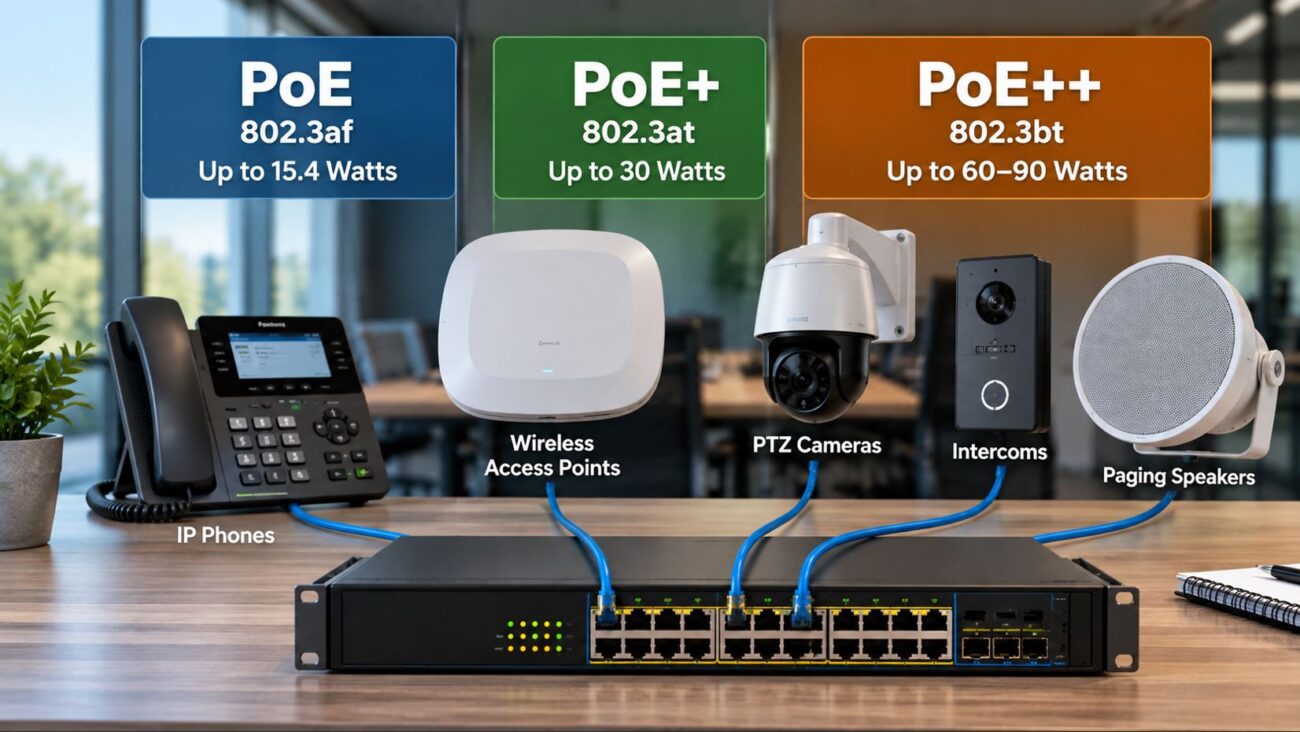
A PoE switch supplies both data and electrical power through one Ethernet cable, so you don’t need a separate wall plug or power brick at every phone. This is especially helpful for open office layouts, desks far from outlets, or new build-outs where powering each seat individually becomes messy.
Key benefits for business:
- Simpler installs: Run only Ethernet cabling anywhere there’s network access – no need to plan for power outlets at every phone location.
- Centralized management: Back up all phones with a single UPS where your switch is installed.
- Tidy cable management: Fewer wires at desks, easier moves/adds/changes.
- Scalability: Easily add more phones or devices as your company grows.
- Multi-device support: PoE is also used for wireless access points, security cameras, paging equipment, Teams Rooms/Zoom Rooms gear, and more.
For example, IT buyers supporting an expanding team or making frequent desk changes often find PoE switches save hours of re-cabling and troubleshooting versus running extra power lines.
When Can You Skip PoE for VoIP?
- You only need 1-2 phones and every desk has a nearby power plug.
- You’re on a very tight budget and initial hardware price is the top priority.
- No plans for wireless expansion or PoE devices like paging horns, access points, or security cameras.
In these situations, you can power each phone with its included power adapter and use a conventional switch. But even many smaller offices pick a small PoE switch now so they’re ready for future flexibility without a rewiring job later.
Which Type of PoE Switch Is Right For Your Office?
Unmanaged PoE Switches
Best for simple networks or where just basic connectivity is needed. These are plug-and-play; you connect your VoIP phones and go. Setup is fast, but they lack advanced network controls. Browse our Unmanaged Switches for fast options for basic deployments.
Managed PoE Switches
Ideal for larger deployments or companies that need features like Quality of Service (QoS), VLANs, remote reboot, and security segmentation between phones and computers. Managed switches support custom traffic rules for better voice call quality. See the Grandstream GS-GWN7803P 24-Port Layer 2+ Managed PoE Switch or more options under Managed Switches. These are especially important in offices running CRM apps, file transfers, and video meetings over the same network.
High-Power and Outdoor PoE Switches
If you plan to use endpoint devices that need more power (like large video phones, lighted desk phones, video bars, multiple access points, or outdoor paging horns), check that your switch total power budget is sufficient. For outdoor installs or manufacturing environments, shop for industrial/outdoor-rated switches for durability and safety.
Don’t Miss These Compatibility Checks
- PoE Standard: The majority of business VoIP phones use 802.3af (standard PoE), but check if you need 802.3at (PoE+) or 802.3bt (high power). Phone spec sheets or the vendor site will list this.
- Power Budget: Add up watts for all phones and future devices. Aim to leave extra headroom—never max out the entire switch.
- Port Count: Always buy a switch with more ports than you need today; 20-30% buffer is practical for fast-growing businesses.
- Gigabit Network: Nearly all VoIP deployments now use gigabit switches and fast Cat5e or Cat6 cabling for reliability and call quality. Avoid old 10/100 switches.
Still unsure? VoIP specialists and integrators like Axion Communications can review your device list and cabling plan.
Key Network Setup Tips for Reliable VoIP
- Make sure your internet service can handle your total number of phone lines plus normal office traffic.
- Use managed switches to prioritize voice (QoS) and segment voice/data traffic (VLANs) for best performance in busier offices.
- Use quality patch cables and keep cable runs under 100 meters to avoid signal drop.
- IP PBX systems or hosted VoIP/UC solutions work perfectly with PoE, letting you future-proof your investment as phone systems and collaboration tools evolve.
Common Pitfalls and How to Avoid Them
- Port shortage: Counting only today’s devices and forgetting about lobby phones, future users, or conference room upgrades. Buy with growth in mind.
- Underpowered switches: Not all PoE switches can power all ports at once at full PoE output. Check the total power budget and footnotes in your switch specs—especially if adding video phones, cameras, or many access points.
- Poor cable quality: Using old or damaged Ethernet cables hinders both power delivery and network reliability.
- Skipping managed switches in larger networks: Even small/mid-size offices benefit from managed features like device monitoring, VLANs, and prioritized voice/data.
Business-Grade PoE Switches We Recommend
You can explore our full PoE Switches catalog for additional sizes and advanced models.
How PoE Switches Fit Into Your Complete Office System
A PoE switch is one part of a resilient business network. Expect to connect not just phones, but printers, wireless access points, paging equipment, and UC/meeting solutions (like Microsoft Teams or Zoom Rooms panels) for a truly unified workspace. This approach is the modern standard for IT-driven organizations.
If you’re handling a larger or multi-site rollout, partners such as Axion Communications can help map out structured cabling plans and optimal switch counts, reducing future surprises as your company grows.
Ready to build? See Network Switches or contact our team for guidance on the best PoE models for your environment.
FAQ: Answers for VoIP & PoE Buyers
Do VoIP phones always need a PoE switch?
No – you can use standard power adapters, but PoE switches make almost every business install easier and tidier.
How do I know if my VoIP phone is PoE compatible?
Check for “802.3af”, “802.3at”, or “PoE” on your device spec sheet or consult your reseller. Nearly every business-class phone supports standard PoE today.
Can I combine PoE and non-PoE devices on one switch?
Yes. Non-PoE devices will simply ignore the power feed and operate as data only.
What mistakes should I avoid when buying a PoE switch?
Forgetting about future device growth, undersizing your power budget, and skipping managed features needed for QoS or VLANs.
Which is better for VoIP—managed or unmanaged PoE?
For business networks, managed PoE switches are usually the best choice for advanced controls, security, and performance.
Will PoE switches work with my existing IP PBX or cloud VoIP?
Yes, PoE works with any VoIP system as long as your phones support PoE. The switch just delivers power and data.
Choosing PoE: The Standard for Modern VoIP Networks
For most buyers, a PoE switch is a better long-term investment than regular switches. It supports tidy rollouts, central power, and makes expanding your phone system, wireless, and paging much simpler as needs change. If you need help sizing, choosing, or setting up your VoIP network, browse our PoE Switches or consult with integration experts like Axion Communications for project planning that supports your business for years ahead.