Microsoft Teams Device Health Alerts Are Leaving Teams Admin Center: What IT Teams Need to Do Before the September 2026 Deadline
Microsoft is making another important change to the way IT administrators manage Microsoft Teams devices.
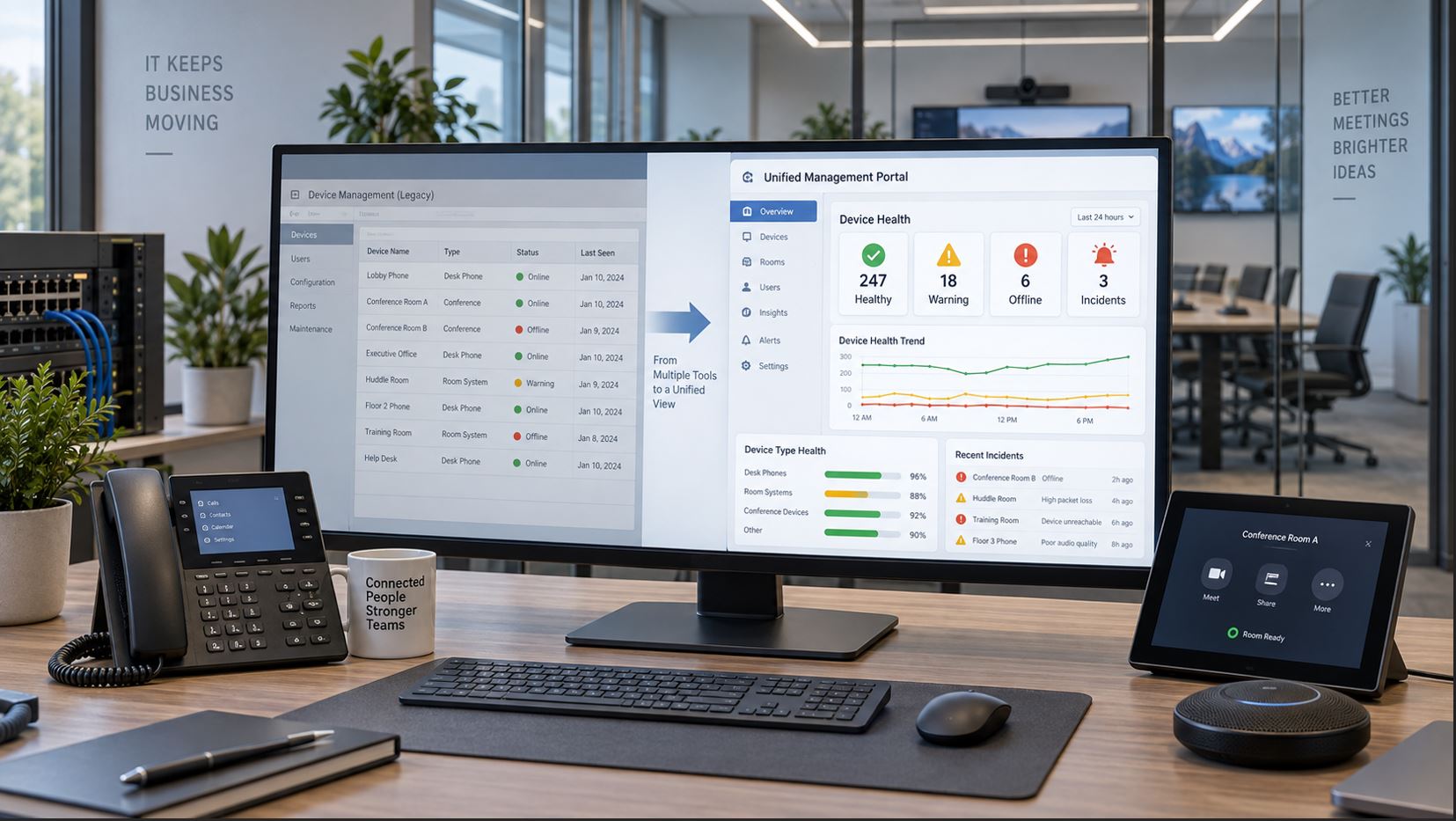
By late September 2026, Microsoft plans to retire the Device state rule and associated device health alerts currently available in the Microsoft Teams Admin Center. Device health monitoring is moving to the Microsoft Teams Rooms Pro Management Portal, where Microsoft is consolidating monitoring, incident management, device inventory, updates, configuration, and other administrative functions.
This change affects organizations that rely on Teams Admin Center to notify administrators when Teams Phones, Teams Rooms devices, Panels, or other managed endpoints become unhealthy or go offline.
The most important point for administrators is that existing Teams Admin Center alert configurations will not simply move to the new portal. Organizations need to review their current monitoring rules, recreate the necessary alerting in the Pro Management Portal, and rebuild any webhook or ITSM integrations that depend on the old Teams Admin Center alerts.
What Is Microsoft Retiring?
Microsoft is retiring the Device state rule currently found under Notifications & alerts > Rules in the Teams Admin Center.
The rule has been used to monitor Teams device health and generate alerts when selected devices enter an unhealthy or offline state.
According to Microsoft’s September 2026 Message Center notice, the following changes are expected when the retirement is completed:
The Device state rule page in Teams Admin Center will no longer be available.
Existing Device state rule configurations will stop being evaluated.
Device offline and health alerts generated by those rules will stop.
Alerts will no longer be delivered to the MonitoringAlerts channel in the Admin Alerts and Notifications team.
Webhook integrations connected to the Teams Admin Center Device state rule will stop receiving alert payloads.
Existing rule configurations and historical alerts will not be migrated automatically into the Pro Management Portal.
Microsoft says this does not change the end-user experience. The change affects the administrative monitoring workflow rather than how users operate Teams devices.
Microsoft’s Message Center notice identifies late September 2026 as the worldwide rollout period for retiring the Teams Admin Center Device state rule and its associated alerts.
Change
Timing
Administrator Impact
Device health monitoring moves to PMP
2026 transition underway
Administrators should begin using Pro Management Portal monitoring.
TAC Device state rule retirement
Late September 2026
Existing Teams Admin Center rules stop being evaluated.
TAC Teams-channel health alerts stop
Late September 2026
MonitoringAlerts channel no longer receives these device alerts.
TAC webhook alert payloads stop
Late September 2026
External monitoring and ITSM integrations need replacement.
Organizations that currently depend on Teams Admin Center alerts should not wait until the old workflow disappears. The safest approach is to build and validate the replacement monitoring process before the retirement is complete.
Why Is Microsoft Moving Device Health Monitoring?
The alert retirement is part of Microsoft’s broader effort to consolidate Teams device management inside the Teams Rooms Pro Management Portal.
Starting in 2026, Microsoft has been moving management functions for Teams Rooms on Android, Teams Phones, Teams Panels, and SIP devices away from Teams Admin Center and into the Pro Management Portal.
The transition includes capabilities such as:
Device inventory
Device health signals
Incident management
Firmware and application updates
Configuration settings
Remote restart
Remote sign-in and sign-out
Log collection
Device provisioning
SIP device management
Microsoft describes the goal as providing a unified administrative experience across Teams device types rather than requiring administrators to manage related functions through multiple portals.
This is where IT teams need to pay particular attention.
Microsoft says existing Device state rule configurations will not be migrated into the Pro Management Portal.
That means an administrator who currently monitors hundreds of phones or meeting-room devices through Teams Admin Center cannot assume those same monitoring rules will automatically appear in PMP.
Administrators should document the existing configuration before the retirement date.
Record Your Current Monitoring Scope
Review Teams Admin Center under Notifications & alerts > Rules > Device state rule.
Document which devices, users, device groups, or locations are currently monitored and identify which conditions trigger notifications.
This gives you a baseline for recreating equivalent monitoring in the Pro Management Portal.
Document Who Receives Alerts
Record the administrators, teams, channels, service desks, or monitoring systems currently receiving notifications.
When the old rule is retired, administrators should verify that the replacement PMP workflow reaches the same operational teams.
Teams-Channel Alerts Will Stop
Organizations using the Admin Alerts and Notifications team should pay particular attention to this change.
Microsoft says device offline and health alerts generated by the retiring Device state rule will stop appearing in the MonitoringAlerts channel.
If your IT department currently watches that Teams channel as its primary indication that a phone or meeting-room device has gone offline, a replacement notification workflow should be established before the deadline.
Do not assume that administrators will automatically begin receiving equivalent notifications from the Pro Management Portal.
Webhook and ITSM Integrations Need to Be Rebuilt
This may be the most operationally significant part of the change for larger organizations.
Some businesses send Teams Admin Center device alerts into external systems such as:
IT service-management platforms
Network operations dashboards
Help-desk ticketing systems
Custom monitoring applications
Automation platforms
Incident-response systems
Microsoft states that webhook integrations connected to the retiring Device state rule will stop receiving those alert payloads.
The Teams Rooms Pro Management Portal has its own incident notification webhook integration. Microsoft documents support for customizable incident subscriptions, device and signal filtering, authentication, delivery logging, and integration with systems capable of accepting inbound webhooks.
Administrators can configure these integrations in the Pro Management Portal under Settings > Integrations.
Microsoft currently documents a limit of 10 incident webhook integrations per portal, and the feature is available for Commercial and GCC environments but not GCC High or DoD. Administrators should confirm current availability and licensing before designing an integration around it.
What Should IT Teams Do Before Late September?
Action
Priority
Reason
Review current TAC Device state rules
Critical
Existing configurations will not migrate automatically.
Administrators need appropriate access before the transition.
Check offline and aging devices
Medium
Older endpoints may already have management or update issues.
Update documentation
Medium
Operations teams need to know where device health is now monitored.
Verify Access to the Pro Management Portal
Before migrating monitoring workflows, verify that the people responsible for Teams device operations can access the Teams Rooms Pro Management Portal.
Microsoft supports several Microsoft Entra roles for portal access, including Global Administrator, Teams Administrator, Teams Device Administrator, and Global Reader.
The Pro Management Portal also provides its own role-based access control system, including roles such as Teams Rooms Pro Manager, Site Lead, and Site Technician.
Microsoft recommends using the least-privileged role appropriate for the administrator’s responsibilities rather than routinely using Global Administrator credentials.
Organizations using Microsoft Entra Administrative Units should also review Microsoft’s current restrictions because Administrative Unit-scoped Teams Administrator and Teams Device Administrator roles do not currently provide normal access to the Pro Management Portal.
How Device Health Monitoring Changes Operationally
The move to PMP changes the administrative model from individual Teams Admin Center alert rules toward a broader incident-management environment.
The Pro Management Portal can display device health signals and incidents that help administrators identify problems affecting the Teams environment.
Examples of health categories documented by Microsoft include connectivity, configuration, hardware and peripherals, security, operating system and firmware, applications, displays, and other device conditions.
This can provide a more comprehensive operational picture than simply knowing that an endpoint has gone offline.
What About Teams Phones?
Teams Phones are part of Microsoft’s broader Android device-management transition.
Organizations with large Teams Phone deployments should make sure their phone inventory appears in the Pro Management Portal and that administrators can view the health information needed for day-to-day operations.
If aging phones are already creating reliability or management problems, this transition can also be an appropriate time to evaluate replacements.
For example, the Yealink MP55 E2 Teams Phone is designed for Microsoft Teams environments and supports modern enterprise deployment features including Ethernet, Power over Ethernet, Wi-Fi, Bluetooth, and Microsoft-oriented device management.
A hardware replacement should not be driven by the portal change alone. Existing supported equipment should generally be retained when it remains reliable, secure, manageable, and suitable for its users.
What About Teams Rooms?
Teams Rooms environments are especially dependent on proactive monitoring because a conference-room problem may not be discovered until employees attempt to begin a meeting.
Monitoring can help IT teams identify connectivity, peripheral, application, display, or system problems before they result in a failed meeting.
As with Teams Phones, hardware purchasing decisions should be based on room requirements, platform compatibility, support lifecycle, camera and audio requirements, networking, and deployment needs rather than on the management-portal transition by itself.
What About SIP Devices?
Microsoft’s broader device-management migration also includes SIP devices used with Microsoft Teams SIP Gateway.
Organizations retaining older SIP endpoints should use this transition as an opportunity to verify which devices remain supported, manageable, and operationally worthwhile.
Open the Teams Admin Center and document every active Device state rule.
Record which endpoints and users are monitored.
Document all Teams-channel and webhook alert destinations.
Confirm administrator access to the Teams Rooms Pro Management Portal.
Verify that the expected Teams devices appear in PMP.
Configure health monitoring and incident notifications in PMP.
Recreate required webhook or ITSM integrations.
Generate controlled test incidents where practical.
Verify that the correct operations personnel receive notifications.
Update internal documentation and escalation procedures.
Continue running the new workflow before the TAC monitoring functionality disappears.
Common Migration Mistakes
Assuming Existing Alerts Will Migrate Automatically
Microsoft specifically states that existing rule configurations and historical alerts will not migrate into PMP.
Forgetting About Webhooks
A Teams Admin Center rule may quietly feed an external help desk or monitoring system. When the rule is retired, that integration can stop even if administrators are successfully using PMP manually.
Checking the Portal but Not Testing Notifications
Seeing healthy devices in PMP is not enough. Test the notification workflow and verify that incidents reach the people responsible for responding to them.
Waiting Until the Old Rule Disappears
Running the replacement monitoring process before retirement gives your team time to identify missing devices, permission issues, incomplete integrations, or notification gaps.
Frequently Asked Questions
When are Teams Admin Center device health alerts being retired?
Microsoft’s current Message Center guidance says the retirement will roll out in late September 2026.
Will existing Device state rules automatically move to PMP?
No. Microsoft says existing rule configurations and historical alerts will not be migrated automatically to the Teams Rooms Pro Management Portal.
Will offline device alerts still appear in the MonitoringAlerts Teams channel?
No. Alerts generated by the retiring Teams Admin Center Device state rule will stop being delivered to that channel.
What happens to existing webhook integrations?
Webhook integrations connected to the Teams Admin Center Device state rule will stop receiving those alert payloads. Administrators should build an equivalent integration using the capabilities available in PMP.
Does this change affect Teams users?
Microsoft says there is no direct change to the end-user experience. The change affects administrative monitoring and alerting.
Which devices are moving toward Pro Management Portal administration?
Microsoft’s broader 2026 transition includes Teams Rooms on Android, Teams Phones, Teams Panels, and SIP devices, with Pro Management becoming the primary location for overlapping device-management functions.
Final Recommendation
The September 2026 retirement of Teams Admin Center device health alerts should be treated as an operational migration rather than a cosmetic portal change.
If your organization depends on the Device state rule, Teams-channel alerts, or webhook integrations, document those workflows now and rebuild them in the Teams Rooms Pro Management Portal before the old monitoring system is retired.
The most important test is simple: intentionally verify that your operations team can identify a device problem through the new system and receive the expected notification without relying on Teams Admin Center.
For organizations refreshing Microsoft Teams hardware as part of a broader modernization project, Telecom-Store.com carries Microsoft Teams phones, Teams Rooms systems, SIP phones, managed PoE switches, and supporting business communications infrastructure.
To provide the best experiences, we use technologies like cookies to store and/or access device information. Consenting to these technologies will allow us to process data such as browsing behavior or unique IDs on this site. Not consenting or withdrawing consent, may adversely affect certain features and functions.
Functional
Always active
The technical storage or access is strictly necessary for the legitimate purpose of enabling the use of a specific service explicitly requested by the subscriber or user, or for the sole purpose of carrying out the transmission of a communication over an electronic communications network.
Preferences
The technical storage or access is necessary for the legitimate purpose of storing preferences that are not requested by the subscriber or user.
Statistics
The technical storage or access that is used exclusively for statistical purposes.The technical storage or access that is used exclusively for anonymous statistical purposes. Without a subpoena, voluntary compliance on the part of your Internet Service Provider, or additional records from a third party, information stored or retrieved for this purpose alone cannot usually be used to identify you.
Marketing
The technical storage or access is required to create user profiles to send advertising, or to track the user on a website or across several websites for similar marketing purposes.