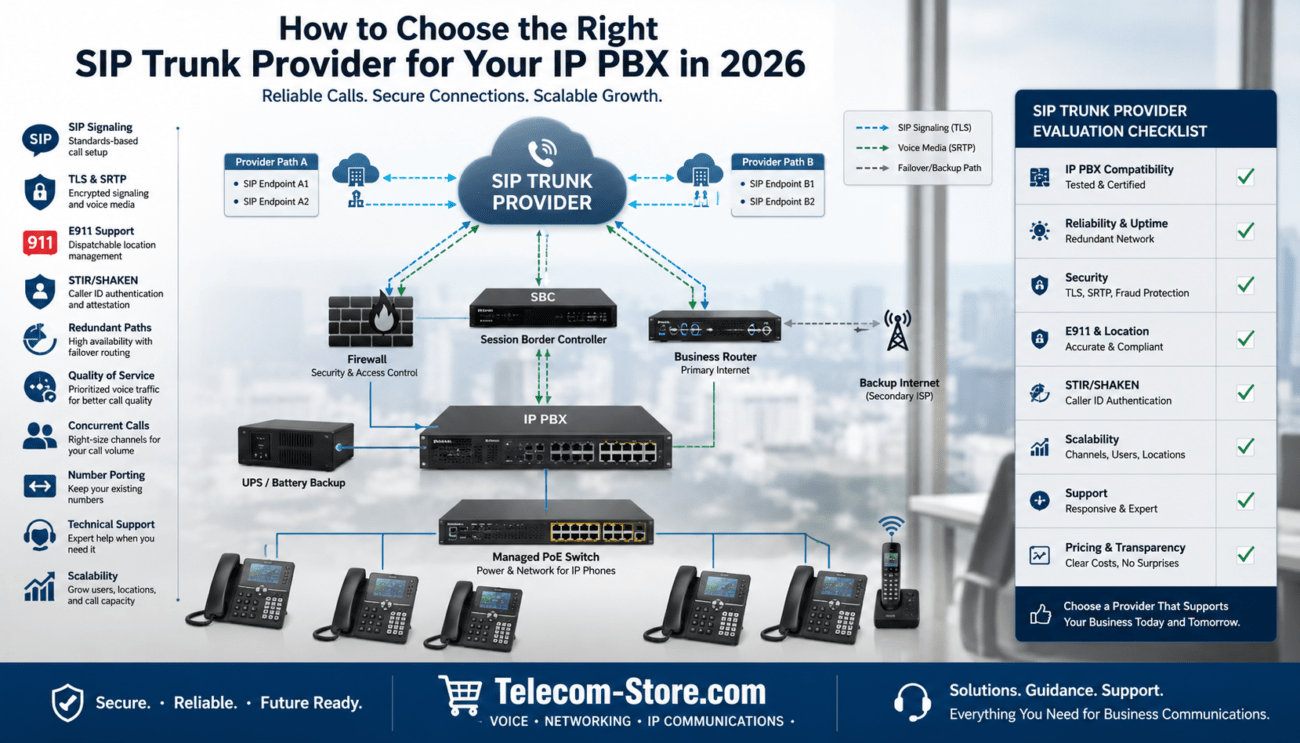
How to Choose the Right Business Router for VoIP Networks in 2026
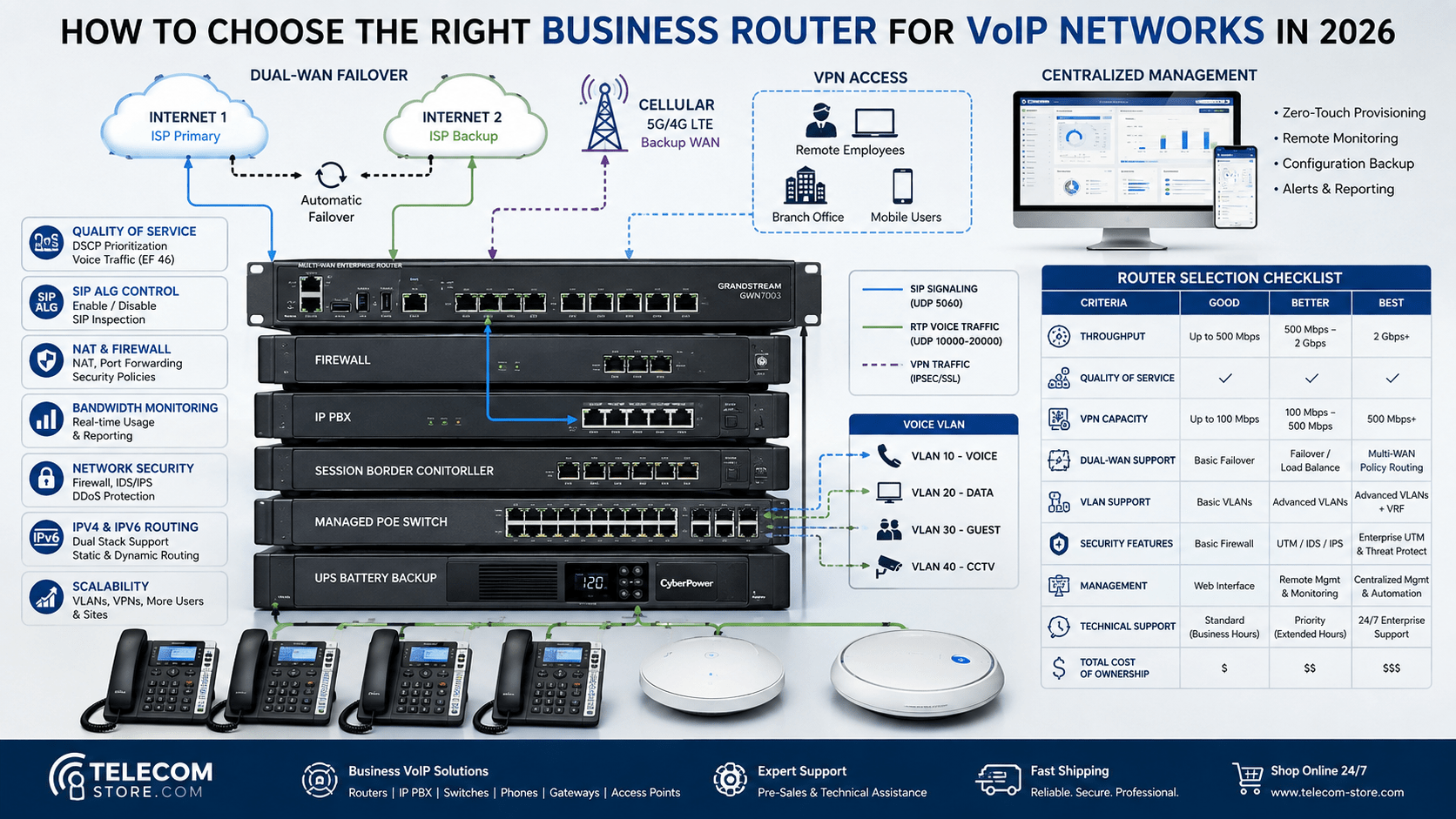
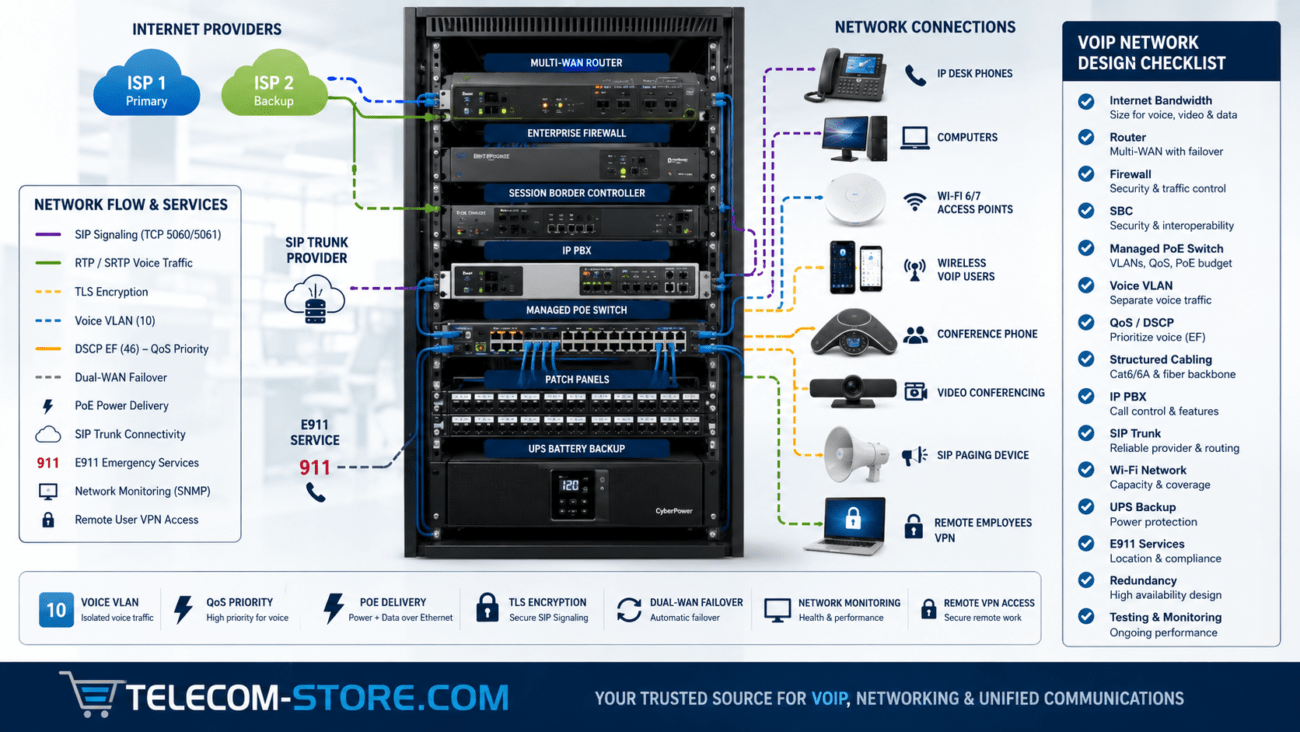
A business router plays a central role in the reliability of a Voice over Internet Protocol system. It directs traffic between the local network and the internet, applies Quality of Service policies, manages Network Address Translation, supports remote users, and determines how the business responds when an internet connection fails.
The right business router for VoIP should do more than provide a fast internet connection. It should support predictable voice quality, secure VPN access, network segmentation, traffic monitoring, dual-WAN failover, and enough processing capacity for the company’s present and future requirements.
This guide explains how to compare business routers for VoIP networks in 2026, including performance ratings, QoS, SIP compatibility, VPN capacity, failover, security, deployment examples, and common purchasing mistakes.
What Does a Business Router Do?
A router connects separate IP networks and forwards packets between them. In a typical business installation, the router connects the internal office network to one or more internet services.
Depending on the product, the router may also provide:
Network Address Translation
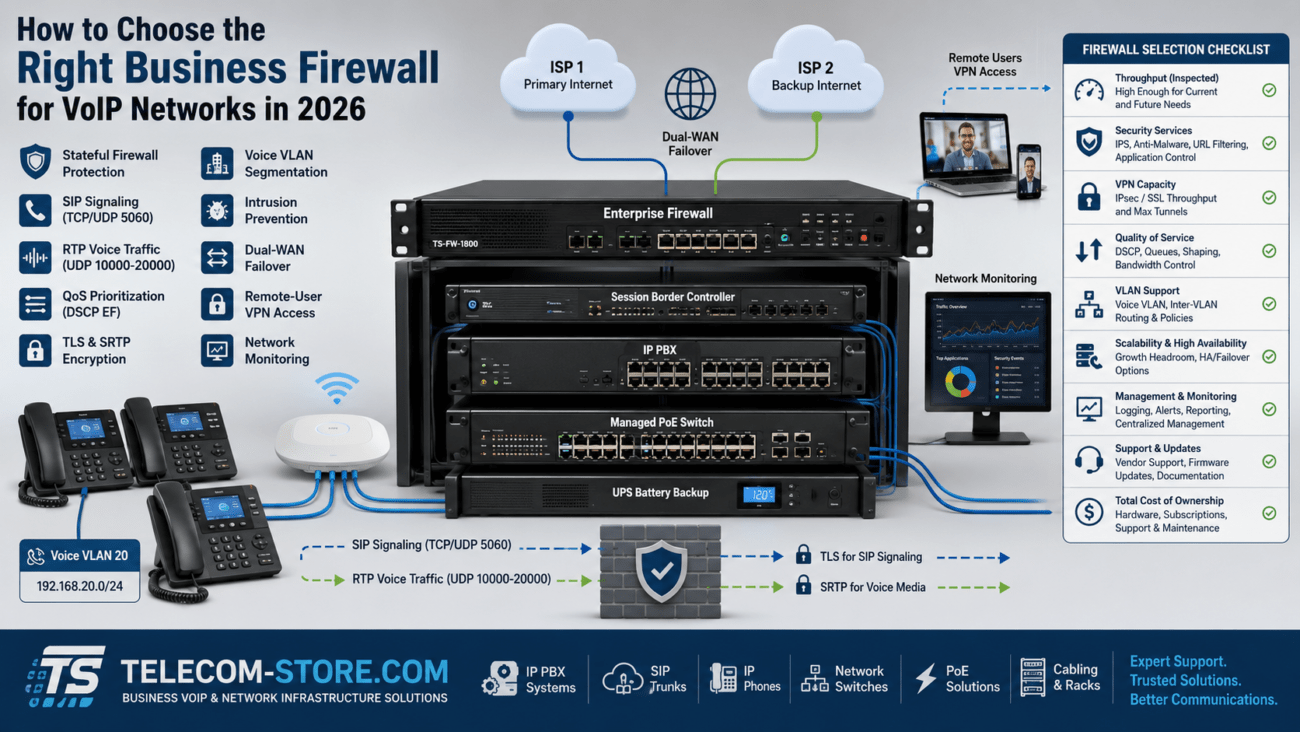
Stateful firewall protection
Quality of Service
Traffic shaping
Virtual private networks
Dual-WAN or multi-WAN failover
VLAN routing
Dynamic routing
Bandwidth monitoring
Wireless network management
Intrusion prevention and content filtering
Some products combine routing with additional functions. For example, the Grandstream GCC6010 IP PBX router and firewall combines routing, firewall, switching, PoE, VPN, and IP PBX capabilities in one platform. An integrated appliance can simplify a smaller deployment, but the business should still confirm that its user capacity, concurrent calls, security features, port count, and expansion limits match the project.
Why the Router Matters for VoIP
Voice traffic is more sensitive to network conditions than email, web browsing, or ordinary file transfers. A short delay in downloading a document may go unnoticed, while the same delay during a telephone conversation can cause clipped words, pauses, or callers speaking over one another.
Common VoIP problems related to routers include:
Choppy or robotic audio during network congestion
One-way audio caused by NAT or firewall behavior
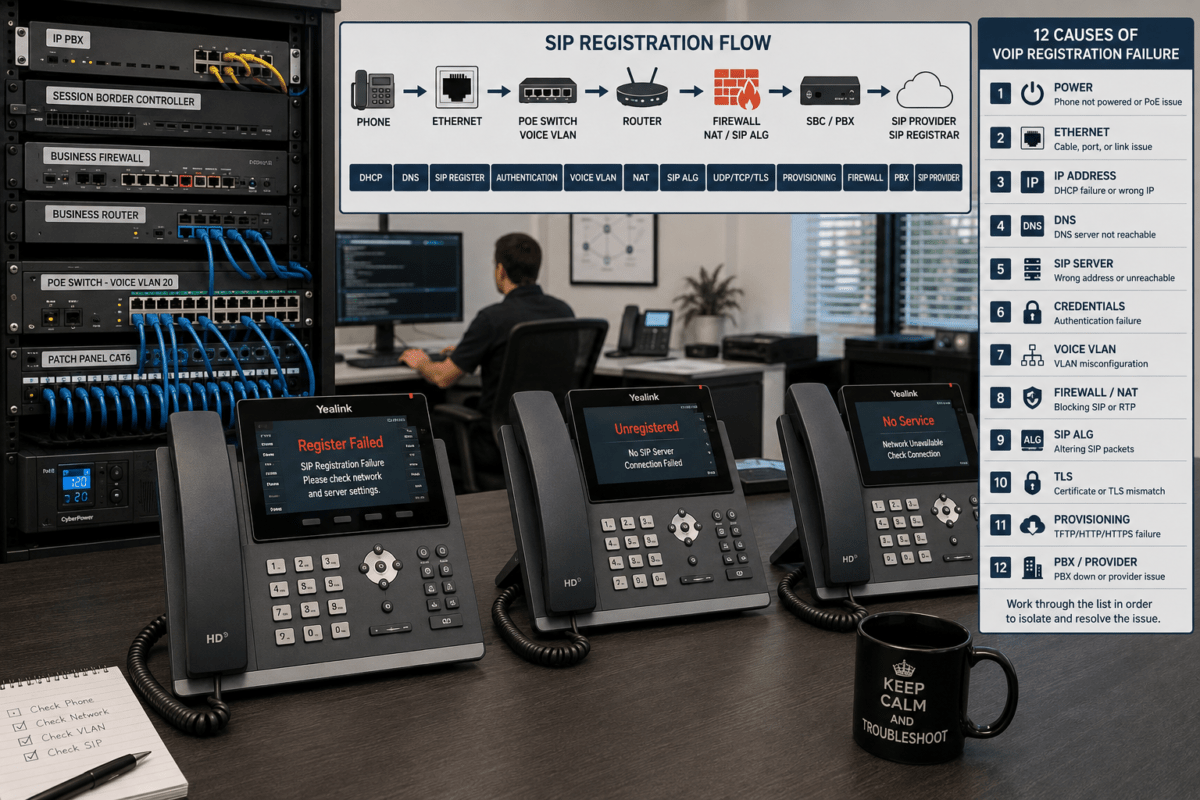
Phones that fail to register
Calls that drop after a consistent amount of time
Poor performance for remote phones or softphones
Service interruption when the primary ISP fails
Insufficient upload bandwidth during backups or file transfers
Businesses already experiencing these problems should review the recommended router settings for reliable VoIP calls before replacing equipment. Incorrect QoS, SIP ALG, NAT, firewall, DNS, or timeout settings can cause problems even when the router has adequate hardware capacity.
Start with Realistic Routing Performance
Router specifications often include several performance figures, and they are not interchangeable. A router may advertise high basic routing throughput but deliver lower performance after VPN encryption, deep packet inspection, traffic shaping, logging, or security services are enabled.
Compare the following measurements where available:
Stateful routing or firewall throughput
Threat-prevention throughput
IPsec VPN throughput
SSL or remote-access VPN throughput
Maximum concurrent sessions
New sessions per second
WAN interface speeds
Packet-forwarding rate
Performance with application control enabled
Size the router according to the business’s actual internet speed and the services that will operate simultaneously. Include voice, video meetings, cloud applications, security cameras, backups, software updates, VPN users, and ordinary internet traffic.
A router that is adequate for a 200 Mbps connection may become a bottleneck after the company upgrades to gigabit fiber or activates more demanding security services.
Prioritize Quality of Service
Quality of Service is one of the most important router features for a shared voice and data network. QoS identifies delay-sensitive traffic and determines which packets receive preferential access when a network interface becomes congested.
A useful business router should support:
DSCP classification and preservation
Priority or low-latency queues
Bandwidth reservations
Traffic shaping
Application- or protocol-based classification
Separate rules for each WAN connection
Queue statistics and monitoring
Policies for both IPv4 and IPv6 where required
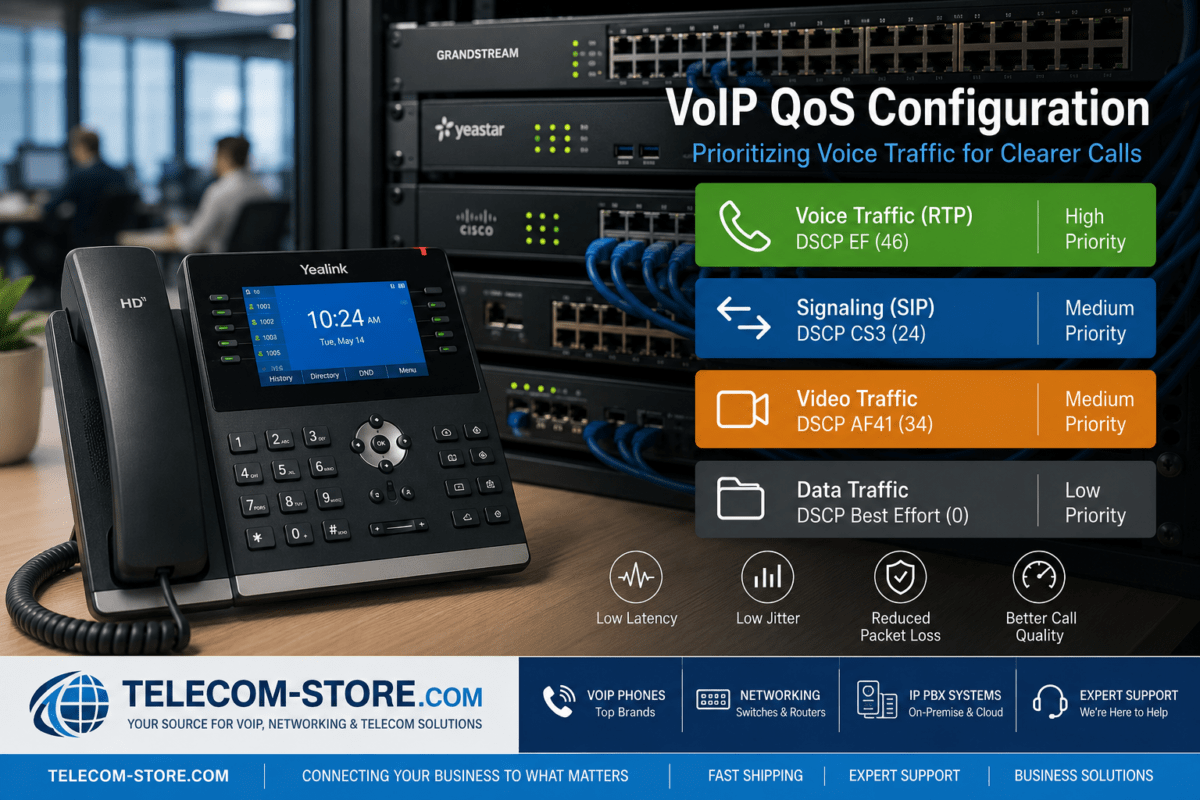
DSCP EF, decimal 46, is commonly used for real-time telephony media. However, packet markings do not provide priority by themselves. The router must place marked packets into the correct queue and schedule them appropriately when congestion occurs.
The VoIP QoS configuration guide explains DSCP, voice VLANs, trust boundaries, bandwidth planning, and WAN-edge traffic shaping in greater detail.
Control the actual bottleneck
QoS works best when the router controls the congested queue. Administrators commonly configure traffic shaping slightly below the measured internet capacity so congestion occurs on the business router instead of inside the ISP’s upstream equipment.
This is particularly important for asymmetric services with much less upload capacity than download capacity. Cloud backups, security cameras, and large uploads can interfere with outbound voice even when the download connection remains mostly idle.
Look for Dual-WAN or Multi-WAN Support
A secondary internet connection can reduce downtime when the primary service fails. A dual-WAN or multi-WAN router can monitor each connection and redirect traffic when a path becomes unavailable.
Useful WAN features include:
Active health checks
Automatic failover
Load balancing
Policy-based routing
Application-aware path selection
Separate QoS policies for each connection
Automatic return to the preferred ISP
Support for Ethernet, fiber, cellular, or fixed-wireless connections
The Grandstream GWN7003 multi-WAN VPN router is designed for organizations that need multiple WAN options, VPN connectivity, load balancing, traffic monitoring, and centralized management of compatible Grandstream network devices.
For mobile, branch-office, or cellular-backup deployments, the Peplink 5G cellular router with SpeedFusion WAN bonding can add cellular connectivity and resilient WAN options where the carrier plan, signal coverage, and network design support the application.
Understand what failover can and cannot do
Dual-WAN failover does not guarantee that an active VoIP call will survive the transition. The public IP address and network path may change, causing the existing SIP and RTP sessions to end.
However, properly designed failover can allow phones to re-register and new calls to resume quickly. Provider-side call forwarding can add another layer of protection if the PBX or entire location becomes unreachable.
Evaluate VPN Performance
Businesses commonly use VPNs for branch offices, remote employees, system administration, and access to internal applications. Encryption requires processing power, so VPN throughput may be substantially lower than basic routing throughput.
Evaluate:
IPsec VPN throughput
Supported encryption algorithms
Maximum site-to-site tunnels
Maximum remote-access users
Multi-factor authentication
Certificate support
Split-tunneling policies
QoS treatment inside encrypted tunnels
High-availability options
For specialized carrier-edge deployments, the Ribbon EdgeMarc 2900e router combines routing and intelligent edge functions for voice-oriented environments. Confirm session licensing, call capacity, management platform requirements, and carrier compatibility before selecting this type of appliance.
Review NAT and SIP Handling
Most business routers use Network Address Translation to allow internal devices with private IP addresses to access external services. VoIP can be more difficult than ordinary web traffic because SIP signaling and RTP media may use separate addresses, ports, and sessions.
A suitable router should provide control over:
Source and destination NAT
Outbound NAT
Static-port NAT where required
Port forwarding
UDP session timeouts
Connection tracking
Multiple public IP addresses
Hairpin or loopback NAT
SIP ALG or SIP inspection
SIP ALG should be controllable
SIP Application Layer Gateway attempts to inspect and rewrite SIP signaling. Some implementations work correctly in supported environments, while others alter addresses, ports, or headers in ways that cause registration failures, one-way audio, or dropped calls.
Do not assume SIP ALG must always be on or always be off. Follow the tested recommendations for the exact router, firmware, PBX, and service provider.
At minimum, administrators should be able to enable or disable SIP ALG, control it by policy, review related logs, and adjust relevant session timers.
Choose Appropriate Security Features
A router may include a basic firewall or a more complete security platform. The required level depends on the organization’s size, compliance obligations, remote-access model, and tolerance for downtime.
Useful security functions include:
Stateful firewall policies
Intrusion prevention
Denial-of-service protection
Geo-IP restrictions
IP reputation filtering
Application control
Administrative multi-factor authentication
Role-based access
Encrypted configuration backups
Centralized logging and alerts
Automatic or managed firmware updates
Organizations that need an integrated communications and security platform may consider the Grandstream GCC6011 IP PBX router with built-in firewall. It is intended for larger integrated deployments than entry-level models, but compatibility, capacity, licensing, and redundancy requirements should be reviewed carefully.
For a smaller office that also needs integrated Wi-Fi, the Grandstream GCC6010W all-in-one router, firewall, Wi-Fi, and IP PBX may reduce the number of separate appliances. An all-in-one design simplifies management but can also concentrate several critical functions in one device.
Decide Whether Wi-Fi Should Be Built In
Some small-business routers include wireless networking, while larger organizations normally use separate managed access points.
An integrated wireless router may be appropriate for:
Separate access points are generally more flexible for larger spaces because they can be positioned according to coverage, capacity, and roaming requirements. For example, an outdoor or campus deployment may use a device such as the Grandstream GWN7660ELR outdoor Wi-Fi 6 access point when its range, environmental rating, power, mounting, and management requirements fit the site.
QoS cannot correct poor wireless design. Voice over Wi-Fi also depends on signal strength, interference, airtime utilization, access-point placement, roaming, and WMM configuration.
Confirm VLAN and Inter-VLAN Routing Support
A voice VLAN separates IP phones from computers, cameras, guests, and other devices. VLANs can improve organization, access control, troubleshooting, and QoS enforcement, but the router must support the complete design.
Look for:
Multiple VLAN interfaces
802.1Q tagging
Inter-VLAN firewall policies
DHCP server or relay support
Static and dynamic routing
Guest-network isolation
Policy-based internet access
Logging by VLAN or rule
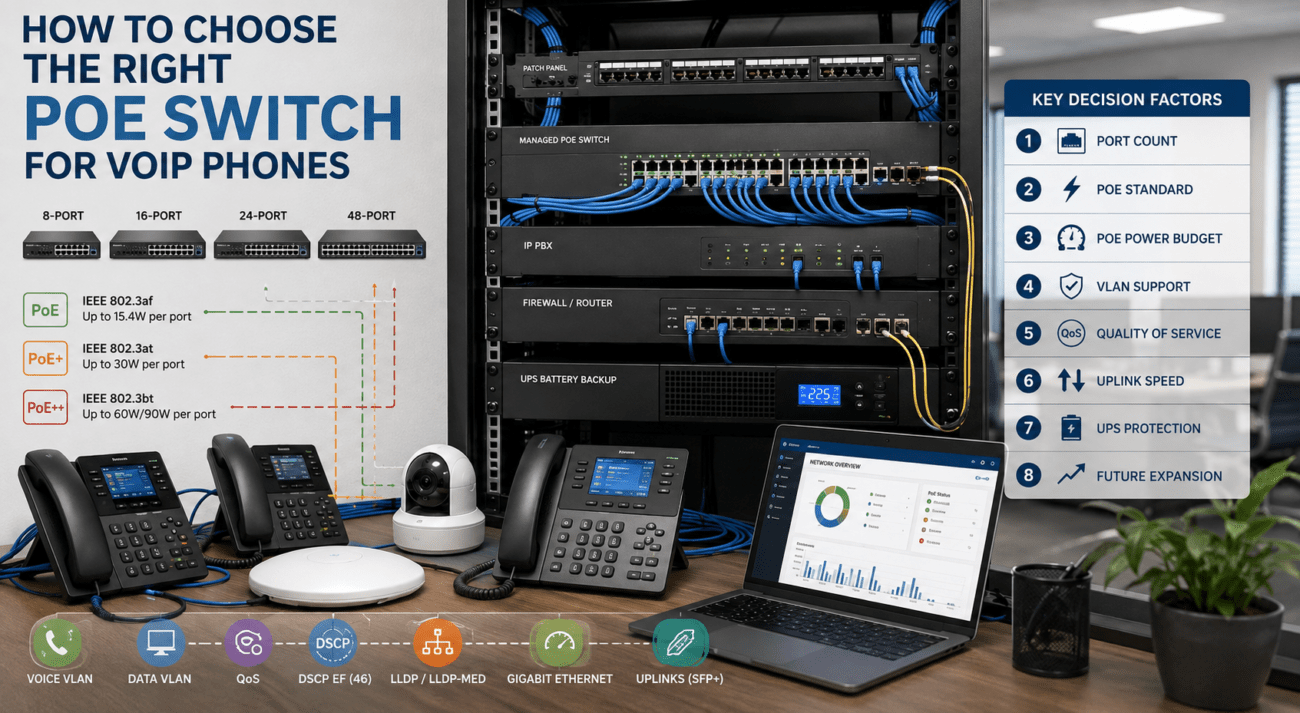
VLANs must also be supported by the access switches. A small business may pair the router with the Grandstream GWN7801P managed PoE switch to provide VLANs, QoS, and power for compatible IP phones and access points.
Growing deployments may require more ports and additional uplink capacity. The Grandstream 24-port managed PoE switch with SFP+ uplinks can support a larger number of powered endpoints when its PoE budget, port count, and switching capacity meet the project requirements.
Business Router Comparison Matrix
Feature
Small Office
Growing Business
Multi-Site Organization
Configurable QoS
Recommended
Required
Required
VLAN routing
Recommended
Required
Required
Dual-WAN
Optional
Recommended
Usually required
VPN support
Basic
Moderate to advanced
Advanced and centrally managed
Integrated firewall
Required
Required
Required or separate appliance
Centralized management
Optional
Helpful
Important
Dynamic routing
Usually unnecessary
Sometimes useful
Frequently useful
High availability
Usually unnecessary
Depends on downtime tolerance
Frequently recommended
Cellular backup
Optional
Useful
Useful for selected sites
Example Router Selection Scenarios
Small office with fewer than 15 users
A small office using hosted VoIP may need reliable NAT, adjustable SIP ALG, basic QoS, VLAN support, secure remote management, and enough throughput for its broadband connection.
An integrated model such as the Grandstream GCC6010W may be practical when the business wants routing, Wi-Fi, firewall, and IP PBX functions in one system. However, a separate router, firewall, PBX, and access point may provide greater flexibility and reduce the impact of a single appliance failure.
Growing company with 25 to 75 users
A growing company may require dual-WAN failover, site-to-site VPNs, voice and data VLANs, centralized monitoring, stronger security services, and managed PoE switching.
The Grandstream GWN7003 may fit businesses that want a dedicated multi-WAN VPN router and centralized management for compatible GWN networking equipment. The router should be sized according to internet throughput, VPN traffic, active security services, and expected growth.
Multi-site company
A multi-site organization may need policy-based routing, redundant ISP connections, centralized configuration, dynamic routing, resilient VPN tunnels, cellular backup, and application-aware WAN selection.
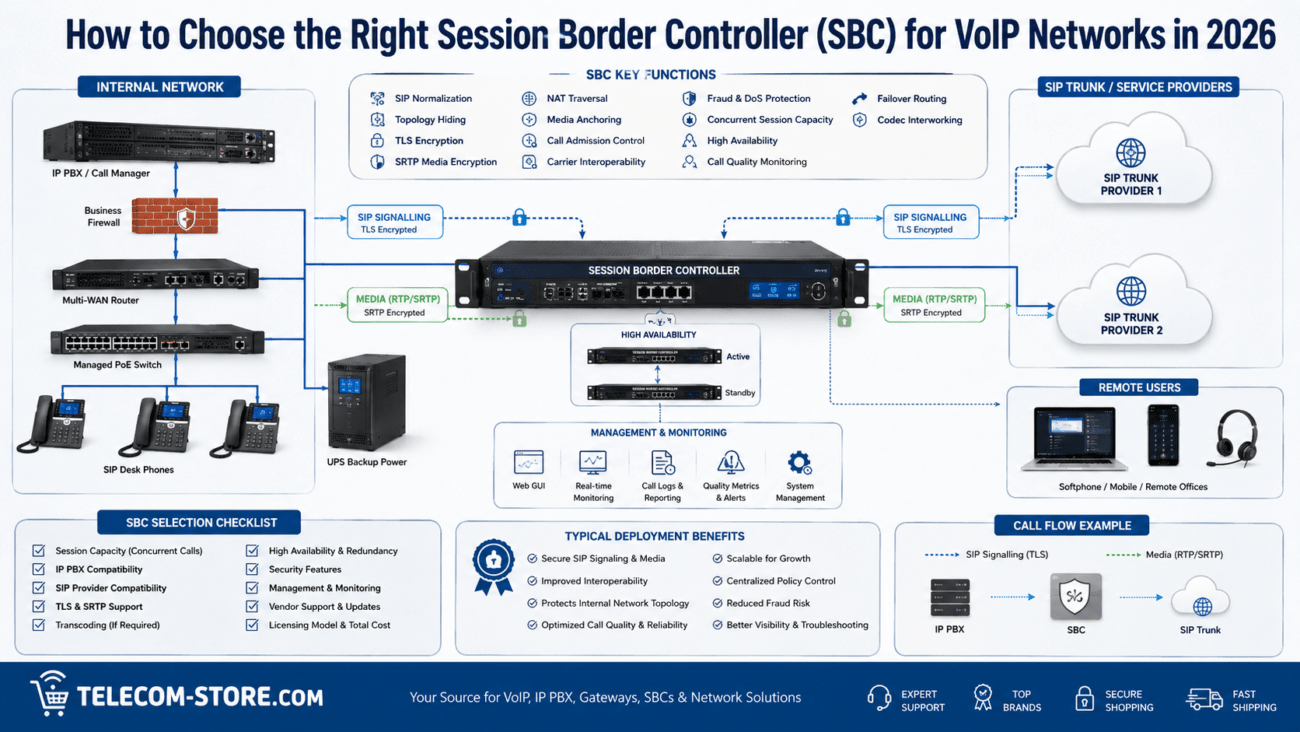
A specialized router or managed SD-WAN platform may be more appropriate than an entry-level small-business appliance. The company should also coordinate routing with its SIP provider, PBX, firewall, session border controller, DNS, and disaster-recovery plan.
Common Router Mistakes That Affect VoIP
Buying by Wi-Fi speed alone
Wireless speed does not indicate VPN performance, routing capacity, QoS quality, session limits, or security throughput.
Ignoring upload bandwidth
Many internet services provide much less upload capacity than download capacity. Outbound backups and camera traffic can interfere with voice calls.
Trusting every DSCP marking
Computers and applications should not be allowed to mark ordinary traffic as high-priority voice. Establish a controlled QoS trust boundary.
Leaving SIP ALG enabled without testing
An incompatible ALG may interfere with signaling. Verify the provider and PBX recommendations.
Assuming dual-WAN means seamless calls
Existing calls may drop when the public IP address or path changes. Test recovery behavior rather than assuming it works.
Using one flat network
Combining phones, guests, servers, cameras, and employee devices on one unrestricted network makes security and troubleshooting more difficult.
Failing to monitor router resources
CPU usage, memory, session tables, dropped packets, queue statistics, and interface errors can reveal that the router is overloaded.
Business VoIP Router Buying Checklist
Measure actual internet throughput in both directions.
Determine expected concurrent voice calls.
List all enabled security and VPN services.
Verify QoS, DSCP, and traffic-shaping capabilities.
Confirm voice VLAN and inter-VLAN routing support.
Verify SIP ALG can be controlled or disabled.
Review NAT and UDP timeout settings.
Determine whether dual-WAN or cellular failover is required.
Check VPN throughput with encryption enabled.
Review monitoring, logging, and alerting.
Confirm administrative MFA and role-based access.
Check firmware support and product lifecycle.
Verify management options for multiple locations.
Plan for three to five years of growth.
Test the router with the actual PBX and provider before deployment.
VoIP Router Troubleshooting Matrix
Symptom
Possible Router Cause
Recommended Check
Phone will not register
DNS, NAT, firewall, ALG, or blocked signaling
Review logs, name resolution, outbound rules, and SIP inspection
One-way audio
Incorrect NAT or blocked RTP
Check media addresses, RTP rules, and NAT mappings
Choppy audio during uploads
WAN congestion or poor QoS
Review shaping, upload use, and priority-queue statistics
Calls drop after a fixed time
UDP timeout or signaling refresh failure
Review session timers, re-registration, and SIP logs
Remote phones perform poorly
VPN overload, latency, or path instability
Measure VPN throughput, delay, jitter, and packet loss
Failover does not restore service
DNS, public IP, routing, or provider restrictions
Test the complete failover workflow and PBX re-registration
Frequently Asked Questions
Does a business need a router specifically labeled for VoIP?
No. The router does not need to be marketed specifically for VoIP. It must provide suitable QoS, NAT, VLAN, VPN, security, monitoring, and performance for the deployment.
Should SIP ALG always be disabled?
No universal rule applies. Many providers recommend disabling it because some implementations alter SIP traffic incorrectly. Other controlled environments use SIP inspection successfully. Follow tested guidance for the exact equipment and provider.
Is a faster router guaranteed to improve call quality?
No. A faster router will not correct poor ISP routing, weak Wi-Fi, damaged cabling, insufficient bandwidth, incorrect NAT, or provider-side problems. It may help if the existing router is overloaded or lacks effective QoS.
Does dual-WAN prevent dropped calls?
Dual-WAN reduces the duration of an internet outage, but active calls may still disconnect when the route or public IP address changes. Test how quickly phones and trunks recover.
How much bandwidth does VoIP require?
The requirement depends on the codec, packetization, encryption, VPN overhead, and simultaneous calls. Many G.711 deployments use roughly 80 to 100 Kbps per call in each direction after overhead, but actual traffic should be measured.
Should IP phones use a separate VLAN?
A voice VLAN is recommended for many growing networks because it simplifies QoS, addressing, security, and troubleshooting. Very small offices may operate correctly without one.
Is an integrated router and IP PBX a good choice?
It can be a practical option for a smaller organization that values simplified deployment and centralized management. A modular design may provide more flexibility, capacity, and redundancy for larger environments.
Key Takeaways
Size the router using performance with required VPN and security services enabled.
Use effective QoS and realistic WAN bandwidth values to protect voice traffic.
Confirm VLAN, NAT, SIP ALG, logging, and session-timer controls.
Consider dual-WAN or cellular backup when internet availability is critical.
Do not assume failover will preserve active calls.
Select managed switches and access points that support the same network design.
Test the router with the actual PBX, SIP provider, VPN, and expected traffic load.
Practical Next Steps
Document your current internet speeds, expected simultaneous calls, remote users, VLANs, VPNs, security services, branch locations, and growth plans. Compare router models using realistic throughput instead of relying only on advertised Wi-Fi or routing speeds.
Before replacing existing equipment, inspect router logs and monitor CPU use, memory, interface errors, packet loss, queue drops, and session-table utilization. The router may not be the cause of every call-quality problem.
To provide the best experiences, we use technologies like cookies to store and/or access device information. Consenting to these technologies will allow us to process data such as browsing behavior or unique IDs on this site. Not consenting or withdrawing consent, may adversely affect certain features and functions.
Functional
Always active
The technical storage or access is strictly necessary for the legitimate purpose of enabling the use of a specific service explicitly requested by the subscriber or user, or for the sole purpose of carrying out the transmission of a communication over an electronic communications network.
Preferences
The technical storage or access is necessary for the legitimate purpose of storing preferences that are not requested by the subscriber or user.
Statistics
The technical storage or access that is used exclusively for statistical purposes.The technical storage or access that is used exclusively for anonymous statistical purposes. Without a subpoena, voluntary compliance on the part of your Internet Service Provider, or additional records from a third party, information stored or retrieved for this purpose alone cannot usually be used to identify you.
Marketing
The technical storage or access is required to create user profiles to send advertising, or to track the user on a website or across several websites for similar marketing purposes.