Managed vs Unmanaged Network Switches: Which Is Better for VoIP?
If you are installing business VoIP phones, one of the network decisions you will eventually face is whether to use a managed or unmanaged Ethernet switch.
Both types of switches can move Ethernet traffic between IP phones, computers, routers and other devices. An unmanaged switch can work perfectly well in a small, simple VoIP installation. However, a managed switch provides features such as VLANs, Quality of Service, monitoring, security controls and PoE management that become increasingly valuable as the network grows.
For most permanent business VoIP deployments, a managed PoE switch is the better long-term choice. An unmanaged switch is still appropriate when the network is small, traffic levels are low and advanced segmentation or troubleshooting tools are unnecessary.
This guide explains the difference between managed and unmanaged switches, when each one makes sense for VoIP, and which features actually matter when supporting business IP phones.
Managed vs Unmanaged Switches: Quick Comparison
Feature
Managed Switch
Unmanaged Switch
Plug-and-play operation
Yes, but configuration is available
Yes
VLAN support
Usually yes
Generally no
Voice VLAN
Available on many business models
No
QoS configuration
Advanced or configurable
Little or no configurable QoS
PoE management
Often available on PoE models
Usually basic or unavailable
Port monitoring
Yes
No
Remote management
Often available
No
Port security
Often available
Limited or unavailable
Traffic statistics
Available
Usually unavailable
Configuration complexity
Higher
Very low
Typical cost
Higher
Lower
Best use
Business VoIP and scalable networks
Small or simple networks
What Is an Unmanaged Network Switch?
An unmanaged switch is designed to work with little or no configuration. Connect Ethernet devices to the ports, supply power to the switch and it begins forwarding traffic.
For a small office, that simplicity can be useful.
An unmanaged switch can connect:
VoIP desk phones
Computers
Printers
IP cameras
Wireless access points
Routers
Other Ethernet devices
If the switch also supports Power over Ethernet, it may provide both data and electrical power to compatible IP phones without requiring a separate power adapter at each desk.
The limitation is control. An unmanaged switch generally does not allow an administrator to create VLANs, inspect individual ports, assign traffic priorities or remotely modify how the switch handles network traffic.
What Is a Managed Network Switch?
A managed Ethernet switch provides administrative control over how traffic moves through the network.
Depending on the model, administrators may be able to configure:
802.1Q VLANs
Voice VLANs
Quality of Service
DSCP and 802.1p prioritization
Port mirroring
Link aggregation
Spanning Tree Protocol
PoE power management
Port security
Access control lists
DHCP snooping
Traffic statistics
Remote monitoring
Cloud management
Not every managed switch includes every feature. Always verify the specifications of the exact model being considered.
For VoIP, the most useful managed-switch capabilities are usually Voice VLANs, QoS, monitoring and PoE management.
Do VoIP Phones Require a Managed Switch?
No. A VoIP phone does not inherently require a managed switch.
A SIP phone can operate through an unmanaged Ethernet switch as long as it has:
A valid IP address
Network connectivity to the PBX or hosted VoIP provider
DNS when required
Correct gateway information
Internet access when required
Sufficient power through PoE or an external power supply
Therefore, an office with three or four phones connected to a simple broadband router may operate successfully using an unmanaged switch.
The question is not whether VoIP works on an unmanaged switch. The more important question is whether the business needs the management capabilities that an unmanaged switch cannot provide.
Why Managed Switches Are Usually Better for Business VoIP
1. Voice VLAN Support
A Voice VLAN allows IP phones to be logically separated from computers and other network devices.
For example, a business might configure:
VLAN 10 for computers
VLAN 20 for VoIP phones
VLAN 30 for security cameras
VLAN 40 for guest Wi-Fi
The phones can remain physically connected to the same switching infrastructure while their traffic is logically separated from other network devices.
A Voice VLAN can simplify:
DHCP configuration
IP addressing
QoS policies
Network security
Troubleshooting
Phone provisioning
Some managed switches can automatically identify compatible IP phones and assign them to a configured Voice VLAN.
2. Quality of Service for Voice Traffic
VoIP is sensitive to delay, jitter and packet loss.
A large file transfer may tolerate a brief delay without the user noticing. A voice packet arriving late may result in choppy or distorted audio.
Managed switches can provide configurable Quality of Service policies that classify and prioritize traffic.
Depending on the network design, QoS may use:
DSCP markings
802.1p priority values
Priority queues
Port-based classification
Traffic shaping
Rate limiting
However, the switch is only one part of a complete QoS design. QoS must also be considered at the router, firewall and WAN connection where congestion is most likely to occur.
This is one of the most practical advantages of a managed switch.
If a user reports poor call quality, an unmanaged switch provides very little information about what is happening on the port.
A managed switch may allow IT staff to inspect:
Port status
Link speed
Duplex mode
Traffic volume
Error counters
Dropped packets
VLAN membership
PoE status
Connected MAC addresses
Port mirroring can also allow traffic from a problem phone or PBX connection to be copied to another port for packet capture and advanced troubleshooting.
4. PoE Monitoring and Control
Power over Ethernet simplifies VoIP installations by delivering electrical power and network data through the same Ethernet cable.
A basic unmanaged PoE switch can power phones effectively. However, a managed PoE switch may provide considerably more visibility.
Depending on the model, IT administrators may be able to:
View power consumption by port
Monitor the total PoE budget
Disable or enable PoE remotely
Prioritize powered devices
Restart a powered device by cycling PoE
Set per-port power limits
Remote PoE cycling is particularly useful when an IP phone, access point or other powered device becomes unresponsive.
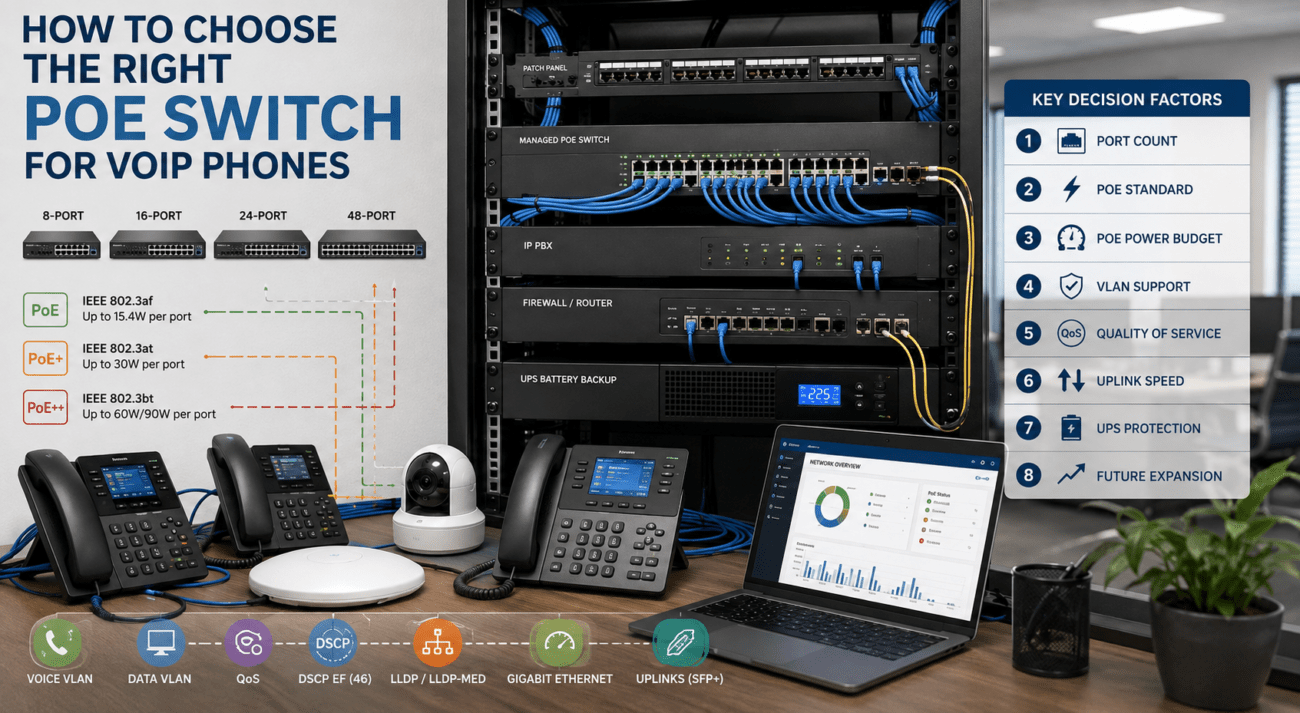
Before selecting a switch, calculate both the number of required PoE ports and the total available power budget. Our PoE switch guide for VoIP phones explains how to size a switch correctly.
5. Improved Network Security
Managed switches can provide additional controls that help administrators restrict or monitor access to the LAN.
Depending on the model, these may include:
Port security
802.1X authentication
Access control lists
DHCP snooping
ARP inspection
IP Source Guard
Storm control
These features do not replace a firewall or a comprehensive security program, but they give IT administrators more control over what can connect to the network and how devices communicate.
6. Easier Growth
A five-phone office may not need a complex network design today. However, a business that grows to 20, 50 or 100 phones will benefit from having a network architecture that can scale.
An unmanaged switch can still be the right choice in several situations.
Very Small Offices
An office with two to five phones, light network usage and no requirement for separate VLANs may not benefit enough from managed features to justify the added complexity.
Temporary Installations
Temporary offices, events and short-term installations may benefit from a simple plug-and-play switch.
Edge Expansion
An unmanaged switch may occasionally be used at the edge of a network to connect a few devices where segmentation and advanced monitoring are unnecessary.
However, administrators should understand how adding an unmanaged switch affects VLAN tagging, QoS and troubleshooting before placing one inside an otherwise managed network.
Networks Where the Router Handles Most Prioritization
A small network may rely primarily on the router or firewall for QoS and traffic management.
This can work when LAN congestion is low and the network does not require multiple VLANs.
When Should You Use a Managed Switch for VoIP?
A managed switch is usually preferable when one or more of the following applies:
The business has more than a handful of IP phones.
A dedicated Voice VLAN is required.
QoS needs to be configured across the LAN.
The phones use centralized PoE.
IT staff need remote troubleshooting.
The network contains multiple departments or device types.
Security cameras share the switching infrastructure.
Wireless access points require VLAN trunking.
The network is expected to grow.
Remote or cloud switch management is desirable.
The organization needs detailed port statistics.
Managed vs Unmanaged PoE Switches for VoIP
PoE and switch management are separate characteristics.
A switch can be:
Unmanaged and non-PoE
Unmanaged and PoE
Managed and non-PoE
Managed and PoE
For a typical business VoIP installation, a managed PoE switch often provides the most useful combination because it delivers centralized phone power while also providing VLAN, QoS and monitoring capabilities.
Switch Type
Suitable for VoIP?
Typical Use
Unmanaged non-PoE
Yes, with phone power adapters
Very small/basic installation
Unmanaged PoE
Yes
Small plug-and-play phone deployment
Managed non-PoE
Yes, with phone power adapters or injectors
Networks requiring VLAN/QoS but not switch-based PoE
Managed PoE
Yes
Most scalable business VoIP installations
Example: Five-Phone Small Office
Consider a small professional office with:
5 VoIP phones
5 computers
1 printer
1 wireless access point
A business router
If the network is lightly used and no Voice VLAN is required, an unmanaged PoE switch may work adequately.
However, choosing a small managed PoE switch gives the business room to add VLANs, QoS and monitoring later without replacing the switch.
Example: 25-Phone Business
Now consider an organization with:
25 VoIP phones
25 workstations
Several wireless access points
Security cameras
Conference room systems
Cloud applications
In this environment, a managed switch is strongly preferable.
The IT administrator may need to separate phones, computers, cameras and guest wireless traffic into different VLANs while applying QoS policies to voice and video traffic.
An unmanaged switch would eliminate most of that control and make troubleshooting significantly more difficult.
Example: 100-Phone Organization
At 100 phones, managed switching should generally be considered part of the basic network architecture.
A larger environment may require:
Multiple access switches
Voice VLANs
QoS
Redundant uplinks
Link aggregation
Spanning Tree
PoE monitoring
Centralized switch management
Network monitoring
Security controls
At this scale, operational visibility is nearly as important as raw switching capacity.
Recommended Managed Switch Features for VoIP
When comparing managed switches for a business phone network, look for the following features where appropriate:
Feature
Why It Matters for VoIP
802.1Q VLANs
Separates voice and data traffic logically
Voice VLAN
Simplifies phone segmentation
DSCP/802.1p QoS
Helps prioritize delay-sensitive traffic
PoE/PoE+
Powers compatible phones through Ethernet
PoE monitoring
Shows power use and device status
LLDP/LLDP-MED
Can assist supported phones with network and voice-VLAN discovery
Port mirroring
Useful for packet capture and troubleshooting
DHCP snooping
Helps protect DHCP infrastructure
Spanning Tree
Helps protect against Layer 2 loops
Remote management
Allows IT staff to monitor and configure switches remotely
Managed Switch Options for Business VoIP
Telecom-Store carries managed switches for small offices through larger business networks.
It provides eight Gigabit Ethernet ports, PoE capability, SFP uplinks and centralized management options. It is a reasonable fit for branch offices, small professional offices and smaller VoIP deployments.
It is more appropriate when administrators need greater routing, segmentation or uplink flexibility than a basic Layer 2 access switch provides.
TP-Link TL-SG2218P
The TP-Link TL-SG2218P Smart PoE Switch provides 16 Gigabit PoE+ ports, SFP uplinks, VLAN support and configurable QoS. Its 150-watt PoE budget makes it suitable for a moderate number of IP phones and other powered endpoints when the calculated power demand fits within the available budget.
Can an Unmanaged Switch Cause Poor VoIP Quality?
Not automatically.
An unmanaged switch operating within its capacity can forward VoIP packets without causing audible problems.
However, an unmanaged switch gives administrators fewer tools when congestion or configuration problems occur.
If call quality deteriorates, possible causes may include:
WAN congestion
Packet loss
High jitter
Incorrect duplex negotiation
Network loops
Broadcast traffic
Bad cabling
Oversubscribed uplinks
Insufficient router QoS
A managed switch does not automatically solve these issues, but it provides much better visibility and control for diagnosing them.
A single voice call requires only a small fraction of a Gigabit Ethernet connection. However, businesses should consider the entire workstation and network rather than the phone alone.
Many IP phones include a secondary Ethernet port that allows a computer to connect through the phone. Gigabit switching prevents the phone from becoming a low-speed bottleneck for the connected workstation.
Gigabit access ports are therefore generally preferable for new business deployments even though the voice stream itself does not require that much bandwidth.
Does a Managed Switch Replace Router QoS?
No.
A managed switch can prioritize traffic inside the LAN, but the internet connection is often the most important congestion point.
The router or firewall must also correctly handle voice traffic when packets leave the local network.
For cloud-hosted VoIP and SIP trunks, administrators should coordinate LAN switching policies with WAN-edge QoS.
A 24-port switch may have enough Ethernet ports but insufficient PoE power for all connected devices.
Ignoring the PoE Budget
Calculate the maximum power demand of the phones and other powered endpoints rather than assuming every PoE port can deliver maximum power simultaneously.
Assuming Every Managed Switch Has Voice VLAN Support
“Managed” describes a broad category. Verify the specific VLAN, QoS and voice features of the exact model.
Configuring QoS Only on the Switch
LAN QoS cannot prevent an internet uplink from becoming congested. The WAN edge must also be considered.
Overcomplicating a Tiny Network
A sophisticated Layer 3 design is unnecessary for a three-phone office with simple requirements. Match the switch to the actual deployment.
Failing to Plan for Growth
Leave adequate Ethernet ports, PoE capacity and uplink capacity for future phones, access points and other devices.
Managed vs Unmanaged Switch Decision Matrix
Requirement
Recommended Switch
2-5 phones, very simple network
Unmanaged or managed
Plug-and-play installation
Unmanaged
Lowest initial cost
Unmanaged
Voice VLAN required
Managed
Configurable QoS required
Managed
Remote troubleshooting
Managed
PoE monitoring
Managed PoE
Multiple departments or device networks
Managed
Growing business
Managed
Large multi-switch network
Managed
VoIP Switch Buying Checklist
Count the number of IP phones and other Ethernet devices.
Determine how many ports are required today.
Reserve ports for reasonable future growth.
Determine whether the phones require PoE, PoE+ or another power standard.
Calculate the total PoE power budget.
Decide whether a Voice VLAN is required.
Determine whether configurable QoS is needed.
Verify Gigabit Ethernet support.
Check uplink requirements.
Verify remote management requirements.
Determine whether port monitoring and troubleshooting features are important.
Check security features appropriate to the network.
Confirm rackmount or desktop requirements.
Consider future phones, cameras, access points and conferencing devices.
Managed vs Unmanaged Switches for VoIP: Final Recommendation
Both managed and unmanaged network switches can carry VoIP traffic, so an unmanaged switch should not automatically be considered unsuitable for IP phones.
For a very small office with a few phones and a simple network, an unmanaged PoE switch may provide everything necessary at a lower cost and with virtually no configuration.
However, managed PoE switches are generally the better choice for permanent business VoIP installations because they provide the tools needed to segment, prioritize, monitor and troubleshoot voice traffic as the network grows.
The most useful capabilities include Voice VLANs, configurable QoS, PoE monitoring, port statistics and remote management.
The decision therefore depends less on whether the phones will technically operate and more on how much control the organization needs over its network.
No. VoIP phones can work through an unmanaged switch. Managed switches become more valuable when a business needs Voice VLANs, configurable QoS, remote monitoring, PoE management or stronger network segmentation.
Is a managed switch better for VoIP?
For most business deployments, yes. A managed switch provides greater control over VLANs, QoS, PoE, security and troubleshooting. However, a very small network may operate reliably with an unmanaged switch.
Can an unmanaged PoE switch power VoIP phones?
Yes, provided the switch and phones support compatible PoE standards and the switch has enough total PoE power capacity.
What is a Voice VLAN?
A Voice VLAN is a logical network segment used to separate IP phone traffic from other network traffic. It can simplify addressing, QoS, security and troubleshooting.
Does QoS require a managed switch?
Configurable switch-level QoS generally requires a managed or smart-managed switch. However, QoS must also be considered on routers, firewalls and WAN links to provide effective end-to-end traffic prioritization.
Does a managed switch automatically improve call quality?
No. Installing a managed switch does not automatically improve voice quality. The benefit comes from correctly using features such as QoS, VLANs, monitoring and traffic management.
Should a small office buy a managed switch?
A small office does not always need one, but a managed switch can be worthwhile if future growth, Voice VLANs, PoE management or remote troubleshooting are expected.
What is the best type of switch for a business VoIP deployment?
For most scalable business installations, a managed Gigabit PoE switch with adequate PoE capacity, VLAN support and configurable QoS provides the most flexibility.
To provide the best experiences, we use technologies like cookies to store and/or access device information. Consenting to these technologies will allow us to process data such as browsing behavior or unique IDs on this site. Not consenting or withdrawing consent, may adversely affect certain features and functions.
Functional
Always active
The technical storage or access is strictly necessary for the legitimate purpose of enabling the use of a specific service explicitly requested by the subscriber or user, or for the sole purpose of carrying out the transmission of a communication over an electronic communications network.
Preferences
The technical storage or access is necessary for the legitimate purpose of storing preferences that are not requested by the subscriber or user.
Statistics
The technical storage or access that is used exclusively for statistical purposes.The technical storage or access that is used exclusively for anonymous statistical purposes. Without a subpoena, voluntary compliance on the part of your Internet Service Provider, or additional records from a third party, information stored or retrieved for this purpose alone cannot usually be used to identify you.
Marketing
The technical storage or access is required to create user profiles to send advertising, or to track the user on a website or across several websites for similar marketing purposes.