How to Choose the Right Business Firewall for VoIP Networks in 2026
A business firewall does more than protect computers from outside threats. In a Voice over Internet Protocol deployment, the firewall can determine whether phones register reliably, callers hear audio in both directions, remote employees stay connected, and SIP trunks remain stable throughout the workday.
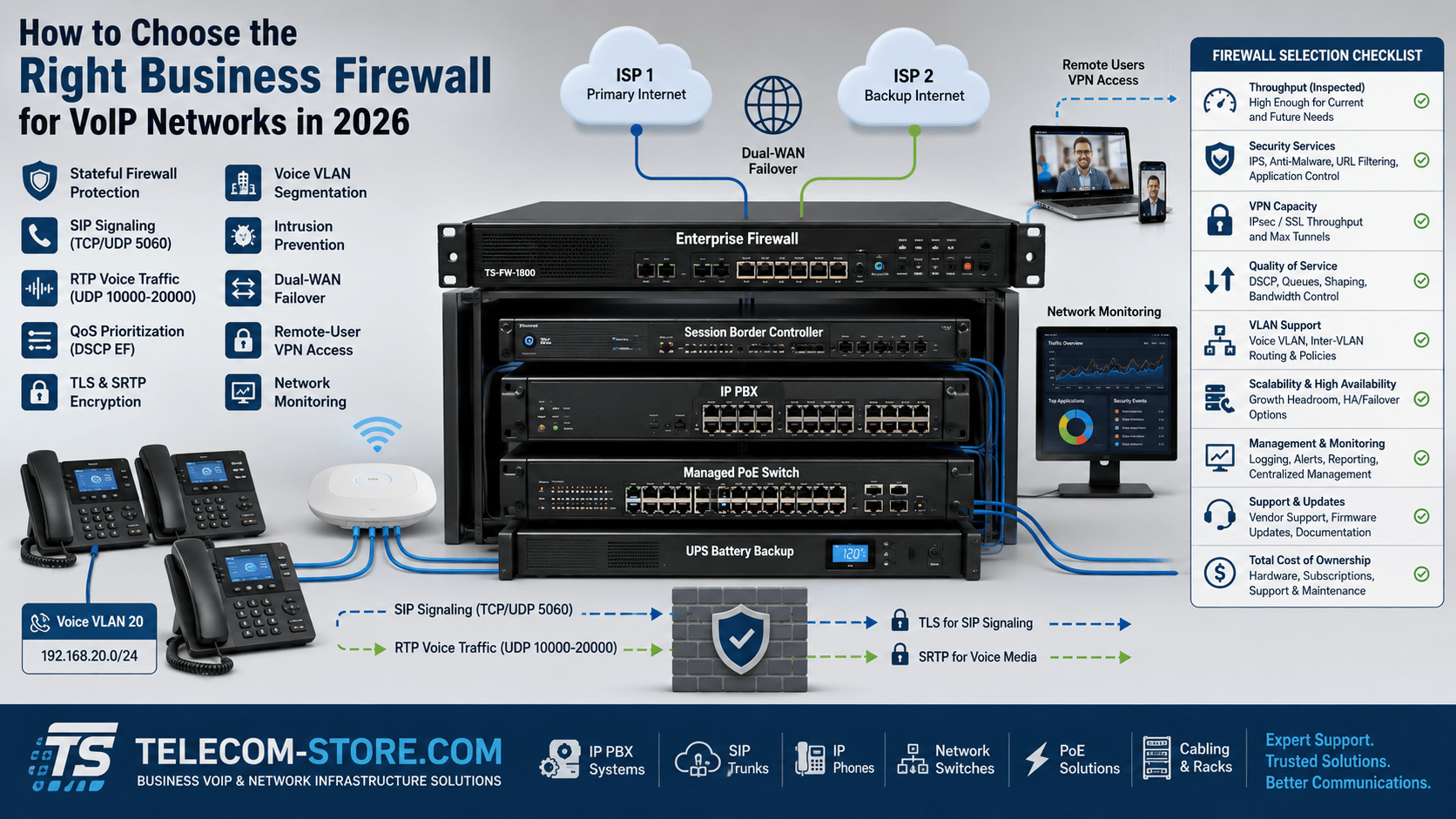
The right business firewall for VoIP should protect the network without disrupting legitimate Session Initiation Protocol signaling or Real-time Transport Protocol media. It should also provide sufficient throughput, Quality of Service controls, VPN performance, logging, network segmentation, and capacity for future growth.
However, the firewall is only one component of a complete communications system. Reliable VoIP also depends on a compatible IP PBX, managed switches, properly configured VLANs, sufficient PoE capacity, dependable internet service, and backup power for critical network equipment.
What Does a Firewall Do in a VoIP Network?
A firewall controls traffic moving between trusted internal networks and untrusted external networks. It examines connections, enforces security policies, translates network addresses, and blocks traffic that does not meet established rules.
In a business VoIP deployment, the firewall may manage traffic associated with:
IP desk phones and softphones
On-premises IP PBX systems
Hosted VoIP services
SIP trunks
Remote extensions
Session border controllers
Voice and video conferencing
Site-to-site and remote-access VPNs
SIP is used to establish, modify, and terminate communication sessions, while RTP normally transports the audio. The firewall must allow the required signaling and media traffic while blocking unauthorized registration attempts, scanning, malformed packets, and unnecessary access to management interfaces.
Businesses building an on-premises phone system may pair the firewall with an appropriately sized IP PBX. For example, the Yeastar P520 VoIP PBX for 20 users supports smaller deployments, while larger organizations may require systems with greater extension and concurrent-call capacity.
Why Consumer Routers Often Cause VoIP Problems
A small office may initially operate with a consumer router, especially when only a few phones are installed. However, consumer equipment often provides limited control over NAT behavior, SIP inspection, VPN capacity, traffic shaping, logging, VLANs, and failover.
Common limitations include:
Basic or inconsistent QoS controls
Limited visibility into blocked traffic
Inflexible NAT behavior
SIP ALG that cannot be properly controlled
Low encrypted VPN throughput
No dual-WAN failover
Limited VLAN support
Short or fixed connection timeouts
Insufficient performance when security inspection is enabled
A business-grade firewall provides more control, but it must still be configured correctly. Replacing a consumer router with an enterprise appliance will not automatically resolve SIP registration failures, one-way audio, or dropped calls if the underlying policies remain incorrect.
Start with Realistic Firewall Throughput
Firewall throughput ratings can be misleading because manufacturers often publish several different performance figures. Basic stateful firewall throughput is not the same as throughput with intrusion prevention, VPN encryption, application control, malware inspection, and detailed logging enabled.
When comparing firewall models, evaluate:
Stateful firewall throughput
Threat-prevention throughput
VPN throughput
Maximum concurrent sessions
New sessions per second
WAN interface speeds
Security subscriptions and services
Current and planned internet speeds
A firewall should be sized for the services the company will actually use. A model advertised for gigabit routing may deliver considerably less throughput when advanced security inspection and encrypted VPN traffic are enabled.
Choose a Firewall with Effective Quality of Service
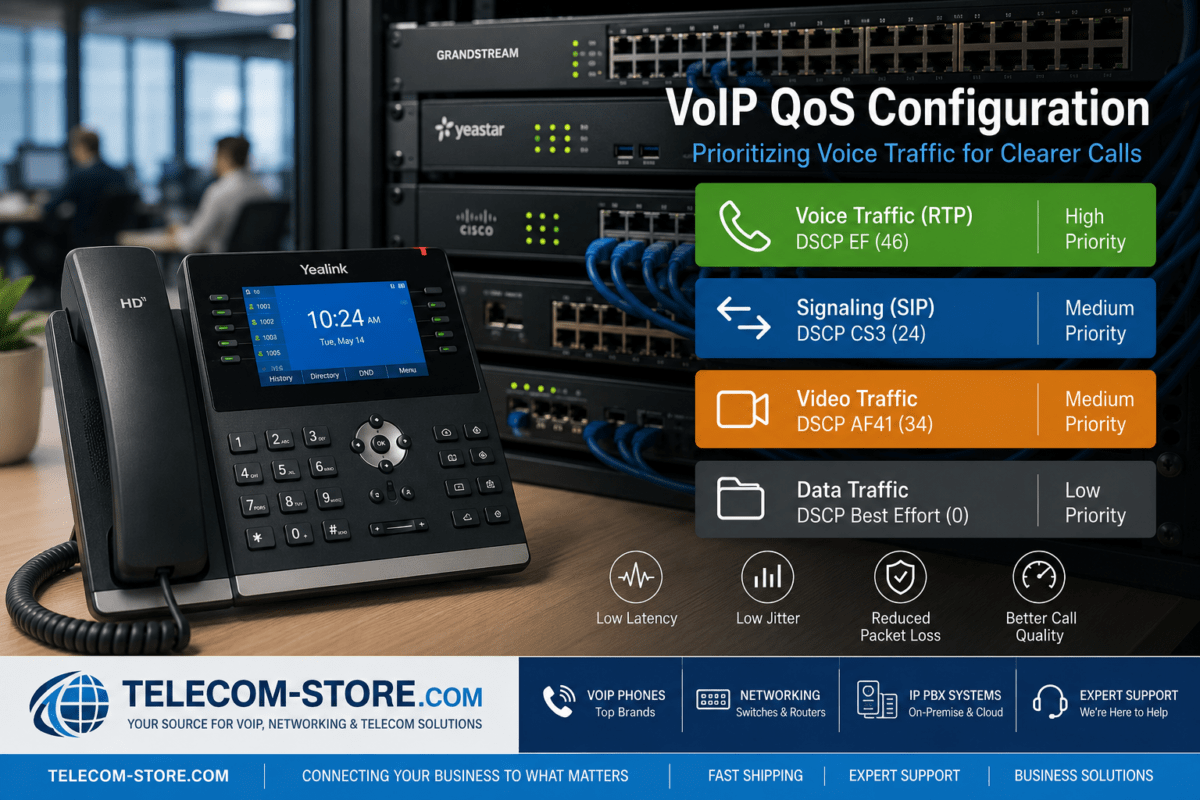
VoIP calls are sensitive to latency, jitter, packet loss, and congestion. Quality of Service helps identify voice traffic and give it preferential treatment when multiple applications compete for limited bandwidth.
A suitable firewall should support:
DSCP classification and preservation
Protocol- or application-based traffic rules
Priority or low-latency queues
Bandwidth reservations
Traffic shaping
Per-WAN-interface QoS policies
Queue monitoring and statistics
QoS does not create more bandwidth. It controls which traffic receives access to the available bandwidth first. This is particularly important on the internet upload connection, where cloud backups, security cameras, large files, and video meetings can interfere with outbound voice traffic.
SIP Application Layer Gateway attempts to inspect and modify SIP messages as they pass through Network Address Translation. In theory, this can help phones and PBXs advertise reachable IP addresses. In practice, an incompatible SIP ALG can rewrite headers incorrectly, alter ports, interrupt registration, or contribute to one-way audio and dropped calls.
SIP ALG is not universally bad, but it should not be enabled blindly. Its behavior depends on the firewall, firmware, VoIP provider, PBX platform, NAT design, and whether a session border controller is present.
When evaluating a firewall, confirm that administrators can:
Enable or disable SIP ALG
Control SIP inspection by policy
Adjust UDP and SIP session timers
View SIP-related logs
Exclude specific devices or trunks
Follow the provider’s tested configuration
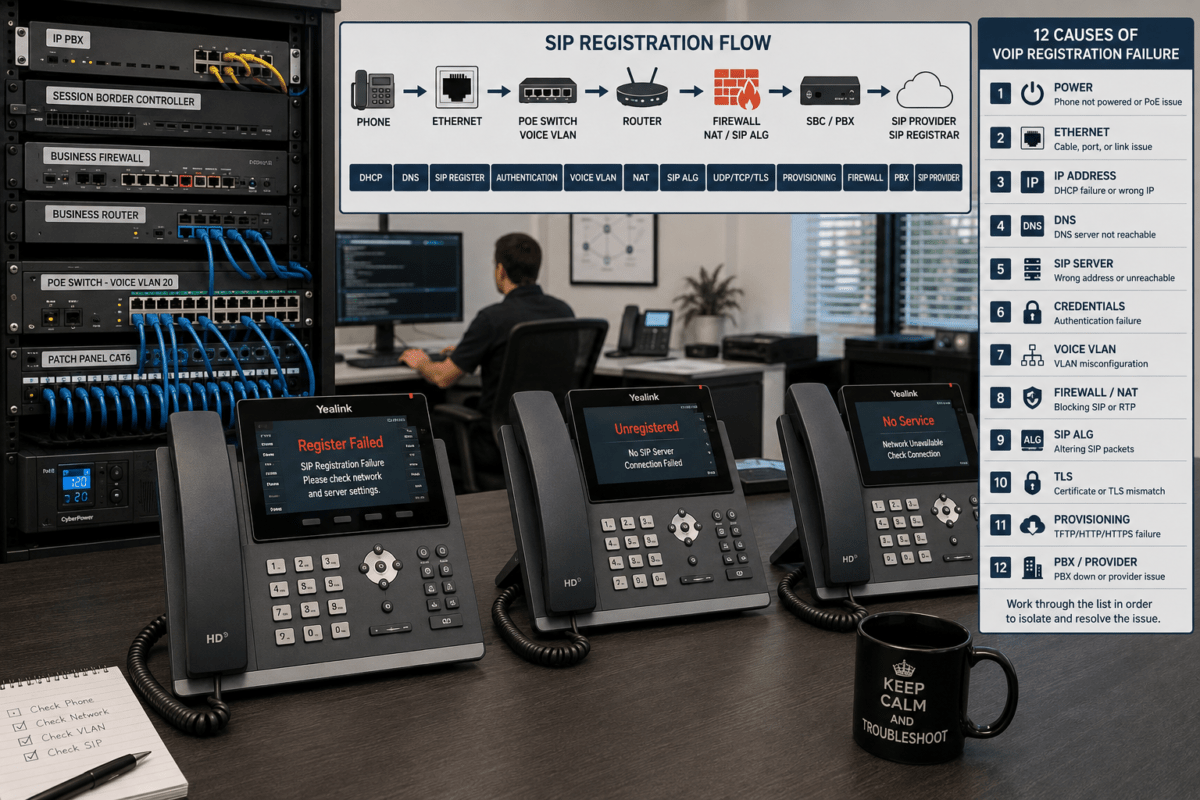
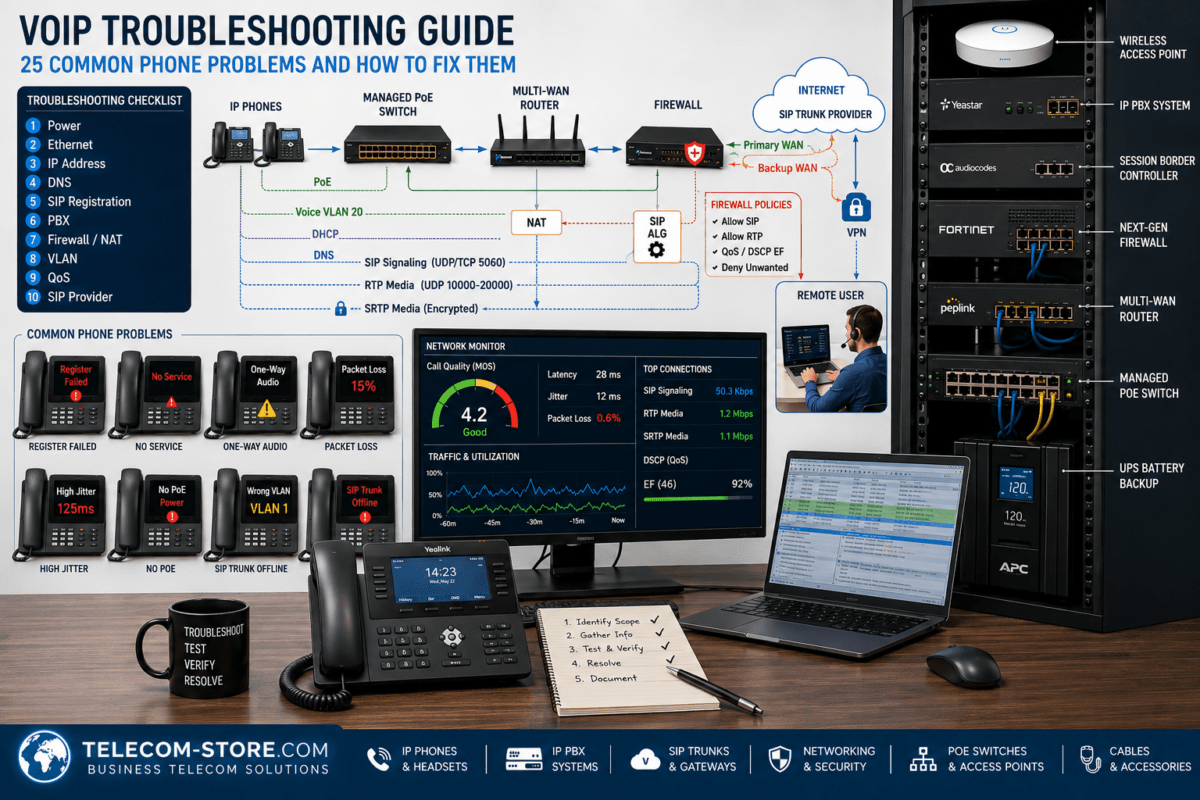
Do not assume that a failure to register is caused by the phone itself. The PBX, DNS service, firewall rules, NAT policies, SIP ALG, credentials, and provider access restrictions all need to be reviewed.
Review NAT and Session-Handling Features
Network Address Translation allows devices using private IP addresses to communicate with external services. VoIP can be challenging because SIP signaling and RTP media may use different connections, addresses, and port ranges.
A business firewall should provide flexible control over:
Source and destination NAT
Static-port behavior where required
Port forwarding
Outbound NAT policies
UDP session timeouts
Connection tracking
Multiple public IP addresses
Hairpin or loopback NAT
Avoid opening broad SIP and RTP port ranges to the entire internet unless the system design specifically requires it. Whenever possible, restrict inbound traffic to verified provider networks, an SBC, a VPN, or another controlled source.
Look for Strong VoIP Security Controls
A firewall cannot secure an entire telephone system by itself, but it provides an important enforcement point between the internet and internal communications infrastructure.
Useful security features include:
Stateful packet inspection
Intrusion prevention
Geo-IP restrictions
IP reputation filtering
Denial-of-service protection
Rate limiting
Port-scan detection
Network segmentation
Administrative multi-factor authentication
Role-based management
Configuration backups
Detailed logging and alerts
TLS and SRTP
TLS can protect SIP signaling when it is supported and correctly configured across the required systems. SRTP can protect real-time voice media by providing encryption, authentication, and replay protection.
Encryption must be evaluated across the complete path. A service that supports TLS or SRTP does not necessarily mean every PBX, endpoint, carrier route, or PSTN call leg remains encrypted.
Administrative security
The firewall’s administrative interface should not be exposed openly to the public internet. Use restricted management networks, secure VPN access, strong unique credentials, multi-factor authentication, and timely firmware updates.
Determine Whether You Need a Session Border Controller
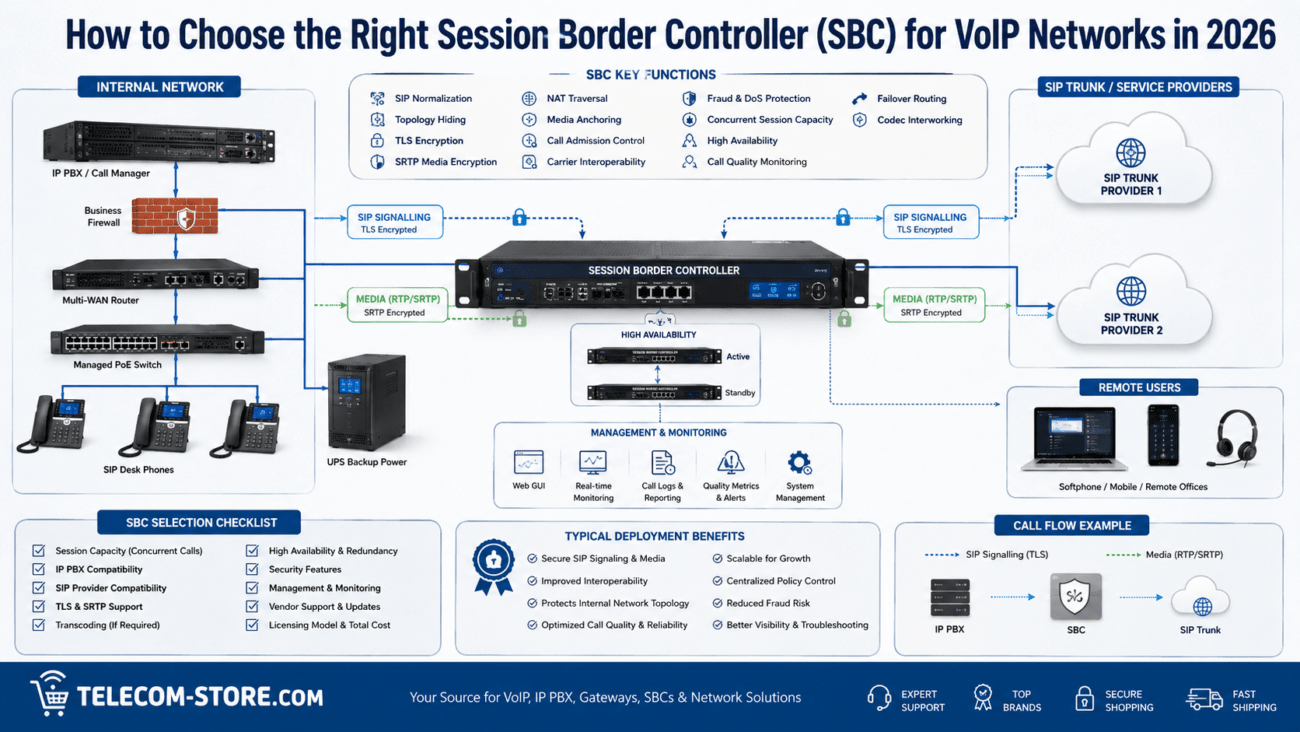
A session border controller and a general-purpose firewall perform related but different jobs. The firewall protects the broader IP network, while the SBC is specifically designed to control real-time communications at the session border.
An SBC may provide:
SIP normalization
Topology hiding
Media anchoring
Call-admission control
SIP rate limiting
Encryption interworking
Codec negotiation
Carrier interoperability
Fraud and denial-of-service protection
A small hosted-VoIP installation may not need a separate SBC because the provider already performs these functions. Larger on-premises PBX deployments, multi-carrier configurations, and contact centers may benefit from dedicated session-border control.
When analog lines, legacy equipment, or carrier services must be integrated, an IP business gateway may also become part of the design. The exact gateway should be selected according to the required analog, PRI, SIP, routing, and SBC capabilities.
Use VLANs to Separate Voice Traffic
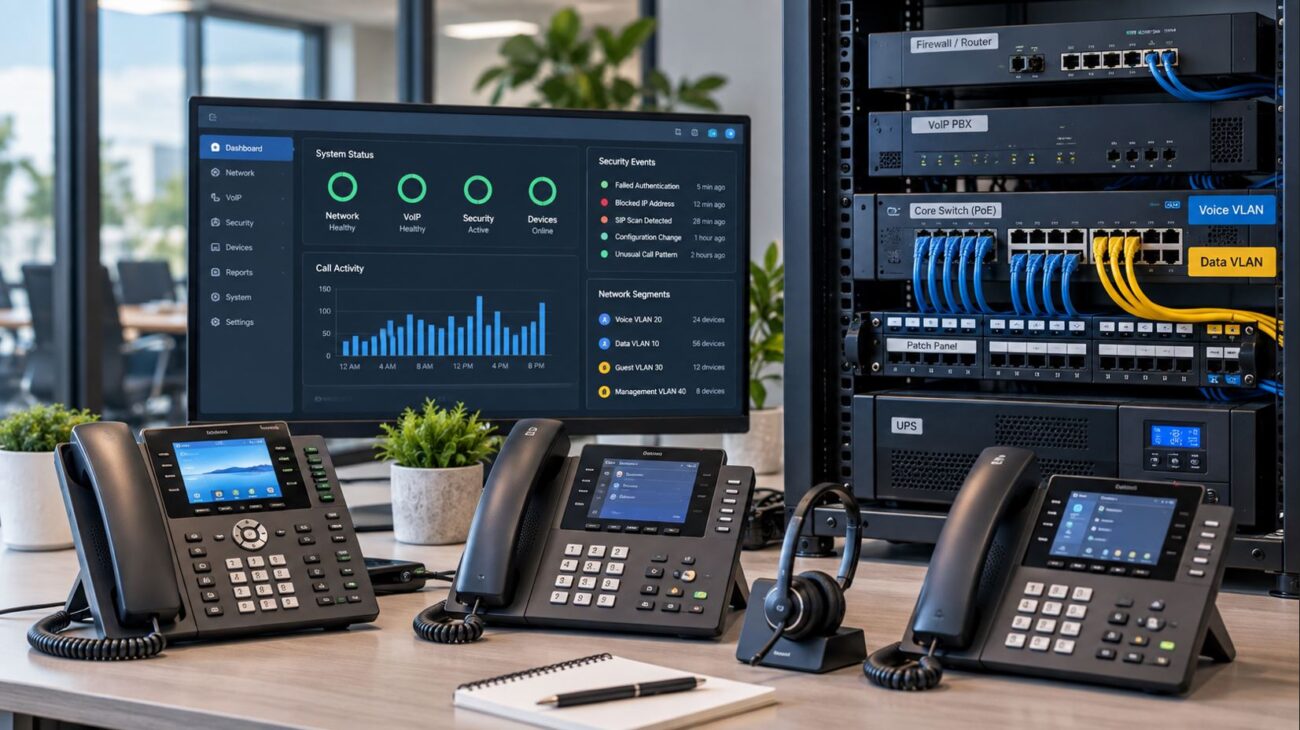
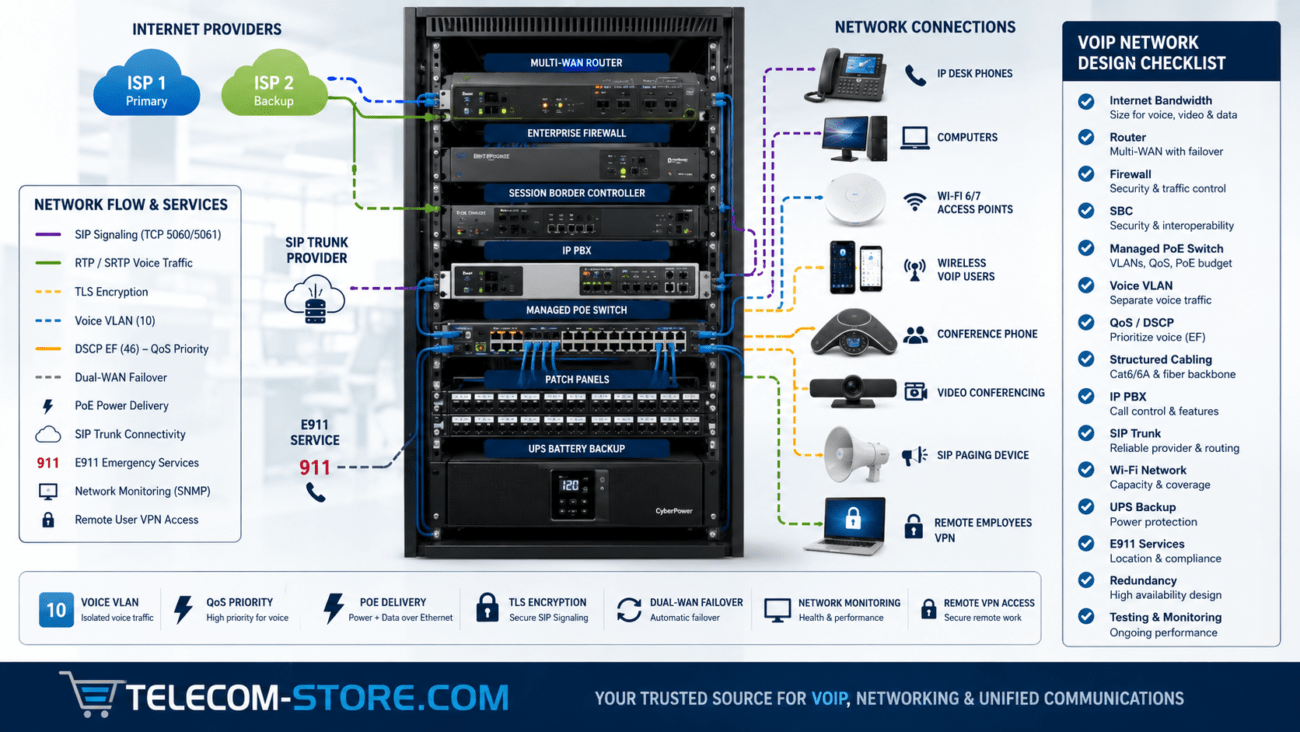
A voice VLAN places IP phones in a logical network separate from computers, cameras, guest devices, and other endpoints. This makes it easier to apply firewall rules, QoS policies, DHCP settings, monitoring, and access restrictions.
A firewall used in a segmented VoIP network should support:
Multiple VLAN interfaces
Inter-VLAN firewall policies
DHCP relay or server functions
Voice-to-PBX access controls
Voice-to-internet policies
Guest-network isolation
Logging by VLAN or policy
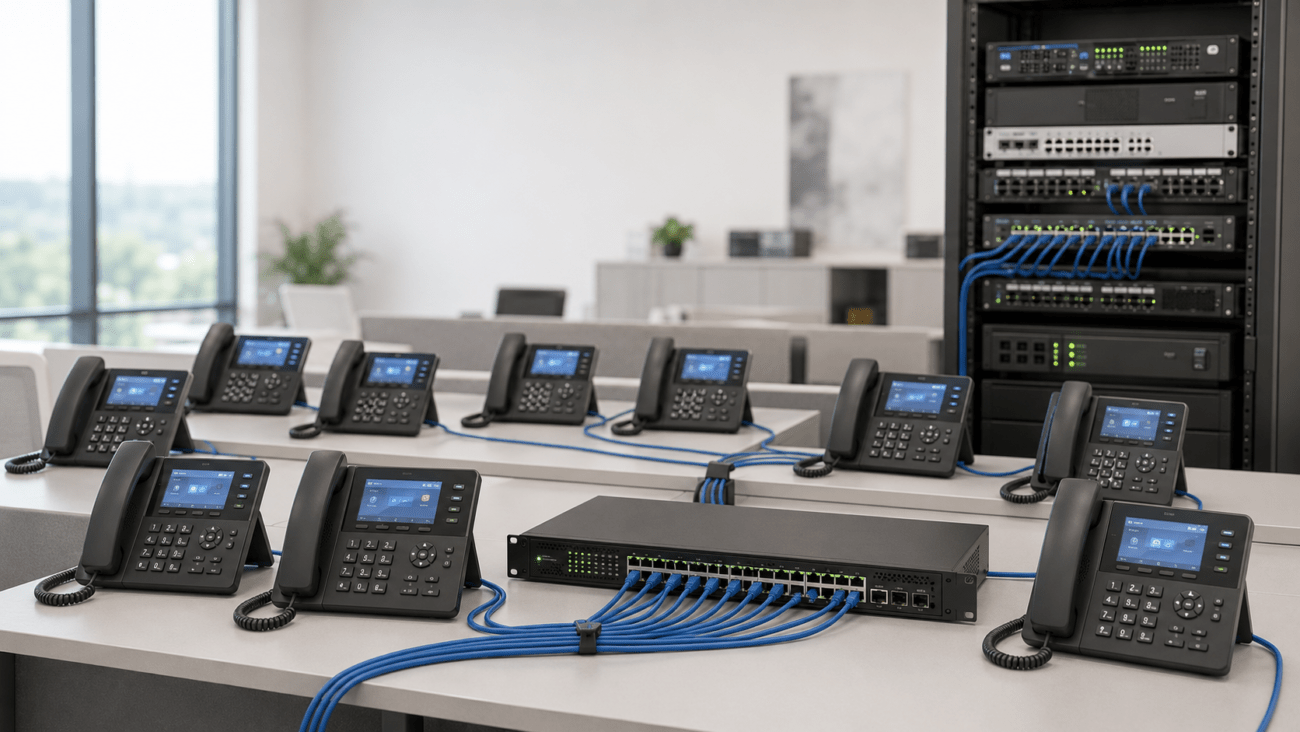
The switch must support the same VLAN design. For a compact network that needs multigigabit connectivity and higher-power PoE, the Grandstream 8-port 2.5G PoE++ managed switch can support compatible phones, wireless access points, and other powered devices. Confirm the required PoE standard and total power budget before selecting any switch.
Evaluate VPN Performance for Remote Employees
Remote phones and softphones may connect directly to a cloud service, through a VPN, or through an SBC. When VPN access is required, the firewall must provide enough encrypted throughput for the expected number of remote users.
Evaluate:
IPsec throughput
SSL or TLS VPN throughput
Maximum remote-user capacity
Site-to-site tunnel capacity
Multi-factor authentication
Split-tunnel policies
Operating-system and client support
Voice QoS treatment inside VPN tunnels
Encryption creates processing overhead. A firewall that handles normal office internet traffic may still become overloaded when many employees use encrypted voice, video, cloud applications, and remote desktop sessions simultaneously.
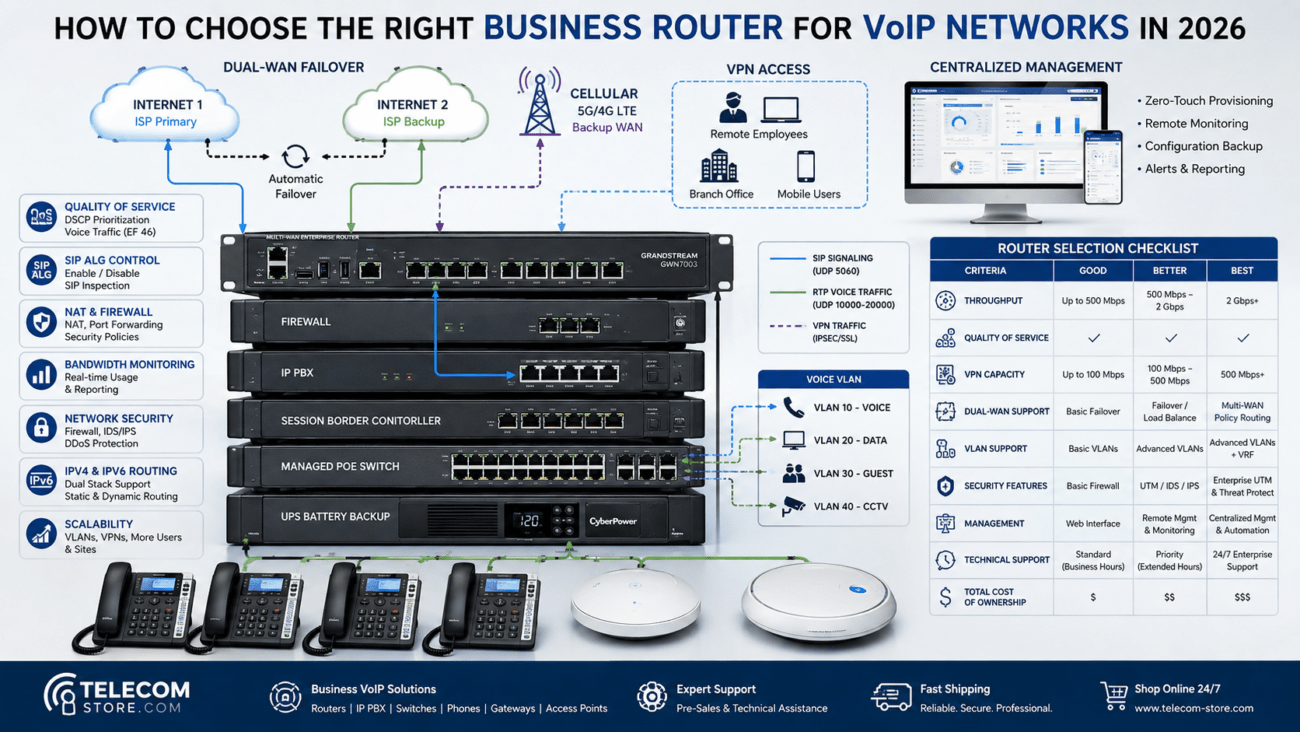
Plan for Dual-WAN and Internet Failover
Because VoIP depends on network connectivity, a secondary internet connection may provide more operational value than minor differences between firewall brands.
A dual-WAN firewall may support:
Automatic connection-health checks
Failover to a secondary ISP
Load balancing
Policy-based routing
Application-aware path selection
Separate QoS policies for each WAN
Automatic return to the primary connection
Failover does not guarantee that active calls will remain connected. Existing sessions may drop when the public IP address or network path changes. However, new calls may recover quickly when the firewall, PBX, DNS, and service-provider configuration are designed correctly.
Some businesses also use cellular connectivity as an additional recovery path. For compatible Yeastar S-Series systems, the Yeastar EC25A 4G LTE module may support cellular voice, messaging, or data applications when its carrier and PBX compatibility match the project.
Protect the Firewall and VoIP System with a UPS
A properly configured firewall provides no protection during a power failure if the router, modem, switches, PBX, or firewall shuts down immediately.
Critical equipment should be connected to an appropriately sized uninterruptible power supply. A small installation may be able to use the Minuteman Enspire-G 450VA UPS for selected low-power networking equipment, provided the connected load remains within its capacity.
A larger rack may require greater capacity, such as the Orion Office Pro 1000VA UPS. Calculate the actual wattage of the firewall, switches, PBX, modem, access points, and other connected devices rather than selecting a UPS based only on its VA rating.
Also consider the required runtime. A UPS intended only to bridge short outages may be much smaller than one expected to keep the communications system operating until a generator starts or power service is restored.
Business Firewall Feature Comparison
Feature
Small Office
Growing Business
Multi-Site or Enterprise
Stateful firewall
Required
Required
Required
Configurable QoS
Recommended
Required
Required
VLAN support
Recommended
Required
Required
Dual WAN
Optional
Recommended
Usually required
Intrusion prevention
Recommended
Recommended
Required by many security policies
Site-to-site VPN
Optional
Common
Common
High availability
Usually unnecessary
Depends on downtime tolerance
Frequently recommended
Centralized management
Optional
Helpful
Important
Advanced logging
Helpful
Important
Required in many environments
Example Firewall and VoIP Deployment Scenarios
Small office with 10 to 20 users
A small office using hosted VoIP may need a firewall with dependable NAT, adjustable SIP ALG behavior, VLAN support, QoS, secure administration, and sufficient throughput for the internet connection.
If the business prefers an on-premises phone system, the Yeastar P520 IP PBX is designed for a smaller user and concurrent-call requirement. The PBX, firewall, phones, switches, licenses, and SIP service must still be checked for compatibility before deployment.
Growing company with approximately 50 users
A growing organization may require separate voice and data VLANs, SIP trunks, site-to-site VPNs, dual-WAN failover, intrusion prevention, detailed logging, and more granular QoS.
The Yeastar P550 IP PBX for up to 50 users may be appropriate when its concurrent-call, feature, and expansion capacity fit the project. The firewall should be sized with all intended security services enabled rather than according to basic routing performance.
Larger or multi-site organization
A multi-site organization may require centralized firewall management, resilient VPNs, redundant internet connections, SD-WAN functions, high availability, SBC integration, and coordinated policies across branch locations.
The Yeastar P560 IP PBX supports larger deployments than entry-level systems, while the Yeastar P570 IP PBX is intended for substantially larger user and call requirements. Select the PBX only after confirming required users, concurrent calls, recording, conferencing, trunking, storage, remote access, and future growth.
Businesses that prefer the Grandstream ecosystem may evaluate the Grandstream UCM6302A scalable IP PBX. Firewall selection should still be based on the complete network load and security design, not the PBX brand alone.
Common Firewall Mistakes That Disrupt VoIP
Leaving SIP ALG enabled without testing
An ALG that rewrites signaling incorrectly can cause registration, audio, and call-stability problems. Follow tested guidance for the exact firewall, PBX, and provider.
Opening every SIP and RTP port to the internet
Broad exposure increases the attack surface. Restrict access to verified providers, VPN users, SBCs, and required services whenever possible.
Buying based only on advertised throughput
Confirm performance with the inspection, VPN, logging, and QoS services that will actually be enabled.
Ignoring UDP session timeouts
Short timeouts can remove NAT or session-table entries between registration messages and interrupt calling.
Failing to prioritize the WAN upload
Large outbound file transfers, backups, and camera traffic can interfere with voice even when download bandwidth appears plentiful.
Using one flat network
Placing phones, computers, guests, cameras, and servers on one unrestricted network makes security and troubleshooting more difficult.
Failing to review firewall logs
Logs may reveal blocked registrations, repeated authentication attempts, port scans, policy errors, expired sessions, and provider connectivity problems.
Business Firewall Buying Checklist
Measure current and planned internet speeds.
Determine which security services will be enabled.
Calculate VPN and remote-user requirements.
Confirm support for VLANs and inter-VLAN policies.
Verify QoS, DSCP handling, and traffic shaping.
Confirm SIP ALG can be controlled or disabled.
Review NAT and UDP timeout options.
Determine whether dual-WAN failover is required.
Evaluate intrusion prevention and denial-of-service protection.
Confirm administrative MFA and role-based access.
Review logging, alerts, and reporting.
Check high-availability options.
Verify support availability and firmware lifecycle.
Confirm compatibility with the PBX, SBC, SIP provider, and VPN design.
Plan for at least three to five years of growth.
Troubleshooting VoIP Through a Firewall
Symptom
Possible Firewall Cause
Recommended Check
Phone will not register
Blocked signaling, NAT error, SIP ALG interference, or DNS failure
Review firewall logs, outbound rules, NAT, DNS, and provider access
One-way audio
Blocked RTP or incorrect advertised media address
Check RTP policies, NAT behavior, and SIP message addresses
Calls drop after a fixed period
Session timeout, failed re-INVITE, or signaling interruption
Review UDP timers, SIP inspection, and session logs
Calls become choppy during uploads
WAN congestion or ineffective QoS
Review upload utilization, traffic shaping, and queue statistics
Remote phones cannot connect
VPN, NAT, certificate, routing, or access-policy problem
Review VPN logs, routes, authentication, and DNS
Only some calls fail
Incomplete rules, multiple media paths, or provider routing
Compare successful and failed calls using logs and packet captures
Frequently Asked Questions
Does every business VoIP system need a special firewall?
No. A firewall does not need to be marketed specifically for VoIP. It does need suitable NAT, QoS, VLAN, security, logging, throughput, and session-handling capabilities for the deployment.
Should SIP ALG always be disabled?
No universal rule applies. Many providers recommend disabling it because incompatible implementations can alter signaling incorrectly. Other managed environments use SIP inspection successfully. Follow tested guidance for the exact firewall, PBX, and service provider.
What ports should be opened for VoIP?
The required ports depend on the PBX, provider, transport protocol, SBC, and RTP range. Use documented requirements from the relevant vendors and restrict source addresses whenever possible.
Can a firewall improve VoIP call quality?
Yes, when it provides effective QoS and controls congestion at the WAN edge. It cannot repair poor ISP routing, inadequate bandwidth, damaged cabling, weak Wi-Fi, or an overloaded PBX.
Is a session border controller the same as a firewall?
No. A firewall protects general network traffic. An SBC controls and secures voice and video communication sessions. Some products combine related functions, but the roles remain different.
How much firewall throughput does a VoIP system need?
Voice itself normally uses modest bandwidth, but the firewall processes all business traffic. Size it for internet speed, security inspection, VPNs, video, cloud services, users, and expected growth.
Should VoIP phones be placed on a separate VLAN?
A voice VLAN is recommended for many growing or security-conscious networks because it simplifies QoS, addressing, access control, and troubleshooting. Very small offices may operate satisfactorily without one.
Key Takeaways
Size the firewall using performance figures with the required security services enabled.
Prioritize voice at the WAN edge using QoS and realistic bandwidth values.
Confirm SIP ALG can be tested, controlled, or disabled.
Use restrictive firewall policies instead of exposing broad SIP and RTP ranges.
Support voice VLANs, secure VPNs, dual-WAN failover, logging, and administrative MFA.
Consider an SBC for larger, multi-carrier, or on-premises SIP deployments.
Protect the firewall, PBX, switches, and internet equipment with an appropriately sized UPS.
Test registration, calls, transfers, audio, failover, and remote users before production deployment.
Practical Next Steps
Document your internet speed, number of users, remote-worker requirements, PBX platform, SIP provider, VLAN design, VPNs, and required security services. Compare firewall models using realistic inspected-throughput and VPN-performance figures rather than headline routing speeds.
Before replacing existing equipment, review logs and confirm whether the firewall is actually causing the problem. Registration failures, one-way audio, and poor call quality can also result from DNS failures, cabling, wireless coverage, PBX configuration, provider routing, or endpoint problems.
To provide the best experiences, we use technologies like cookies to store and/or access device information. Consenting to these technologies will allow us to process data such as browsing behavior or unique IDs on this site. Not consenting or withdrawing consent, may adversely affect certain features and functions.
Functional
Always active
The technical storage or access is strictly necessary for the legitimate purpose of enabling the use of a specific service explicitly requested by the subscriber or user, or for the sole purpose of carrying out the transmission of a communication over an electronic communications network.
Preferences
The technical storage or access is necessary for the legitimate purpose of storing preferences that are not requested by the subscriber or user.
Statistics
The technical storage or access that is used exclusively for statistical purposes.The technical storage or access that is used exclusively for anonymous statistical purposes. Without a subpoena, voluntary compliance on the part of your Internet Service Provider, or additional records from a third party, information stored or retrieved for this purpose alone cannot usually be used to identify you.
Marketing
The technical storage or access is required to create user profiles to send advertising, or to track the user on a website or across several websites for similar marketing purposes.