Video Door Phones for Business – 2026 Buyer’s Guide

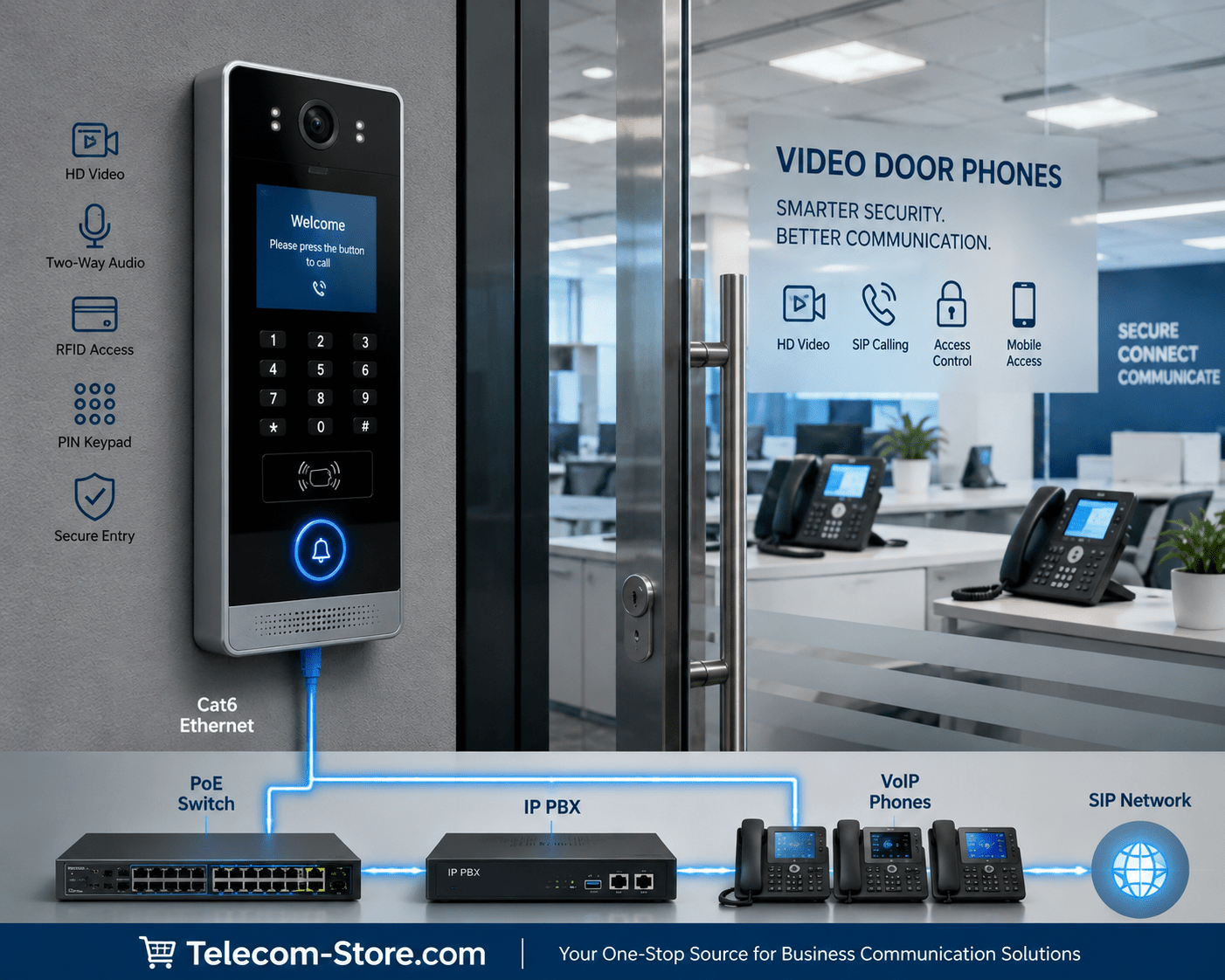
Business IP video door phone installed at a commercial office entrance

Choosing a Video Door Phone System: Direct Answers for Business Buyers

Looking to control building access, identify visitors, and connect your door entry system directly with business phones? IP-based video door phones help organizations manage access with clear video, real-time conversations, and remote get—all using your existing network and phone setup. Below, you’ll find side-by-side comparisons, compatibility advice, and tips for picking the right system for your business environment.

Feature BASIC SIP VIDEO DOOR PHONE ADVANCED IP VIDEO DOOR SYSTEM AI-ENHANCED VIDEO DOOR PHONE
Video Quality HD (720p) Full HD (1080p) 2K Ultra HD
Access Methods Voice/Call Button PIN Keypad, RFID Keypad, RFID, Bluetooth, Face Recognition
Integration SIP (VoIP Phone/IP PBX) SIP, Cloud/Mobile App SIP, Cloud, Mobile, AI
Best For Small Office Multi-tenant/Growing Business Warehouses, Large/High-Security Sites
PoE Support Usually Yes Yes
Weather Resistance Optional Outdoor Models Available Outdoor & Rugged

What Are Video Door Phones?

Video door phones are network-connected intercom systems for secure business entry. They combine an HD camera, microphone, speaker, and call button in one device. Most commercial models connect by Ethernet and support the SIP protocol, which means they can work directly with IP PBX systems, VoIP phones, and popular business networks. Many systems also add keypads, RFID readers, or mobile app support for added security and flexible access.

Why Businesses Install Video Door Phones

  • See who’s at the door before opening: Clear video for verifying visitors.
  • Remote answering and unlocking: Let staff respond from any VoIP phone, headset, or mobile app—even offsite.
  • Better control for multiple locations: Manage main entrances, delivery doors, or gates from a centralized platform.
  • Reduce staffing needs: No need for a full-time receptionist at every entrance.

Main Types of Video Door Phone Systems

SIP Video Door Phones

SIP models act as extensions on your IP PBX. They’re best for organizations already using VoIP phones, letting calls from the front door reach your desk phone or designated groups. CyberData Secure Outdoor Video Intercom is a well-known option for professional deployments.

Advanced IP & AI Video Door Phones

Systems like the Grandstream GDS3710 or GDS3725 add weather resistance, 2K video, RFID and keypad access, and app support. Advanced models use AI for face recognition and visitor history, which helps busy or high-security environments.

Key Buying Considerations

  • Power over Ethernet (PoE): Most business models use a single Ethernet cable for power and connection. Confirm your PoE switch can provide enough power for every connected device.
  • Video Resolution: Full HD and 2K give sharper images, making it easier to identify visitors. Choose higher resolution for main entrances or areas with frequent foot traffic.
  • Access Options: Some models offer only a basic call button, while others add keypads, RFID, Bluetooth, or face recognition. Decide how you want authorized staff and guests to enter.
  • Compatibility: Check that your phones or IP PBX support adding SIP-based devices. See our range of VoIP phones and IP PBX systems for ideas.
  • Outdoor Use: For external doors, select weather-resistant and vandal-resistant models with an appropriate IP rating.

Compatibility & Practical Requirements

Most commercial video door phones work right out of the box with leading VoIP phones (Yealink, Poly, Grandstream) and cloud PBX systems. For hassle-free setup:

  • Confirm SIP/VoIP support on your communications platform.
  • Make sure your PoE switch meets IEEE standards for required power.
  • Check if you need advanced door relay options for gates or magnetic locks.

For details, see our guides on PoE switches and IP PBX systems.

What to Watch Out For When Buying

  • Cloud services, if needed, may require annual or monthly plans.
  • Video preview on desk phones often needs compatible models; not all brands support live video.
  • Select outdoor-rated units for any exterior entryway.
  • Large installations with many endpoints may benefit from managed switches for control and monitoring.

Recommendations by Business Size

  • Small offices/retail: Simple SIP video door phone with PoE and basic call button/keypad. Best for one or two doors.
  • Growing/multi-tenant offices: Choose systems with RFID, PIN integration, and mobile support. Look for models that support multiple SIP accounts.
  • Warehouses/critical sites: Use 2K HD, weatherproof, and AI-enhanced models with multiple relays or advanced access logging.

Frequently Asked Questions

What is a Video Door Phone?
A video door phone is a network-connected intercom device with a camera that lets you see and speak to visitors at your business entrance, often with options for unlocking doors remotely via VoIP phones or mobile apps.
Can Video Door Phones work with VoIP phone systems?
Yes. Most business video door phones support the SIP protocol, so they’re compatible with IP PBX systems and can ring desk phones, cordless handsets, and reception consoles.
Do Video Door Phones require Power over Ethernet?
Many modern models use Power over Ethernet (PoE) for simple installation, meaning they use a single Ethernet cable for both power and network connectivity.
How do I know if a model will work with my existing phones?
Check that your phone system supports SIP devices and verify device compatibility with your IP PBX or cloud communications platform. Most leading business phone brands support SIP video door phones.
What is the main mistake to avoid when buying?
Choosing a model without considering weather resistance for outdoor use, PoE requirements, or necessary access options like keypads or RFID. Also confirm compatibility with your current network and phone setup.
Do I need a managed PoE switch for video door phones?
Not always. A basic PoE switch can be enough for small setups. For larger deployments or if you want advanced control or monitoring, a managed switch is recommended.

Have questions about fitting a video door phone into your site? Contact the Telecom-Store.com team for personalized advice based on your network and access needs.