

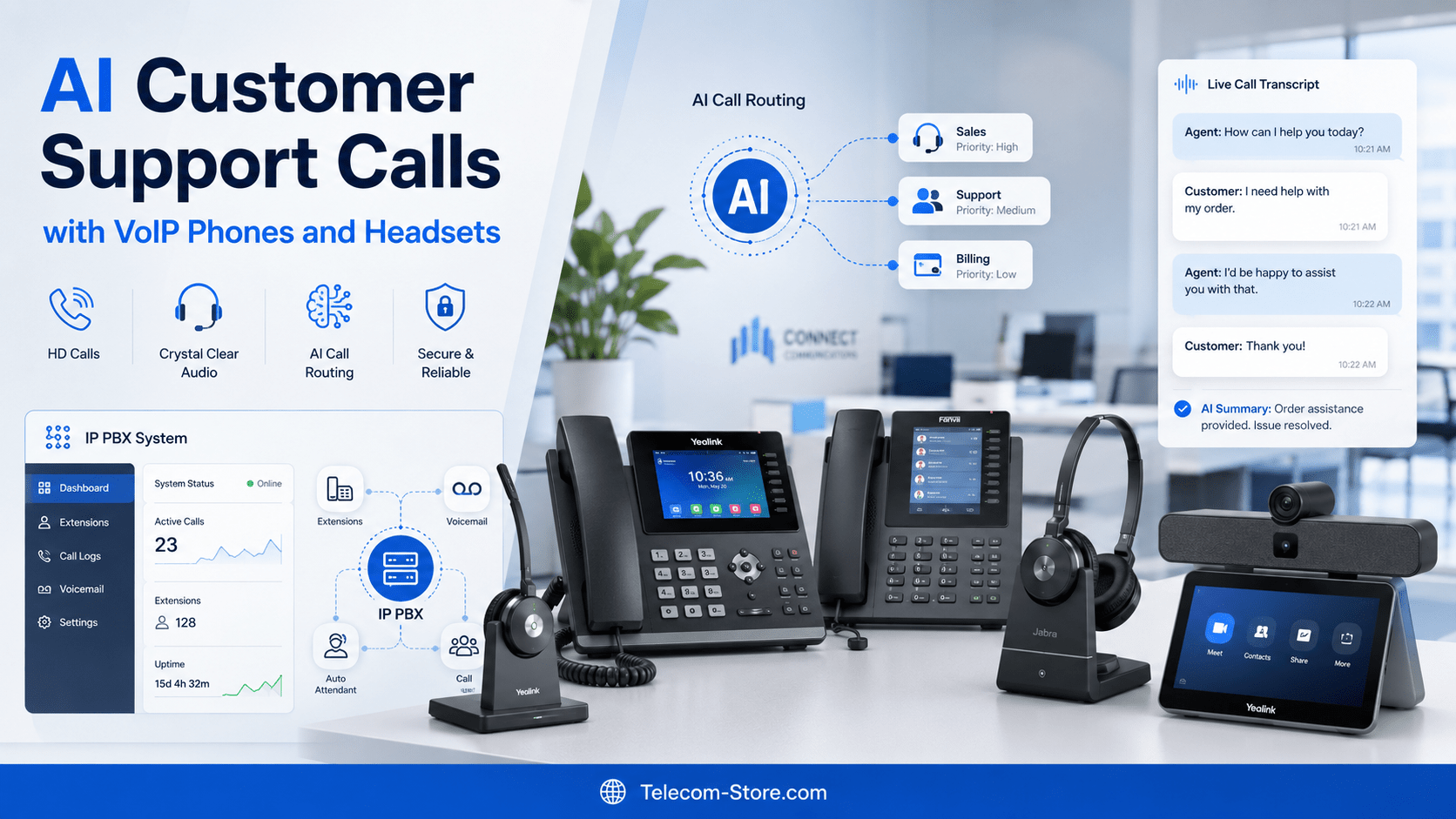
AI customer support calls are changing how businesses answer questions, route calls, assist agents, and follow up with customers. In 2026, customer service is no longer only about having a phone line and a receptionist. Businesses now need faster call handling, clearer audio, better records, smarter routing, and communication tools that work across office, remote, and hybrid teams.
AI improves customer support calls by helping businesses understand caller intent, route customers to the right person, summarize conversations, support live agents, reduce repetitive tasks, and connect phone systems with customer data. However, AI works best when it is supported by reliable VoIP phones, headsets, IP PBX systems, networking equipment, and video conferencing tools that keep communication clear and stable.
What AI Customer Support Calls Mean for Business Communication
AI customer support calls use artificial intelligence to make phone-based customer service faster, more organized, and easier to manage. Instead of relying only on manual call handling, businesses can use AI tools to detect what a caller needs, suggest answers to support agents, create call notes, and help teams follow up after the conversation.
This does not mean every support call should be fully automated. In many businesses, the most useful setup is a hybrid approach. AI handles simple tasks, while human agents handle complex questions, complaints, technical issues, and high-value customer conversations.
For example, AI can help identify whether a caller is asking about order status, billing, returns, appointment scheduling, product support, or technical troubleshooting. Then the phone system can route that call to the right department or show helpful information to the agent before the customer repeats the same details.
AI Customer Support Calls: Main Benefits
The main benefit of AI customer support calls is better call efficiency without removing the human side of service. AI can reduce repetitive work, improve call records, and give support teams more context during live conversations.
Faster Call Routing
Traditional phone menus can be slow when customers have to press several numbers before reaching the right team. AI call routing can understand natural speech and help direct customers based on what they say. This is useful for companies with sales, support, billing, service, and technical departments.
Better Agent Support
AI can assist live agents by showing suggested answers, customer history, product details, or next steps during a call. This helps new support agents learn faster and helps experienced agents avoid searching through multiple systems while the customer is waiting.
Cleaner Call Summaries
After a support call, AI can create a summary of what happened, what the customer asked, what was promised, and what follow-up is needed. This is helpful for customer service teams, sales teams, repair departments, and businesses that need accurate records.
Improved Customer Experience
Customers usually want quick answers, clear communication, and fewer transfers. AI can help reduce confusion by routing calls more accurately, preparing agents with better context, and making follow-up more consistent.
Why This Matters in 2026
In 2026, businesses are handling more customer communication across phone, email, chat, video meetings, and messaging platforms. However, phone calls still matter because many customers prefer speaking to a real person when the issue is urgent, complex, or sensitive.
AI is becoming more practical in customer support because it can work with VoIP systems, cloud phone platforms, CRM tools, and call analytics software. However, the quality of the phone hardware and network setup still affects the final customer experience.
Hybrid Work and Cloud Communication
Many support teams now work from different locations. Some agents work in an office, while others work from home or from remote branches. Cloud communication and VoIP systems make this easier because calls can be handled through internet-based phone systems instead of only traditional landlines.
Businesses exploring VoIP phones should consider how their phone hardware will support call clarity, headset use, remote extensions, and integration with AI call tools.
Buyer Expectations in 2026
Modern buyers expect fast answers, clear voice quality, easy transfers, and support agents who already understand their issue. They also expect businesses to keep records properly, especially when the same customer calls again.
This is why many companies are reviewing their business phone systems, IP PBX setups, network switches, headsets, and video meeting devices before adding AI features. AI can improve support workflows, but it cannot fully solve problems caused by poor audio, weak networks, outdated phones, or unreliable call routing.
Key Features or Factors to Consider
Before using AI for customer support calls, businesses should look at the full communication setup. The right mix of phone hardware, software, network equipment, and support workflow makes AI more useful.
VoIP Phone Compatibility
VoIP phones are important for support teams because they allow internet-based calling, extension management, call transfer, voicemail, and platform integration. Buyers can explore Yealink phones, Poly phones, and Cisco phones depending on their phone system and business needs.
Headset Quality
Good headsets are important for AI-assisted calls because clear audio helps both the customer and the support agent. Poor microphone quality can affect call transcription, call summaries, and live AI suggestions. Businesses with busy support teams should compare wired, wireless, mono, stereo, USB, Bluetooth, and DECT headset options.
IP PBX System Support
An IP PBX system manages internal extensions, call routing, voicemail, call queues, and business phone features. Businesses that want more control over support calls may explore IP PBX systems for office-based or hybrid communication setups.
Call Routing and Queues
AI works well when call routing rules are clearly planned. For example, billing calls should not go to technical support, and product questions should not go to the wrong department. Call queues, ring groups, auto attendants, and routing logic should be reviewed before adding AI tools.
Network Stability
AI customer support calls depend on stable internet and internal networking. If calls drop, delay, echo, or lose audio quality, the AI layer may also struggle. Businesses should review routers, switches, cabling, and PoE power needs before scaling a support phone system.
Security and Privacy
Customer support calls may include order details, billing information, addresses, account data, or private business information. Businesses should choose AI call tools and phone systems that support secure access, clear user permissions, and responsible handling of call recordings and summaries.
CRM and Helpdesk Integration
AI becomes more useful when it connects with customer records. If the phone system can connect with a CRM or helpdesk, agents can see previous tickets, customer history, notes, and follow-up tasks during the call.
Scalability
A small business may only need a few VoIP phones and basic call routing. A growing support team may need call queues, analytics, AI summaries, IP PBX features, conference phones, headsets, and stronger networking equipment.
Recommended Product Types to Explore
The right products depend on business size, call volume, agent location, and support workflow. Telecom buyers should focus on equipment that improves voice clarity, reliability, call handling, and compatibility with modern communication platforms.
For Small Offices
Small offices usually need simple and reliable communication tools. A practical setup may include a few VoIP phones, business headsets, a basic network switch, and a cloud phone service. For many small teams, the goal is not complex automation. The goal is to answer calls clearly, transfer customers easily, and keep support organized.
Small businesses can start by comparing VoIP phone options and customer support headsets that match their daily call volume.
For Growing Businesses
Growing businesses may need more advanced call routing, multiple departments, remote users, voicemail management, reporting, and better call records. This is where IP PBX systems, managed phone systems, PoE switches, and AI call summaries can become useful.
Businesses expanding their support team should review PoE switches, IP PBX products, and compatible desk phones before choosing AI call software.
For Call Centers and Support Teams
Call centers need reliable phones, comfortable headsets, call queues, clear reporting, and tools that help agents stay productive. AI can support these teams with call summaries, live suggestions, intent detection, and faster follow-up notes.
For call-heavy teams, headset comfort matters. A lightweight headset with good microphone quality can reduce fatigue and improve call clarity during long shifts.
For Meeting Rooms or Hybrid Teams
Some customer support discussions move from phone calls to video meetings, especially for technical support, sales support, product demos, and internal escalation. Businesses can explore video conferencing devices, conference phones, and meeting room devices to support hybrid collaboration.
Compatibility and Setup Requirements
AI customer support calls require more than installing one software tool. The phone system, devices, network, and customer data sources should work together.
VoIP Platform Compatibility
Before buying phones or AI call tools, confirm compatibility with the business phone platform. Some phones work with SIP-based systems, while others are designed for specific cloud communication platforms. Brands such as Yealink, Poly, Cisco, Grandstream, and Fanvil may support different use cases depending on the model and firmware.
PoE and Power Requirements
Many VoIP phones use Power over Ethernet, also called PoE. This allows the phone to receive power and network connectivity through one Ethernet cable. If a business plans to use multiple desk phones, conference phones, or network devices, the PoE switch power budget should be checked carefully.
Small Technical Note
Not every network switch supports PoE, and not every PoE switch has enough power for all connected devices. Always check the total wattage needed for phones, access points, speakers, cameras, and other network hardware.
VLAN and QoS Setup
Voice calls need stable bandwidth and low delay. VLANs can separate voice traffic from normal data traffic, while QoS can prioritize voice calls. This is especially important for businesses with many users, cloud applications, video meetings, and customer support calls happening at the same time.
Firmware and Admin Setup
VoIP phones, IP PBX systems, and network devices should be kept updated. Firmware updates may improve security, compatibility, and performance. Businesses should also decide who will manage users, extensions, call routing, voicemail, and AI call settings.
Common Limitations Buyers Should Know
AI can improve customer support calls, but it is not a complete replacement for good planning, trained staff, and reliable telecom equipment.
First, AI may misunderstand callers if audio quality is poor, accents are difficult for the system, background noise is high, or the customer gives unclear information. This is why good headsets and reliable phones still matter.
Second, fully automated AI voice agents may not be suitable for every customer conversation. Complex complaints, sensitive billing issues, technical troubleshooting, and high-value sales calls often need a trained human agent.
Third, AI call summaries should still be reviewed when accuracy is important. A summary can save time, but it should not be treated as perfect in every situation.
Fourth, businesses must consider privacy and consent rules for call recording, transcription, and AI processing. Customer data should be handled responsibly and securely.
Finally, AI tools may require integration with phone systems, CRMs, helpdesk platforms, and business workflows. A company with outdated phones, weak networking, or unclear call routing may need to improve the foundation first.
How to Choose the Right Option
The right AI customer support call setup depends on how many calls the business receives, how many agents answer calls, what phone system is already in place, and how much control the business needs.
For Low Call Volume
A small business with low call volume may not need advanced AI automation. It may benefit more from reliable VoIP phones, professional voicemail, simple call forwarding, and good headsets. AI call summaries or basic call transcription can be added later.
For Medium Call Volume
A business with regular customer calls may need call queues, routing rules, shared voicemail, AI notes, and CRM integration. This type of business should compare phones, headsets, PoE switches, and IP PBX options carefully before scaling.
For High Call Volume
A support team or call center with high call volume may benefit from AI-assisted routing, live agent suggestions, call analytics, automatic summaries, and deeper helpdesk integration. These teams should also invest in reliable headsets, stable networking, and business-grade phone hardware.
For Businesses With Remote Agents
Remote support teams should focus on cloud phone compatibility, secure login, headset quality, softphone support, and reliable internet connections. AI can help remote teams stay consistent by giving all agents the same knowledge base, call notes, and follow-up guidance.
Related Telecom Products
Businesses planning AI customer support calls should look beyond software and review the full communication stack. The right hardware can improve call clarity, reduce support friction, and help AI tools work more accurately.
For desk-based support teams, explore VoIP phones, Yealink phone models, Poly phones, and Cisco business phones.
For team communication and call management, review IP PBX systems, networking equipment, and PoE switches.
For agents who spend many hours on calls, compare business headsets, wireless headset adapters, and call center headset accessories. For team meetings and customer demos, explore video conferencing products and conference phones.
Conclusion
AI customer support calls are helping businesses answer calls faster, support agents better, summarize conversations, and improve customer follow-up. However, AI works best when the business has a reliable telecom foundation, including VoIP phones, headsets, IP PBX systems, PoE switches, networking equipment, and compatible communication platforms.
For most businesses, the best approach is not to replace human support completely. Instead, AI should reduce repetitive work, improve call handling, and give support teams better information during and after each call. With the right setup, AI customer support calls can make business communication more organized, more efficient, and easier to scale.
FAQ Section
What are AI customer support calls?
AI customer support calls use artificial intelligence to help answer, route, summarize, and manage customer phone conversations. AI can understand caller intent, assist live agents, create call notes, and connect call activity with CRM or helpdesk systems. It is commonly used with VoIP phone systems, cloud calling platforms, and business communication tools.
Can AI replace human customer support agents?
AI can handle simple and repetitive tasks, but it should not replace human agents in every situation. Complex complaints, technical issues, sensitive billing questions, and high-value sales conversations usually need human judgment. Many businesses use AI to support agents rather than fully replace them.
Do VoIP phones work with AI customer support tools?
Many VoIP phone systems can work with AI customer support tools, especially when they support SIP, cloud calling, call recording, CRM integration, or call analytics. Compatibility depends on the phone model, phone service provider, IP PBX system, and AI software. Always confirm platform support before buying hardware.
Why are headsets important for AI support calls?
Headsets are important because AI tools depend on clear audio for transcription, summaries, and live suggestions. A poor microphone can reduce accuracy and make calls harder for both customers and agents. Support teams should choose comfortable business headsets with good voice pickup and noise reduction.
Do I need an IP PBX system for AI customer support calls?
Not every business needs an IP PBX system, but it can help companies that want more control over extensions, call routing, voicemail, queues, and internal communication. Businesses using AI for larger support teams may benefit from an IP PBX or cloud phone system with strong integration options.
What equipment is needed for AI-powered customer service calls?
A practical setup may include VoIP phones, business headsets, a cloud phone service or IP PBX system, PoE switches, stable networking equipment, and CRM or helpdesk software. Larger teams may also need call analytics, AI summaries, call recording, and video conferencing devices for escalations.
Can AI improve call routing for small businesses?
Yes, AI can help small businesses route calls based on what customers say instead of forcing callers through long phone menus. However, small businesses should first make sure their phone system, extensions, voicemail, and support workflow are organized. AI works better when the basic call structure is clear.
Is AI call summarization accurate?
AI call summarization can be very helpful, but it should still be reviewed when accuracy matters. Audio quality, background noise, unclear speech, and complex conversations can affect the summary. Good VoIP phones, quality headsets, and clear call handling practices can improve the results.
Are AI customer support calls secure?
AI customer support calls can be secure when businesses use trusted platforms, proper access controls, secure recordings, and responsible data handling. Companies should review privacy rules, customer consent requirements, and vendor policies before recording, transcribing, or processing customer conversations with AI.
How should a business choose products for AI support calls?
Start with call volume, number of agents, existing phone system, remote work needs, and budget. Small teams may need VoIP phones and headsets. Growing teams may need IP PBX systems, PoE switches, call queues, and CRM integration. Call centers may need AI summaries, analytics, and stronger network planning.