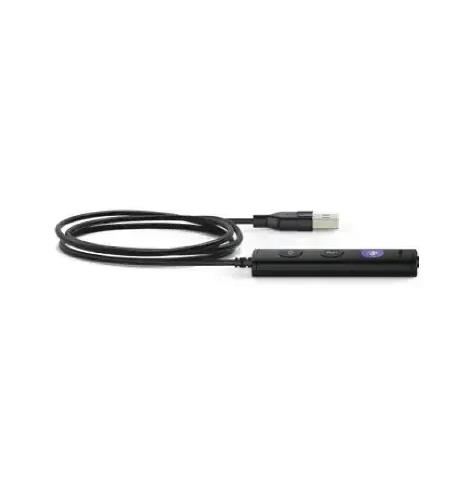
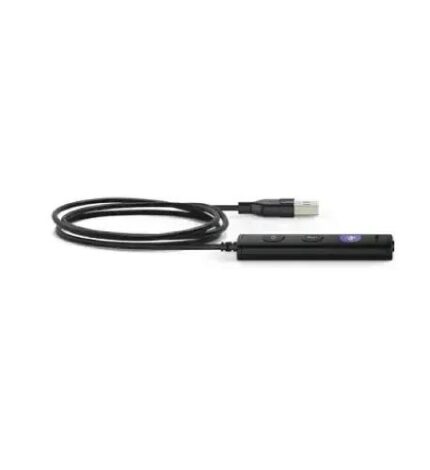
Yealink Headsets YHC20 USB-A Controller Button for UH36 Headset
- Customer support
-
Free Shipping
- Secure payment method
$ 20.00
79 in stock
79 in stock
Description
– Controller (UC button for UH36
– USB-A 20
Enhance Your Communication with the Yealink YEA-YHC20-UC USB-A Controller Button
Streamline your audio experience and elevate your productivity with the Yealink YEA-YHC20-UC USB-A Controller Button for UH36 headsets. Designed for seamless integration with your existing audio setup, this controller button is your ultimate solution for effortless call management.
Why Choose the Yealink YEA-YHC20-UC?
In today’s fast-paced business world, effective communication is crucial. The Yealink YEA-YHC20-UC allows you to take control of your calls with ease, ensuring you stay connected without interruptions. Experience the perfect blend of functionality and convenience, tailored for professionals who demand the best.
Benefits of the Yealink YEA-YHC20-UC
- Effortless Call Management: Easily answer, mute, or end calls with a single click, freeing you to focus on what matters most.
- Compatibility: Specifically designed for Yealink UH36 headsets, ensuring reliable performance and quality.
- Plug-and-Play Setup: Connects via USB-A, requiring no additional software installation, making it simple to use right out of the box.
Key Features
- High-Quality Build: Crafted by Yealink, a trusted name in audio technology, ensuring durability and long-term use.
- Compact Design: Lightweight and portable, making it easy to carry wherever your work takes you.
- Intuitive Controls: User-friendly interface that minimizes distractions and maximizes productivity.
Use Cases for the Yealink YEA-YHC20-UC
The Yealink YEA-YHC20-UC is ideal for:
- Remote Workers: Enhance your home office setup and manage calls effortlessly.
- Corporate Environments: Perfect for conference calls, ensuring smooth communication among teams.
- Customer Support: Improve response times and customer satisfaction with easy call handling.
Get Yours Now!
Don’t miss out on the opportunity to upgrade your audio experience. With 84 units available, the Yealink YEA-YHC20-UC USB-A Controller Button is ready to revolutionize the way you communicate. Enhance your productivity and connect with confidence today!
Specification
Overview
| Weight | 0.003125 kg |
|---|---|
| Dimensions | 4 × 2 × 1 in |
| website link | https://www.yealink.com/ |
| upc | YEA-YHC20-UC |
| brand | Yealink Headsets |
| part_number | YEA-YHC20-UC |
Frequently Asked Questions
What is the Yealink YEA-YHC20-UC USB-A Controller Button?
The Yealink YEA-YHC20-UC is a USB-A controller button designed for Yealink UH36 headsets, allowing users to easily manage calls with features such as answering, muting, and ending calls with a single click.
How do I use the Yealink YEA-YHC20-UC?
Using the Yealink YEA-YHC20-UC is straightforward; simply plug it into a USB-A port on your computer, and it is ready to use without any additional software installation, making it ideal for quick setup.
Is the Yealink YEA-YHC20-UC compatible with other headsets?
The Yealink YEA-YHC20-UC is specifically designed for the Yealink UH36 headsets, ensuring optimal performance and compatibility, and it may not function properly with headsets from other brands.
What are the shipping options for the Yealink YEA-YHC20-UC?
We offer free shipping on the Yealink YEA-YHC20-UC USB-A Controller Button, ensuring you receive your product quickly and without any additional shipping fees.
What is the return policy for the Yealink YEA-YHC20-UC?
If you're not satisfied with the Yealink YEA-YHC20-UC, you can return it within 30 days of purchase for a full refund, provided it is in its original condition and packaging.
What are the dimensions of the Yealink YEA-YHC20-UC?
The Yealink YEA-YHC20-UC features a compact and lightweight design, making it portable and convenient to use in various settings, though specific dimensions are not provided in the product specifications.
Can the Yealink YEA-YHC20-UC be used for conference calls?
Yes, the Yealink YEA-YHC20-UC is perfect for conference calls, as it allows users to manage calls easily, ensuring smooth communication among team members during meetings.

Reviews
There are no reviews yet.