Video Intercom vs. Traditional Doorbell: Which Is Better for Your Business?

Video Intercom vs. Doorbell: Business Guide
Every business entrance creates a first impression. Whether someone is delivering a package, arriving for an appointment, or requesting access to a secured area, employees need a reliable way to know when visitors arrive.
A traditional doorbell provides a simple notification. A video doorbell adds visual monitoring and, on supported models, two-way communication. A commercial video intercom goes further by integrating visitor communication with business networks, telephone systems, and potentially electronic door access.
But does every business need a commercial video intercom? Not necessarily. The right solution depends on visitor traffic, security requirements, staffing, infrastructure, and budget.
This guide compares traditional doorbells, consumer-style video doorbells, and commercial IP intercom systems to help business owners choose an appropriate entrance solution.
Quick Answer: Video Intercom or Traditional Doorbell?
A traditional doorbell is usually sufficient for an entrance where employees only need to know that someone has arrived.
A commercial video intercom is generally better when employees need to see and speak with visitors before granting access, answer entrance calls from supported business phones, or integrate the entrance with an electronic locking system.
A consumer video doorbell may provide a useful middle ground for small offices that need smartphone notifications and basic video communication without a larger access-control installation.
Understanding the Three Types of Door Entry Systems
1. Traditional Doorbell
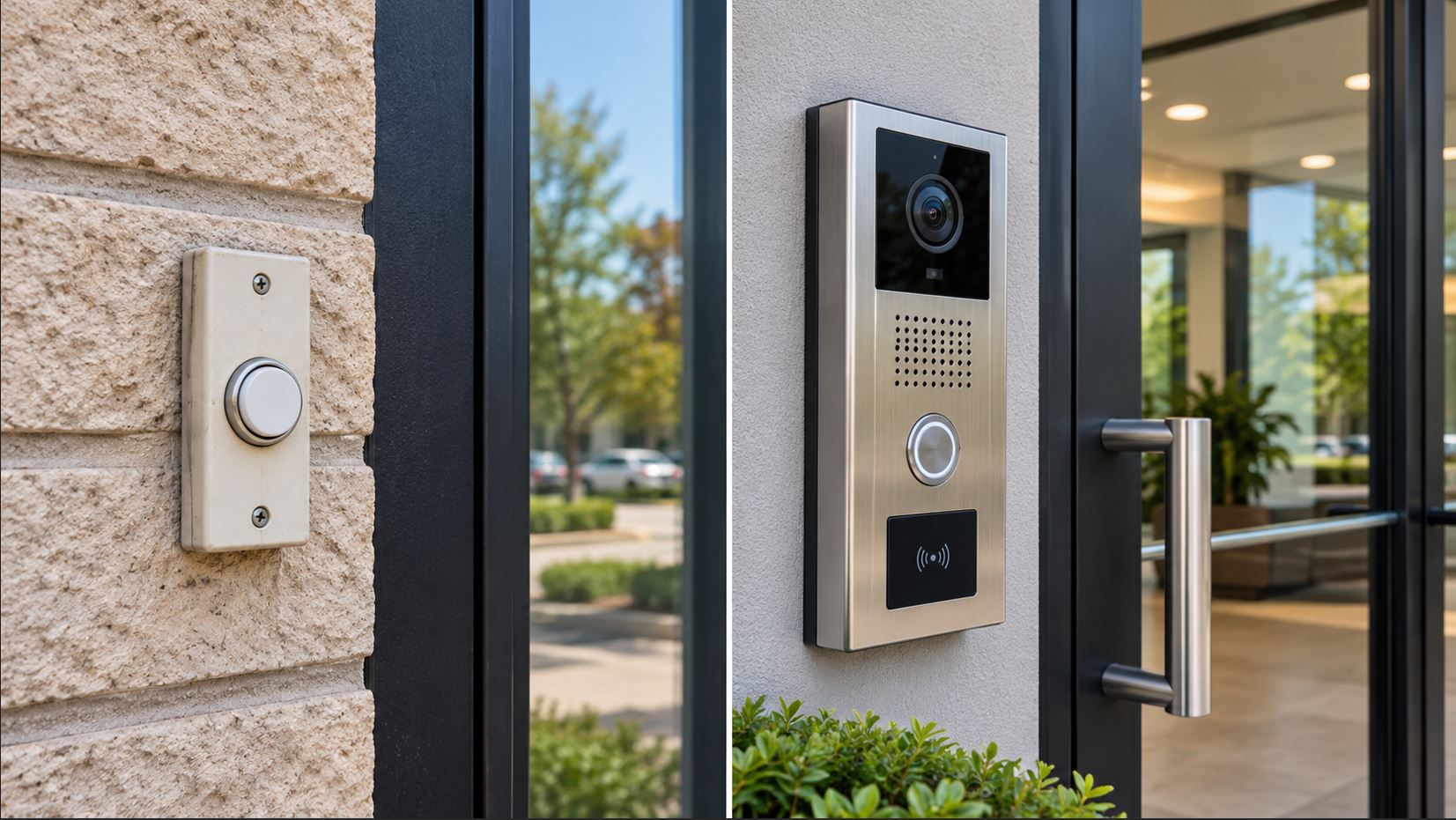
A traditional doorbell uses a push button to activate an indoor chime or notification device. Wired versions typically use a low-voltage transformer, while wireless models use radio communication between the button and chime.
The system announces a visitor’s arrival but does not identify the visitor or provide two-way communication.
Traditional doorbells remain practical for small storefronts, staffed reception areas, and businesses where visitors can enter without special authorization.
2. Video Doorbell
A video doorbell adds a camera, microphone, and speaker. Depending on the model and service, it may send notifications to smartphones, provide live video, and store recordings.
Many consumer video doorbells rely on Wi-Fi and manufacturer-operated cloud services. Some require subscriptions for recording or advanced features.
Although useful for basic visitor monitoring, a video doorbell may not support business SIP phone systems, centralized enterprise administration, or professional access-control integration.
3. Commercial IP Video Intercom
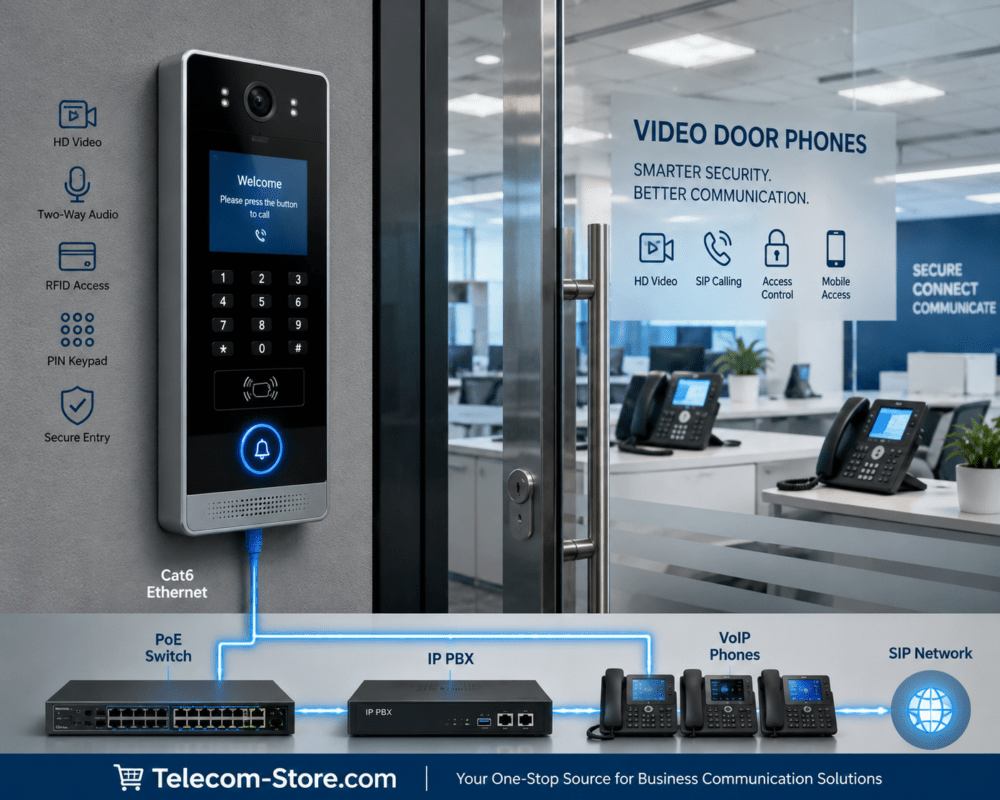
A commercial IP video intercom is designed to provide visitor communication through a network-connected door station. Supported systems may include a camera, microphone, speaker, call button, SIP communication, relay control, and integration with access-control equipment.
For example, a visitor can press the intercom button, initiate a call to a compatible reception phone or intercom client, and communicate with an employee before being admitted.
Depending on the system, the employee may also be able to activate a properly configured electric door strike or other access-control device.
Video Intercom vs. Traditional Doorbell: Feature Comparison
| Feature | Traditional Doorbell | Video Doorbell | Commercial IP Video Intercom |
|---|---|---|---|
| Visitor notification | Yes | Yes | Yes |
| Live video | No | Usually | On video-equipped models |
| Two-way audio | No | Usually | Typically |
| Business SIP integration | No | Uncommon | Available on supported models |
| Remote door release | No | Model and accessory dependent | Available on supported systems |
| PoE networking | No | Model dependent | Common on IP models |
| Video recording | No | Often available | Depends on camera, software, and recording integration |
| Centralized management | Minimal | Varies by manufacturer | Available on many commercial platforms |
| Installation complexity | Low | Low to moderate | Moderate to high |
| Best fit | Basic visitor alert | Small office monitoring | Managed business entry |
Seven Reasons Businesses Choose Video Intercom Systems
1. See Visitors Before Opening the Door
A video intercom allows authorized employees to view visitors before granting entry. This is especially useful for businesses with locked reception doors, delivery entrances, or areas that are not continuously staffed.
Video improves situational awareness, but it does not independently verify a person’s identity. Staff should follow established visitor authorization procedures.
2. Communicate Without Walking to the Entrance
Two-way audio lets employees speak with visitors from a reception desk or another supported endpoint.
For example, a warehouse employee may answer a delivery entrance call without leaving a work area, provided the intercom is integrated with an appropriate communication system.
3. Integrate with Business Phone Systems
Some commercial intercoms support Session Initiation Protocol, or SIP, allowing them to operate as communication endpoints on compatible IP-PBX or hosted VoIP systems.
A properly configured SIP intercom may call a reception extension, ring group, or designated destination.
However, SIP support alone does not guarantee compatibility with every hosted phone provider. Registration methods, codecs, video support, security settings, and provider restrictions must be checked.
Businesses evaluating their broader telephone infrastructure can explore Axion Communications business phone solutions. Confirm intercom compatibility with the provider before purchasing or deploying equipment.
4. Support Controlled Door Entry
Some commercial intercoms include relay outputs or interfaces for electronic access-control systems.
When designed correctly, an authorized employee can communicate with a visitor and then activate the appropriate door-release mechanism.
The complete installation may require an electric strike, lock power supply, door contact, request-to-exit device, and a separate access controller.
Importantly, the intercom itself does not replace all of these components.
5. Use Power over Ethernet
Many IP intercoms support Power over Ethernet, allowing a compatible network switch to provide both network connectivity and electrical power through an Ethernet cable.
This can simplify installation by reducing the need for a separate power adapter at the door station.
Before deployment, verify the intercom’s IEEE PoE requirements and confirm that the switch has sufficient power capacity.
6. Manage Multiple Entrances
Commercial intercom platforms may support centralized configuration and monitoring across several doors or locations.
A business with a main entrance, loading dock, and employee entrance can evaluate whether its selected system supports consistent call routing, administration, and access policies.
7. Improve Visitor Handling
Video intercoms can help employees manage deliveries, scheduled appointments, contractors, and visitors more efficiently.
The operational benefit comes from combining reliable communication with a clear visitor-handling process—not simply installing a camera.
Recommended Business Intercom Systems
Telecom-Store.com offers several intercom options with different capabilities. These products should be selected based on whether the application requires video, audio-only communication, SIP integration, or electronic door control.
Grandstream GDS3726: Video Entry with Multiple Access Methods
The Grandstream GDS3726 2K Video Door System provides a camera-equipped door station with two-way audio and multiple supported access methods.
Its listed features include 2K video, SIP calling, PIN and card-based access options, Bluetooth-related access capabilities, and an IP66-rated enclosure.
This makes it worth evaluating for small commercial entrances where both visitor communication and access functionality are desired.
Best suited for: Small offices or controlled entrances requiring video and supported credential-based access.
Before purchasing: Confirm the exact access-control configuration, network connection, power requirements, and compatibility with the intended phone system.
CyberData CD-011410: Commercial SIP Video Intercom
The CyberData CD-011410 Outdoor Video Intercom is a commercial SIP-based entrance device with a camera, full-duplex voice, and auxiliary relay control.
The product listing describes an adjustable camera angle, network management, and support for TLS 1.2.
Its SIP capabilities make it relevant for organizations planning to integrate door communication with a compatible business telephone environment.
Best suited for: Commercial facilities that need a network-connected video door station and supported SIP integration.
Before purchasing: Verify video interoperability, supported SIP features, security settings, and the requirements of any external lock controller.
Algo 8201: SIP Audio Intercom Without Video
Not every entrance requires a camera.
The Algo 8201 SIP PoE Intercom provides network-managed audio communication using SIP and IEEE 802.3af PoE.
It is an option for businesses that want visitors to communicate with staff through compatible telephone systems but do not need video at the entrance.
Best suited for: Audio-only visitor communication at offices, service entrances, and other appropriate commercial locations.
Viking E-40-SS-EWP: Compact Weather-Resistant Audio Entry
The Viking E-40-SS-EWP Weatherproof Intercom is a compact, vandal-resistant audio entry device designed for installation in suitable door communication systems.
It is not a camera-equipped video intercom and should not be assumed to function as a standalone SIP endpoint.
Best suited for: Businesses needing a compact audio door station where the appropriate telephone interface and control equipment are already available or included in the design.
Which Intercom Should Your Business Choose?
| Business Requirement | Recommended Starting Point |
|---|---|
| Only need an arrival alert | Traditional doorbell |
| Need smartphone video notifications | Suitable video doorbell |
| Need video and controlled entry | Grandstream GDS3726 or comparable commercial system |
| Need commercial SIP video calling | CyberData CD-011410 |
| Need audio-only SIP calling | Algo 8201 |
| Need compact weather-resistant audio entry | Viking E-40-SS-EWP with compatible supporting equipment |
| Need multiple managed entrances | Engineered IP intercom and access-control solution |
How Much Does a Business Video Intercom Cost?
A traditional doorbell is generally less expensive than a commercial intercom because it requires fewer components and less configuration.
Commercial intercom pricing varies substantially depending on the camera, construction, network features, access-control capabilities, and management software.
Businesses should compare complete installation costs rather than the price of the door station alone.
Include These Items in Your Budget
- Door station or video intercom.
- Compatible PoE switch or power supply.
- Ethernet and other required cabling.
- Indoor answering device or SIP endpoint.
- Electronic lock and access-control equipment, if needed.
- Mounting hardware and weatherproof installation materials.
- Configuration and installation labor.
- Optional cloud services, recording, or management subscriptions.
- Ongoing maintenance and support.
For example, a low-cost video door station may still require professional installation and additional locking hardware before it can provide controlled entry.
Video Intercom Installation: Network and Security Requirements
Before installing a commercial IP intercom, evaluate the network, entrance conditions, and door hardware.
Network Connectivity
Use a stable network connection that meets the manufacturer’s requirements. Wired Ethernet is often preferred for fixed commercial IP door stations when supported.
Confirm IP addressing, DNS, VLAN configuration, SIP registration, and firewall requirements before installation.
PoE and Electrical Power
Verify whether the intercom uses IEEE 802.3af, 802.3at, another PoE standard, or a separate power supply.
Do not assume that PoE powering the intercom can also supply sufficient power for an electric lock.
Door Hardware and Life Safety
Door-release hardware must be selected with the building’s fire protection, accessibility, egress, and local code requirements in mind.
Fail-safe and fail-secure lock behavior are not interchangeable. The correct design depends on the door’s purpose and applicable requirements.
Use a qualified access-control installer when integrating electric strikes, magnetic locks, or other controlled-entry equipment.
Cybersecurity
Because an IP intercom is a network-connected device, it should be included in the organization’s security and maintenance processes.
- Change default administrative credentials.
- Use supported firmware and security updates.
- Restrict management access to authorized networks.
- Use supported encrypted communications where available.
- Avoid exposing administrative interfaces directly to the internet.
- Review user permissions and door-release authorization.
- Document device configuration and recovery procedures.
For broader guidance on securing network-connected devices, see the NIST Cybersecurity for IoT Program.
Real-World Deployment Examples
Example 1: Small Retail Store
A small retail business has a staffed front counter and an unlocked public entrance. Employees only need to hear when someone enters or requests attention.
Recommended approach: A conventional chime or simple doorbell may be sufficient. A commercial video intercom could add cost without solving a meaningful problem.
Example 2: Professional Office with Locked Reception
A professional office keeps its entrance locked and needs staff to identify visitors before admitting them.
Recommended approach: A commercial video intercom with suitable indoor answering equipment and properly designed access control.
A product such as the Grandstream GDS3726 may be worth evaluating, subject to the building’s requirements and integration needs.
Example 3: Warehouse Delivery Entrance
A warehouse has a delivery entrance that is not continuously staffed. Employees need to speak with drivers from inside the building.
Recommended approach: An audio-only SIP intercom such as the Algo 8201 may be adequate when video identification is unnecessary.
Where visual verification is important, a commercial SIP video intercom may be more suitable.
Example 4: Multi-Entrance Office Building
A building has separate visitor, employee, and loading entrances.
Recommended approach: Evaluate a managed intercom and access-control system with documented call routing, user permissions, door monitoring, and maintenance procedures.
Multiple entrances should be designed as one coordinated system rather than as unrelated devices whenever centralized control is required.
Common Video Intercom Problems and Fixes
| Problem | Possible Cause | Recommended Action |
|---|---|---|
| Intercom has no power | PoE mismatch or power failure | Check the required power standard and switch power budget |
| Door station cannot call reception | SIP registration or routing problem | Verify account settings, destination, and provider compatibility |
| Video is unavailable | Unsupported video integration or network issue | Confirm supported codecs, receiving device, and network connectivity |
| Audio works in one direction | Firewall, NAT, or audio configuration issue | Check the supported media path and device configuration |
| Door release does not work | Incorrect relay wiring or access-control configuration | Have the installer verify the relay, controller, lock power, and authorization |
| Image is poor at night | Insufficient lighting or incorrect camera placement | Review lighting, exposure, and installation position |
| Intercom repeatedly disconnects | Network instability or power interruption | Inspect cabling, PoE delivery, switch logs, and device status |
Business Video Intercom Buying Checklist
- Determine whether you need a simple alert, audio communication, video, or controlled entry.
- Count the entrances and identify who should answer each one.
- Decide whether calls must reach desk phones, mobile devices, or a dedicated monitor.
- Confirm compatibility with the existing telephone or IP-PBX system.
- Check camera coverage, lighting, and weather exposure.
- Verify power, PoE, cabling, and network requirements.
- Determine whether a separate access controller and electronic lock are required.
- Review security, privacy, and local building requirements.
- Compare total installation and ongoing costs.
- Test visitor calling and authorized entry before placing the system into service.
Frequently Asked Questions
Is a video intercom better than a traditional doorbell?
A video intercom provides more functionality, including visual visitor screening and two-way communication. However, a traditional doorbell can be more appropriate when a business only needs an arrival notification.
Can a video intercom call a business desk phone?
Some commercial SIP intercoms can call compatible IP phones or PBX destinations. Support depends on the intercom, phone system, and service provider.
Can a video intercom unlock a door?
Some models support relay control or integration with access-control systems. Additional locking hardware, power, and an appropriate access-control design are often required.
Does a commercial video intercom need Wi-Fi?
No. Many commercial IP intercoms use wired Ethernet, sometimes with PoE. Other models support wireless connectivity. Follow the manufacturer’s requirements.
Can I use an IP video intercom without a PBX?
Some systems support standalone applications, direct device communication, or vendor-managed services. Others require a compatible SIP server or PBX. Check the exact model’s supported operating modes.
Is a video doorbell the same as an IP video intercom?
No. Both may provide video and two-way audio, but commercial IP intercoms often offer different integration, management, durability, and access-control capabilities.
Does a PoE intercom require a special network switch?
It requires a compatible power source. This may be a PoE switch or injector that supports the device’s specified standard and power requirements.
Are video intercom recordings automatically stored?
No. Recording availability depends on the device, software, storage configuration, and any required service. Some intercoms provide live video without recording.
Which video intercom is best for a small business?
The best choice depends on whether the business needs video, SIP calling, electronic door release, or centralized management. The Grandstream GDS3726 and CyberData CD-011410 are examples worth evaluating for different requirements.
Final Verdict: Video Intercom vs. Traditional Doorbell
A traditional doorbell remains a practical, affordable choice for businesses that simply need to know when someone arrives.
A consumer video doorbell can provide useful visual monitoring and smartphone communication for smaller installations.
However, businesses with controlled entrances, reception workflows, multiple locations, or compatible SIP telephone systems may benefit from a commercial IP video intercom.
The right decision should be based on operational needs, compatibility, security requirements, and total installation costs—not simply the number of features advertised.
Explore the Grandstream GDS3726 video door system, CyberData commercial video intercom, and Algo SIP PoE intercom at Telecom-Store.com.
For organizations also evaluating their business telephone infrastructure, Axion Communications offers business communication solutions. Confirm third-party intercom support with your provider before installation.