Get Clear Audio for Every Meeting: Practical Solutions for IT and Office Buyers
Poor conference room audio isn’t just an annoyance—it can derail remote collaboration, cause customer frustration, and drain team productivity. Whether you’re fitting out a new boardroom, solving ongoing Teams or Zoom complaints, or scaling hybrid workspaces, making the right audio choices up front is critical. Below, we outline the top conference room audio problems, practical solutions, must-check considerations, and actionable buying tips for business IT teams and managers.
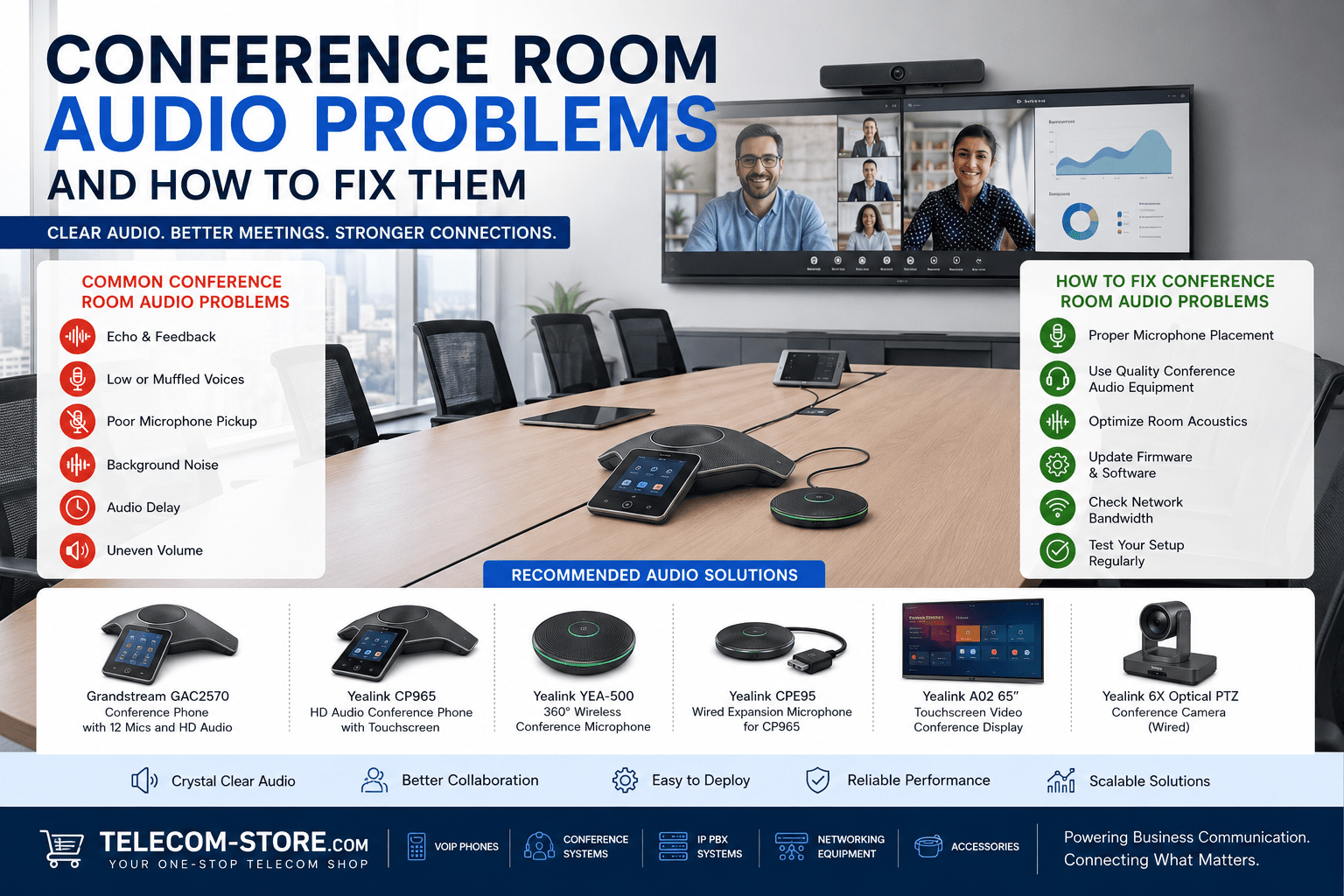
Common Conference Room Audio Issues and Their Impact
- Echo and feedback due to room acoustics or improper speaker/mic placement
- Muffled, weak, or uneven voice pickup across the table
- Participants talking but not being heard clearly by remote users
- Delayed audio or lip-sync issues between video and sound
- Network-related problems like dropouts or stuttering
- Zoom/Teams using the wrong microphone or speaker device
These issues are reported in executive conference rooms, open-plan collaboration areas, boardrooms, training centers, and hybrid offices. Audio problems don’t just impact those in the room—they cause frustration for remote participants and can undermine the value of high-end video and room technology.
Hardware & Solution Comparison Table
| Problem Area | Solution | Recommended Product | Best Use Case |
|---|---|---|---|
| Echo, feedback | Acoustic treatment, DSP/echo cancellation, correct hardware placement | Yealink CP965 | Mid-to-large boardrooms, hybrid offices |
| Poor remote voice pickup | Multi-mic phones or expansion mics, wireless mics, layout redesign | Grandstream GAC2570 | Large tables, U-shaped or modular layouts |
| Platform-specific (Teams/Zoom) problems | Certified conference phones, firmware updates, device tests | Yealink CP965 | Teams/Zoom-based meeting rooms |
| Dead zones/far-end voices not picked up | Wired/wireless expansion microphones | Yealink CPE95 Wired Mic | Training rooms, extra-long tables |
| Flexible/collab spaces | 360° wireless microphones, portable systems | Yealink 360 Wireless Mic | Fast-reconfiguring rooms, workshops |
| AV sync or delay | Integrated AV hardware, platform testing | Yealink 6X PTZ Camera | Teams/Zoom Rooms with video |
Diagnosing Echo and Feedback
Echo and feedback—the persistent loop where microphones pick up sound coming from speakers—are the most damaging to meeting quality. These are aggravated by surfaces like glass or tile, underfurnished rooms, or mics too close to speakers.
- Use conference phones with strong echo cancellation, such as the Yealink CP965.
- Lower the speaker volume and shift microphones farther from speakers.
- Add sound-absorbing panels, curtains, rugs, or even soft seating.
- In large spaces, coverage improves dramatically with beamforming arrays or multiple distributed mics over a single table-center mic.
Not tackling echo before upgrade is one of the most common business mistakes in conference room refreshes.
Microphone Placement, Coverage, and Selection
Poor or inconsistent audio pickup nearly always results from improper microphone choice or placement:
- Place mics closer to where people sit rather than at a far distance or in the center of a large table.
- Avoid placing microphones near air vents, projectors, or directly under ceiling speakers.
- Choose hardware intended for your actual room size. For example, the Grandstream GAC2570 has 12 built-in mics—a significant step up from old single-mic models.
- In mid-large rooms, add Yealink CPE95 wired expansion mics for more seats or install wireless units for fast reconfigurations (Yealink 360 Wireless Microphone).
- For wireless, plan for battery rotation, keep a charging station near your meeting area, and check for Wi-Fi or RF interference before large deployments.
- Test with a group using live video/meeting platforms—walk the entire room and have team members speak from various locations to spot pick up gaps.
If your room seating arrangement frequently changes, opt for wireless or modular microphones that can be repositioned easily. For fixed installations, map out cable routes early to avoid retrofitting headaches, and consider running power and network cables (PoE) where expansion mics or phones will be stationed.
Teams, Zoom, and Unified Conferencing Audio Challenges
- Pick certified or platform-optimized conference phones. Not every VoIP or USB device will play perfectly with Teams, Zoom, or hybrid SIP environments—always check supported lists first.
- Update firmware for both your conference hardware and the PC or collaboration display running the meeting—many audio issues disappear with firmware or driver updates.
- Teams and Zoom sometimes revert audio to built-in laptop devices after updates or new hardware installs—triple-check default audio devices and test before key events.
- Configure proper network Quality of Service (QoS), especially if running meetings over Wi-Fi—see PoE switch options for power and traffic control, a major reliability boost in business environments.
- For troubleshooting, simplify device paths. Too many active audio devices (multiple USB mics, etc.) can create routing confusion—dedicate single audio paths for each space.
- Stagger firmware and conferencing software updates across similar meeting rooms—avoid everyone on different versions to streamline troubleshooting.
Having a standard set of approved, tested devices and a backup conference phone (even a spare USB speakerphone) for emergencies is a smart investment for any office with routine meetings. Schedule regular spot-checks of your meeting rooms—network or firmware changes can impact audio without warning.
Large Rooms: Expansion Mics & Dead Zone Prevention
Large tables create audio dead zones and poor participant experience if mics are only at one end or the table’s middle. Key tips:
- Use expansion microphones across the length or perimeter of your table.
- Plan wiring to avoid trip hazards; consider ceiling drop mics for permanent installs.
- Wireless options like Yealink 360 Wireless Microphone add coverage for flexible or reconfigurable rooms.
- For long rooms or training setups, test with maximum capacity to ensure voices at all ends are clear.
- When using multiple mics, verify your system’s mic limit and avoid accidental echo loops—some phones support up to four expansion mics, while others support more or use daisy-chaining. Review your hardware manual.
Audio-Video Synchronization and Integrated Conferencing
If remote users notice lip-sync problems, invest in made solutions combining camera and audio, such as the Yealink PTZ Camera or interactive display solutions. Always:
- Connect audio and video through unified systems, not separate consumer USB devices.
- Minimize network latency by preferring wired connections over Wi-Fi for AV gear.
- Test for sync during setup with your actual Teams or Zoom accounts.
- For complex builds, ensure your AV installer runs full test meetings before handover to catch sync or device priority problems.
Integrated AV systems greatly reduce troubleshooting pain and are recommended when rolling out multi-room upgrades or new offices. For smaller rooms, pairing a certified conference phone with a tested PTZ camera is often sufficient.
Network, Infrastructure, and Cabling Tips
- Unstable network is a hidden cause of audio glitches, cut-outs, or device disconnects.
- Check your switches: PoE-compatible switches are preferable—see PoE Switches for audio/video endpoint reliability.
- Consider a voice VLAN or QoS settings to ensure meeting audio doesn’t compete with bulk office data or guest Wi-Fi.
- If you plan to expand, select switch gear and room jacks with future capacity in mind.
- For larger deployments, managed switches (learn more in our switch category) offer troubleshooting and monitoring advantages.
- Label all cable runs to prevent troubleshooting chaos that can arise during upgrades or emergencies.
Need expert help? Browse solutions at Telecom-Store.com or request integrated design from Axion Communications.
Buyer Mistakes to Avoid: Checklist for Business Teams
- Assume better hardware will solve a fundamentally problematic room. Room acoustics and layout often matter more than the mic.
- Miss Teams/Zoom certification: Not all devices work seamlessly across platforms. Review certifications before making big purchases.
- Overlook scalability: Buy systems that allow for easy addition of extra mics or wireless units without room-wide replacement.
- Ignore existing wiring routes—account for ceiling, wall, floor constraints during planning. Factor in PoE if you want easy power deployment.
- Forget network health: Overloaded or unmanaged switches in large offices create headaches down the road.
- Neglect end-user training—teach teams to check the correct audio device before starting hybrid meetings.
Expand your setup by exploring categories like conference phones, video conferencing equipment, IP PBX phone systems, and meeting headsets for hybrid use, training rooms, or executive offices.
Frequently Asked Questions (FAQ)
- What causes conference room audio problems?
- Echo, improper mic placement, hard or untreated room surfaces, network instability, device feedback, and using outdated conferencing hardware.
- How do you stop echo in a conference room?
- Combine soft furnishings, paneling, repositioning mics and speakers, and using modern phone systems with built-in echo cancellation.
- Why is audio poor in Teams or Zoom meetings?
- Often caused by Teams/Zoom reverting to a laptop mic, using unsupported hardware, old firmware, or inconsistent network bandwidth.
- Do more mics help large rooms?
- Yes. Expansion or wireless mics ensure voices aren’t lost at the far end. Test each seat’s pickup.
- Are wireless conference mics reliable?
- With careful RF planning and charging routines, wireless mics work well in most offices—plan for spares and manage interference with a scan before deployment.
- What should buyers check before purchasing conference audio equipment?
- Review room size, platform (Teams/Zoom), PoE needs, expansion options, and your building’s IT/network infrastructure.
Business Buyer Summary
Achieving great meeting sound goes far beyond just picking expensive hardware. Start by fixing basic room acoustics, use expansion or wireless mics where needed, ensure all devices fit your workflow (Teams, Zoom, SIP), and keep your network reliable with PoE switches and traffic controls. Don’t leave your IT team guessing—plan for growth, use certified gear, and test thoroughly. Ready to upgrade your meeting experience? Review our full selection at Telecom-Store.com or get in touch for expert recommendations.