How Muddy Wildlife Management Electronics Can Boost Remote Property Oversight
If you’re a landowner, hunter, lease manager, or property caretaker, Muddy wildlife management electronics simplify remote monitoring and reduce unnecessary trips. You can remotely track movement, monitor food plots or gates, get timely images, and measure distances for land planning. Buyers in 2026 can find field-proven cellular cameras, wide-view and high-res models, power and antenna accessories, reliable mounting arms, and rangefinders. The right mix will depend on your cellular signal, monitoring priorities, property layout, power access, and how frequently you want to service equipment.
Choosing the Right Muddy Wildlife Monitoring Gear: Fast Comparison Table
| Product Type | Main Use | Best For | Key Specs | Buyer Tip |
|---|---|---|---|---|
| MTGTRK 24MP Trail Camera | Standard remote camera | Trails, gates, defined areas | 24MP, dual-carrier, cell upload | Check local cell coverage before installing |
| TRF180 36MP Trail Camera | Wide-field camera | Open areas, food plots | 180° view, 36MP | Best where broad coverage is needed |
| MTRX2 Dual-Carrier 36MP | High-res, remote camera | Detail-critical locations | 36MP, dual-carrier | Ideal if you need higher detail, check power needs |
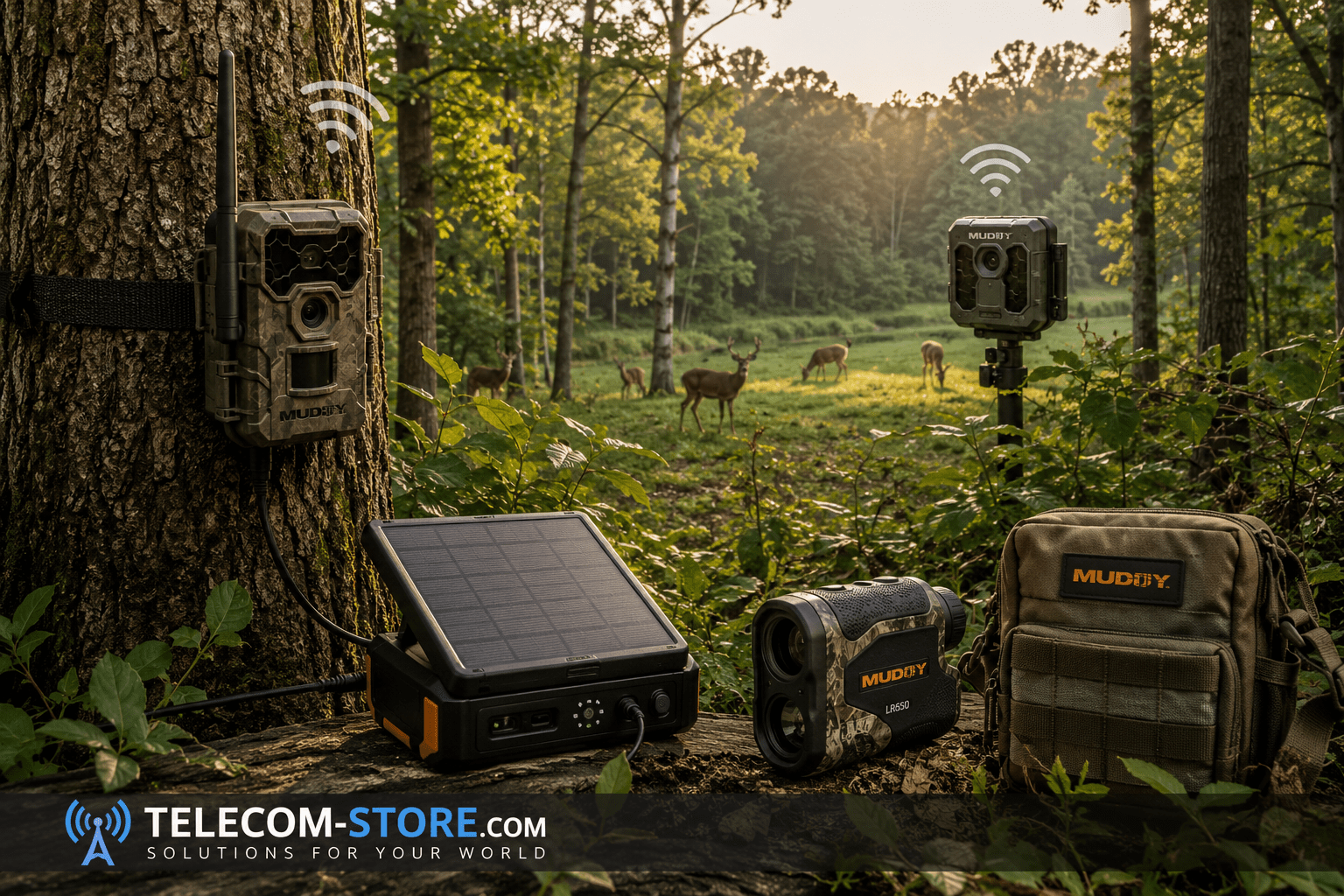
| 12V Solar Battery Pack | Remote power supply | Difficult-to-reach sites | 5000mAh, 12V | Ensure electrical compatibility & full sun |
| CLRANT Cellular Antenna | Signal booster | Marginal cell areas | Weather-resistant, specialized | Double-check connector & frequency |
| MCA200 Pivot Camera Arm | Mounting/Adjustment | Flexible position needs | Quiet, pivot action | Good for specific angles/trees |
| MCA150 All-Steel Camera Arm | Sturdy mount | Fixed positions, outdoor | Steel build, quiet | Best in permanent or heavy-use sites |
| LR650 650yd Rangefinder | Long-distance measure | Large fields, open plans | 650 yards, scan mode | Useful for open terrain layouts |
| LR450 450yd Rangefinder | Shorter-range measure | Wooded, nearer planning | 450 yards, compact | More efficient in wooded spots |
What Are Muddy Wildlife Management Electronics?
Muddy wildlife management electronics are specialized outdoor devices to help you gather info, see what’s happening across your property, and monitor assets without constant site visits. The category covers cellular cameras, rangefinders, antenna upgrades, power packs, camera arms—gear built for woods, fields, food plots, farms, and hunting leases.
A cellular trail camera takes motion-triggered photos and transmits to your phone or app, freeing you from physically checking SD cards. This reduces disturbance and makes widespread monitoring practical, especially where land access is tricky or you want minimal wildlife disruption.
But even cellular solutions require solid planning. Think through your coverage, monthly service costs, battery approach, mounting point, weather, and protection from both animal tampering and trespassers. Consider checking lockboxes or security cables for higher-traffic or easily accessible areas—this improves equipment longevity and deters theft.
Main Product Types: How Each Solves Different Field Problems
Compare Muddy outdoor electronics by purpose:
- Cameras: For visual info and alerts
- Power accessories: To keep gear running longer
- Antennas: Tackle cellular dead zones
- Mounts: Aim and steady your placement
- Rangefinders: Precision distance measurements for land layout, hunting, or field work
Each fills a specific need. There isn’t one “must-have”—the best kit depends on your site and management style. It’s often better to start with key monitoring points (like gates, food plots, or water sources) and then expand as you learn which areas need more attention or different types of gear.
Cellular Trail Cameras: Where Connected Field Monitoring Starts
If your goal is hands-off monitoring, start by checking Muddy MTGTRK dual-carrier 24MP. Dual-carrier support helps if coverage is spotty; you can toggle between carriers for the best signal. But don’t assume dual-carrier means universal coverage—always test at your exact deployment zone. Remember that even within the same field, micro-terrain and moisture can affect signal strength.
Set your motion sensitivity to minimize false triggers from wind-blown branches or shifting sunlight. This helps prevent unnecessary image transmission, which can eat up data and quickly drain batteries in high-traffic environments.
Wide View Options: Coverage for Open Fields and Plots
The TRF180 36MP, 180-degree trail camera is ideal if you need to see everything happening in a big food plot, pasture, or open field. Wide angle coverage reduces blind spots but is more sensitive to wind-blown vegetation, sun glare, and improper placement—walk your field and mark best angles before mount-up. Avoid pointing directly at the sunrise or sunset if possible, as strong backlighting can affect image quality.
High-Resolution Cellular Cameras: For Photo Detail
Checking the MTRX2 Dual-Carrier 36MP gives you more clarity in images. Great if you need to positively ID animals, document trespassers, or zoom the action after the fact. Remember: higher res means bigger file sizes and usually faster battery drain if you choose to transmit full-res images. Test your workflow and power setup before full deployment. Some systems let you choose a lower-res upload and retain full-res files on the SD card for later review.
Night image quality can vary greatly between models—test sample night images in your actual placement before committing to a fleet of cameras. If you are managing security as well as wildlife, factor in night performance and rapid-trigger capabilities.
Why Modern Electronics Matter for Wildlife and Property in 2026
Remote monitoring is no longer a nice-to-have; efficient property oversight means you get updates and alerts without spooking deer or wasting fuel with endless patrols. But, don’t be lulled into thinking all gear works ‘plug and play’ anywhere. Test cell coverage. Validate power needs. Placement, weather, foliage, and topography still count.
With labor, fuel, and subscription costs rising, the gear you choose now needs to keep running through extremes of temperature and weather. It’s smart to choose batteries suited to your climate—lithium batteries often outlast alkalines in the cold but review your manufacturer’s compatibility notice.
How Buyers Use Tech to Reduce Site Visits and Human Disturbance
Properly set up, a cellular camera network can take months off your boot-leather time and let you keep sensitive areas wild. If you use frequent-transmission settings, figure on more battery swaps or invest in solar. Plan battery runs by mapping camera locations and plotting the most efficient service route, especially if you scale up beyond a few devices.
Reduce human scent and minimize impact by wearing scent-control gloves or boots when servicing equipment—you’ll keep wildlife patterns natural and information more reliable.
What IT and Land Buyers Expect in 2026
Most buyers now want clear images, fast reliable triggers, app-based controls, simple setup, and weather-ready casing. Product listings should show compatibility, power specs, and supported networks—never assume a pack will fit every camera.
Key questions to ask for any model: “Is a subscription required?” “Which network works here?” “Are cloud images different than SD local files?” “Which batteries should I stock?” Carefully confirming these points before purchase prevents disappointment and returns down the line.
For operations deploying several cameras, look for management software that enables easy naming, grouping, and notification filtering.
Key Factors: What Smart Buyers Check Before Ordering
1. Cellular Coverage
Your installation is only as strong as the signal in the tree or field. Always check live cellular strength at the mounting spot—your phone bars are only a rough guide. Different antennas and frequencies mean cameras might behave differently than your device. Invest time walking with both a phone and a dedicated field signal tester if available, especially for larger sites or critical gates.
2. Image Resolution
Don’t chase megapixels. Test image quality in YOUR lighting, terrain, and target zones. Consider what detail you actually need versus battery draining or bandwidth consuming images you don’t review. It is usually more important to have dependable, properly framed images than the highest possible pixel count.
3. Field of View
Wide for plots, narrow for funnels—don’t mismatch. Wide cameras can catch more but also fill up storage and send false triggers from swaying grass or branches. Always trim back high grass and low branches in the detection window before final installation. If you cover entry roads or funnels, consider a standard FOV to reduce “junk” pictures and focus alerts where they matter most.
4. Power and Battery Planning
If you want longer intervals between maintenance runs, connect a 12V solar battery pack (if your gear supports it). Insist on checking voltage, plug, polarity, and camera compatibility before ordering. Solar only pays off with enough direct sunlight and a clean panel. Dust, sap, or snow accumulation can significantly reduce real-world output. Consider the use of battery heaters (for some external packs) if you operate in extreme cold. Place your panel away from branches that could cast shadow, especially in winter months when the sun angle is lower.
5. Signal Quality Tools
If you work in valleys, woods, or patchy areas, try the CLRANT weather-resistant antenna—but only if your model supports external antennas. Remember, an antenna amplifies a weak existing signal, not ‘magic’ a dead one. Check antenna cable length—if you plan to mount your camera low for animal ID, you might mount the antenna higher up the same tree or post for better reception. Watch for cable wear and keep water ingress out of connectors to prolong life.
6. Stable Mounting
Use pivot or all-steel arms where tree shape, wind, or traffic demand better angles or greater security. Test orientation for false triggers and avoid aiming where sun might fool the motion sensor. Regularly tighten all mounts, and avoid mounting directly to surfaces that shake or sway with the wind. If you expect frequent camera repositioning (for crop changes, fence moves, or hunting setups), the pivot arm saves labor long-term.
7. Weather Rating
Even rugged models need routine inspection. Protect from rain channels, low spots, or insects. Consider how snow, condensation, or wind might influence image quality or hardware life. In humid climates, open and inspect seals periodically. Invest in silica gel packs to minimize condensation in camera housings during the spring and fall.
8. Subscription & Data Plan Costs
Budget both your camera and carrier plan together. Ask “what’s the annual cost per device?” before expanding. Some platforms offer fleet discounts or multi-device management; evaluate if these options lower your total cost of ownership.
9. Scalability
If managing multiple cameras, pick products (and apps) that allow easy grouping, labeling, and access control—plan your expansion with names and maintenance cycles from day one. As you scale, document install dates, battery changes, and any signal issues for faster troubleshooting next season.
Recommended Product Types for Common Land Monitoring Situations
Food Plots & Fields
Try the TRF180 36MP wide-view cellular camera for broader visual coverage. Scout sun direction and clear tall weeds in the trigger zone before final placement. Test the viewing range with reflective stake markers, especially in very open sites, to ensure complete coverage without wasted triggers from wind-blown grass at the edge of the FOV.
Trails, Gates, Corridors
Let the MTGTRK Dual-Carrier 24MP focus on key transit or pinch points. Standard FOV is ideal where movement is predictable. Mount cameras at waist to chest height on animal trails, but a bit higher at human gates to reduce the chance of tampering or accidental knocks.
Detail-Driven Monitoring
The MTRX2 Dual-Carrier 36MP model helps if you want close review detail, but only if your signal and power plan are up to the job. Adjust trigger speeds and interval settings if the site is busy, or just store high-res images locally while sending moderate-res versions remotely to maintain a balance between data costs and information needs.
Solar-Powered Remote Locations
Pick a 12V solar battery pack—but only for compatible devices/voltage and give the panel good southern sun exposure. Always check cable routing and protect it from gnawing rodents when using external solar setups in remote timber.
Mounting Accessories: Why Pivot and Steel Arms Matter
Quiet Pivot Arm
MCA200 Quiet Pivot Camera Arm: Ideal where you want fast adjustment or flexible angles year-round. Great for temporary monitoring or seasonal rotation. Consider these when monitoring food plots where plant height or sunlight angle changes seasonally.
All-Steel Arm
MCA150 All-Steel Camera Arm: Best in permanent or higher-traffic locations, or where security is needed. Steel mounts stand up to harsh weather and repeated camera swaps. If you move your camera each year to match changing wildlife patterns, steel versions resist corrosion and fatigue better than plastic mounts.
Laser Rangefinders: Useful for More Than Hunting
A rangefinder isn’t just for hunting shots—they’re indispensable for mapping feeders, stand distance, property layout, and habitat work. The LR650 650yd and LR450 450yd give targeted distance readouts. Always check your real-world needs—don’t buy the longest range just for bragging rights; focus on the range you’ll actually use day-to-day. Reflective targets can extend useful range, but in woodland or under poor light, you may get lower-than-stated distance performance. Practice using scan mode to quickly check multiple landmarks before plotting setups.
Setup and Compatibility: Avoid Easy Mistakes
Cellular Service
Test activation on-site when possible. Some apps or portals require specific device registration, firmware updates, or SIM activation steps before first use. Signal may drop quickly across a property—don’t assume top-bar coverage everywhere. For very remote areas, try staggered deployment, starting with your most important monitoring zones before rolling out to the rest of the property.
Power Planning
Don’t plug in off-brand solar or battery packs before confirming voltage, max draw, and wiring. Bad matches risk camera failure or even damage. Take close-up photos of your battery and solar connections for future troubleshooting or when ordering additional units, especially for off-season maintenance.
Solar Placement
Position solar panels in full sun. If tree canopy blocks light, put the panel farther from the camera using extension cable (if manufacturer supports it) or choose longer-lasting internal batteries. Routinely brush clean snow or debris, and check connectors for corrosion twice per season.
Antenna Connection
Double-check the connector, weather sealing, cable length, and frequency support before buying an external antenna. Secure cables against wind and wildlife to avoid disconnections and false alerts caused by sway.
Firmware and App Setup
Run the latest firmware and test full functionality at home or near reliable coverage before remote install. Make a backup set of account information and passwords for all devices and share it with your management team or property partners for faster troubleshooting.
What Buyers Should Not Assume: Common Limitations
- Dual-carrier does not guarantee cell service everywhere (check all your camera locations)
- Solar packs are less useful under dense canopy, in snow, or facing the wrong direction
- Megapixel ratings don’t reflect image quality under all conditions—check sample images and transmission settings
- External antennas boost weak but not absent signals; always verify compatibility
- All gear, even solar, needs regular inspection: mounts can loosen, batteries degrade, lenses get dirty, critters interfere
- Heavy rains or tree pollen may obscure lenses—keep cleaning supplies in your service kit
- Data limits can add up fast if you set too-frequent uploads or choose “always-on” transmission; balance your use case carefully
How to Match Muddy Electronics to Your Land Goals
Know Your Monitoring Intent
What are you trying to see or measure? Choose camera FOV and placement for a specific result; don’t try to “see everything” with one device. For property borders, select a focused, narrow FOV camera and supplement with signage.
Test Signal Before Large Purchases
One area can have 4 bars, another barely works. Start with one or two test units before scaling up. Use test image transmissions from each location to check both day and night performance. Mark poor spots with colored survey tape to avoid accidental reinstallation in future years.
Decide on Maintenance Commitment
Frequent visits? Stick with standard replaceable batteries. Remote areas? Prioritize solar and tough hardware. For ultra-remote locations, consider layering two power solutions—external battery plus solar panel—to extend runtime across multiple seasons.
Account for Property Size
Small tracts may only need a few cameras; big farms might justify a network, identifiable in software by zone or purpose. Create a digital property map using free GIS tools or Google Earth to keep your device locations and coverage areas organized year-to-year.
Plan for Growth
Standardize camera models or accessories if you think you’ll expand, making future scaling and maintenance simpler. Maintain records of device serial numbers, install dates, typical image volume, and key configuration notes for your reference and to help future buyers/partners if properties change hands.
Related Outdoor Gear for Field Monitoring
- Weather-resistant antenna: Only if you need signal help and your device supports it.
- 12V solar power pack: For distant or hard-to-reach installs.
- Pivot camera arm and all-steel camera arm: Select by exposure, stability, and adjustment needs.
For broader IT infrastructure, you can also browse our network switches and VoIP phones if you’re linking camera feeds or planning full digital comms across your land.
Conclusion
Muddy wildlife management electronics give you the control to gather property intelligence effectively—provided you match the right hardware to your real-world signal, power, and monitoring needs. Start every project with a walk of your land, confirm connectivity, choose compatible accessories, and commit to periodic equipment checks for the best long-term results. Every component pays off most where it directly solves a field problem—not from specs alone.
Frequently Asked Questions
What are Muddy wildlife management electronics used for?
Muddy wildlife management electronics are used for remote observation, activity monitoring, distance measurement, and outdoor property management. Common product types include cellular trail cameras, camera mounting accessories, and laser rangefinders. Depending on the equipment, users may monitor wildlife movement, food plots, trails, gates, or other remote locations. The right product depends on the monitoring goal, available cellular coverage, power requirements, terrain, and how frequently the site can be visited.
Do Muddy cellular trail cameras need a cellular plan?
Cellular trail cameras generally require an appropriate service arrangement to transmit images remotely. Exact activation, carrier, subscription, and data requirements depend on the specific camera and service platform. Buyers should review current product requirements before purchase and activation. A camera may still use local storage for certain functions, but remote transmission typically depends on an active compatible cellular service and usable network coverage at the installation location.
How do I choose between a 24MP and 36MP cellular trail camera?
Compare more than the stated megapixel rating. A 36MP specification may appeal to buyers prioritizing photo resolution, while a 24MP model may still be suitable for many monitoring tasks. Consider trigger behavior, night imaging, field of view, transmission options, cellular compatibility, battery consumption, app features, and price. The best choice is the camera that matches the monitoring location and information you need rather than simply the model with the largest resolution number.
Will a cellular trail camera work where my phone has weak service?
Possibly, but weak phone service is a warning that the site may be challenging. A trail camera has different antenna characteristics and network support than a smartphone, so performance may not be identical. Test the intended location when possible. Terrain, foliage, network bands, carrier availability, and mounting position can affect results. An external compatible antenna may help in some situations, but it cannot create service where no usable cellular network signal exists.
Can I use a solar battery pack with a Muddy trail camera?
Only if the electrical and physical requirements are compatible. Check camera voltage, connector type, polarity, current requirements, and manufacturer guidance before connecting a solar battery pack. A 12V accessory should not be assumed compatible with every trail camera. Also consider solar exposure. Dense tree canopy, winter conditions, dirt, and poor panel orientation can reduce charging performance even when the electrical connection is correct.
What is the advantage of a dual-carrier cellular trail camera?
A dual-carrier cellular trail camera can provide more flexibility when properties have uneven network availability. This can be useful in rural areas where one carrier may perform better than another at a particular location. However, buyers should confirm how carrier support and selection work for the specific model. Dual-carrier capability does not guarantee service everywhere, and local terrain, foliage, tower availability, and network conditions still affect connectivity.
Is a 180-degree trail camera better for a food plot?
A 180-degree viewing design can be useful for broad areas such as food plots, field edges, and open monitoring zones because activity may approach from several directions. However, wider coverage is not automatically better for every site. Narrow trails and defined crossings may benefit from more targeted placement. Buyers should consider detection zones, sunlight direction, moving vegetation, expected animal travel, and the amount of area that actually needs to be monitored.
Do I need an external antenna for a cellular trail camera?
Not necessarily. If the camera has reliable cellular connectivity at the installation site, an external antenna may provide little practical benefit. It becomes more relevant when signal conditions are marginal and the camera supports a compatible external antenna connection. Before buying, verify the connector, supported frequencies, outdoor rating, and camera compatibility. An antenna may improve a weak usable signal in some conditions, but it cannot compensate for a complete lack of cellular service.
How should I choose a Muddy laser rangefinder?
Choose a rangefinder according to realistic measurement distances and field conditions. A longer stated range may be useful for open terrain or users who regularly measure greater distances, while a shorter-range model may be sufficient for woods and moderate-distance applications. Also consider scan mode, target size, reflectivity, weather, steadiness, and visibility. Maximum advertised distance should be treated as one specification among several rather than the only buying factor.